Virtual Receptionist Services Terms Explained: A Plain-English Glossary
If you run a home service business in Central Texas and you're shopping for someone (or something) to answer your phone, the sales pages get jargon-heavy fast. This virtual receptionist services glossary translates the terms you'll hit in quotes, demos, and pricing pages into plain English. Use it to understand exactly what a provider is offering, ask sharper questions on the sales call, and spot the gaps before you sign anything. Every definition stands on its own, so skip around freely.
- AI Receptionist
- 24/7 Answering
- After-Hours Coverage
- Live Transfer
- Call Bridging
- Bilingual Support
- Lead Capture
- Lead Qualification
- Call Scoring
- Call Summary
- Booking Link
- Website Chatbot
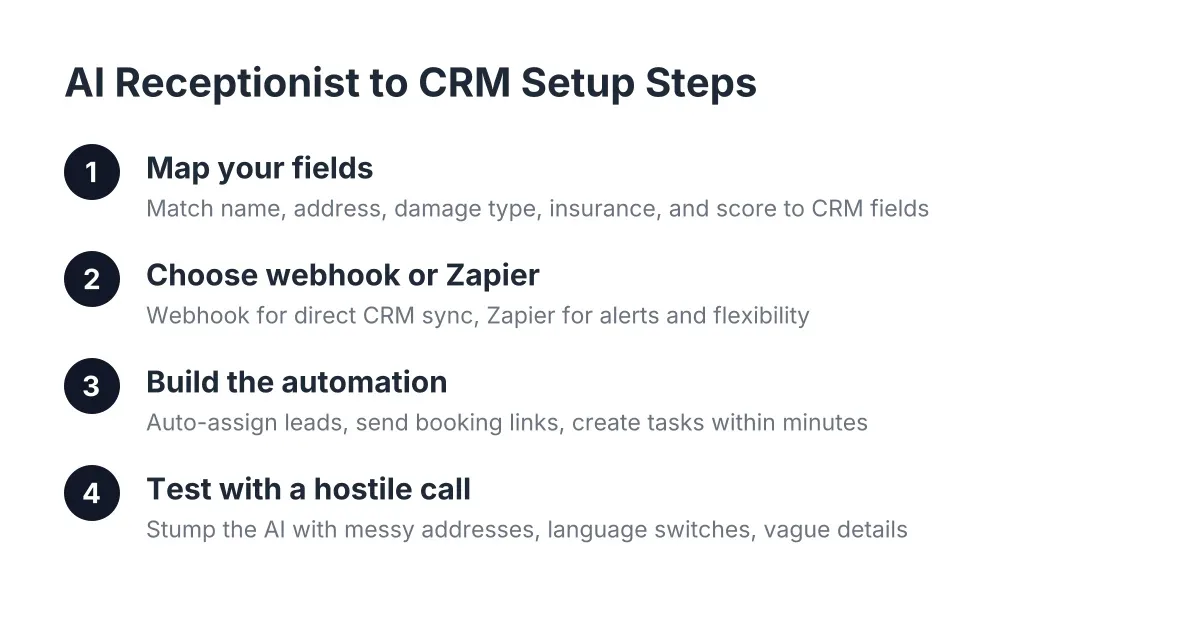
- CRM Sync
- Webhook
- Call Routing
- Per-Minute vs. Per-Call Pricing
- Answering Service vs. Virtual Receptionist
- Setup and Onboarding
How Calls Get Answered
AI Receptionist
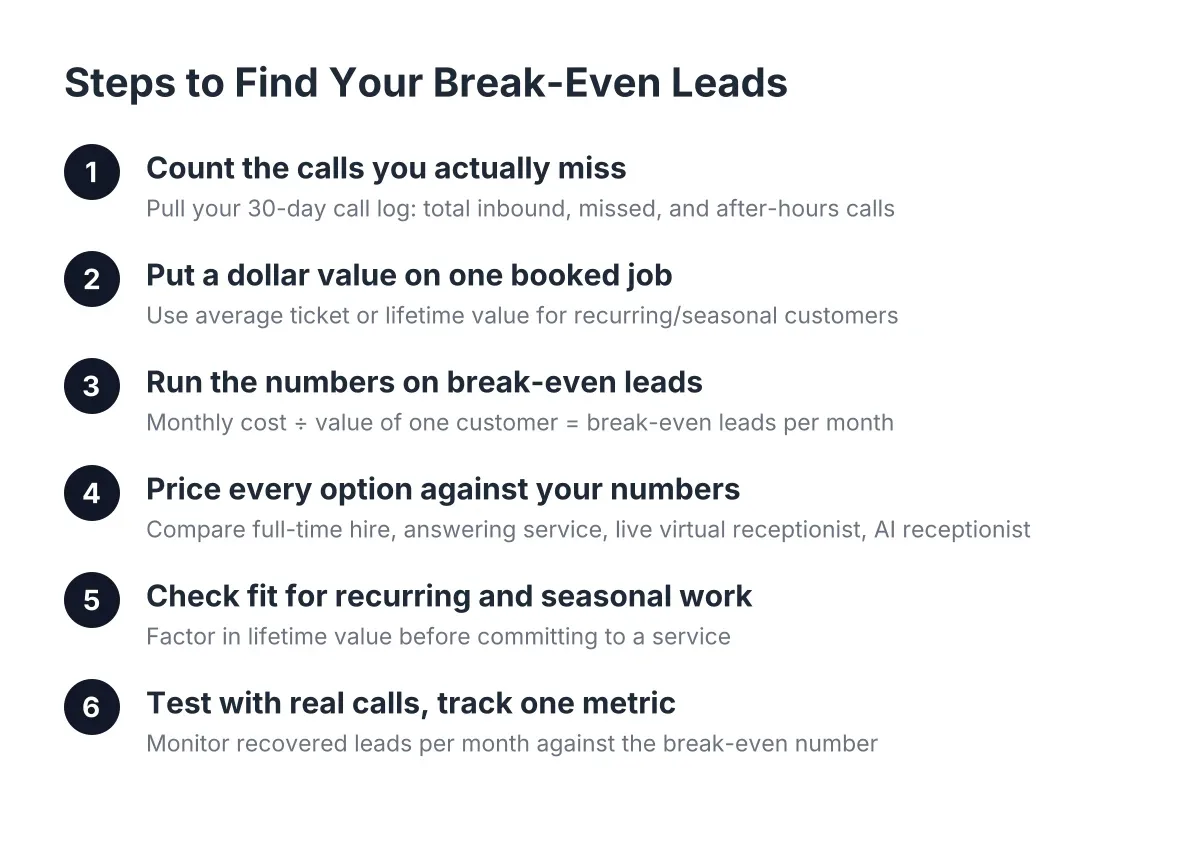
An AI receptionist is software that answers your business phone with a natural-sounding voice, holds a real conversation, and handles tasks like lead capture and booking without a human on the line. Unlike voicemail, it engages the caller: it asks what they need, collects their details, and can send a booking link before they hang up. The practical difference for a trade owner is simple. When you're on a ladder at 2 p.m. or asleep at 2 a.m., the call still gets answered and the job still gets booked. If you want to see how the math works for a trades business, this breakdown of what an AI receptionist costs for Austin home services walks through it.
24/7 Answering
24/7 answering means every call to your business gets picked up around the clock, including nights, weekends, and holidays. It matters because home service emergencies do not keep office hours; a burst pipe at midnight is a job for whoever answers first. When a provider says 24/7, ask whether that includes full conversations and booking after-hours or just message-taking. Those are different services at different value.
After-Hours Coverage
After-hours coverage is the portion of an answering service that handles calls outside your normal business hours. Some providers charge extra for it, staff it thinner, or route it to voicemail. With an AI receptionist, after-hours works exactly like daytime because software does not clock out. If a quote lists after-hours as an add-on, that tells you the base price covers less than you think.
Live Transfer
A live transfer is when the receptionist connects a caller directly to you or your team in real time instead of taking a message. It is the right move for genuine emergencies, like a customer standing in two inches of water. Good services make live transfer opt-in and rule-based, so a routine quote request does not interrupt you mid-job but a flooded kitchen does. Ask any provider how they decide which calls get transferred; vague answers here mean interrupted afternoons.
Call Bridging
Call bridging means connecting you to a lead with one action, usually a click from a dashboard, so you can call back the moment you are free. The value is speed. A homeowner who called three companies will usually hire the one that responds first, and bridging cuts the friction between seeing a lead and dialing them. If a provider mentions one-click call bridging, it signals their dashboard is built for fast follow-up, not just record-keeping.
Bilingual Support
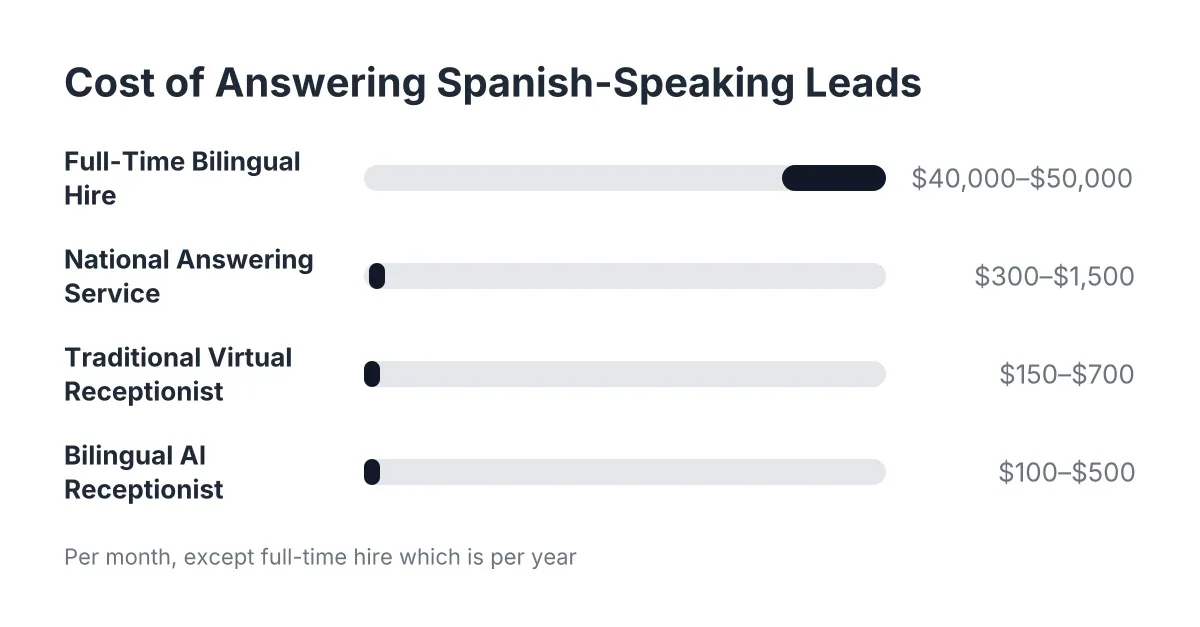
Bilingual support means the receptionist can hold the full conversation, including qualification and booking, in more than one language, most commonly English and Spanish. In Central Texas, a phone line that only works in English turns away a real share of your callers. The key question for any provider: is Spanish a true two-way conversation or just a recorded greeting? Also check whether bilingual costs extra; on some services it is a premium tier, while others include it on every plan.
Capturing and Qualifying Leads
Lead Capture
Lead capture is the process of collecting a caller's name, contact information, and job details so you can follow up and win the work. It is the core reason to pay for any answering service; a missed call with no capture is a job that went to a competitor. Strong lead capture happens on every channel, phone and website chat alike, and lands somewhere you will see it. When comparing providers, ask what specific fields get captured and where that information goes.
Lead Qualification
Lead qualification means sorting callers by how ready and able they are to hire you, using questions about the job, location, timing, and urgency. It saves you from spending your one free hour calling back a tire-kicker while a ready-to-book homeowner waits. A receptionist that qualifies asks things like "Is this a repair or a replacement?" and "When do you need someone on site?" If a provider only takes messages, you do the qualifying yourself, which is the work you were trying to hand off.
Call Scoring
Call scoring is a rating applied to each call that tells you how valuable the lead is, so you can prioritize follow-up. Instead of listening to ten voicemails, you glance at a list and call the hottest lead first. Scoring is part of what the industry calls AI call intelligence, which also covers summarizing conversations. Ask how the score is calculated; a good provider can explain it in one sentence.
Call Summary
A call summary is a short written recap of a conversation, covering who called, what they need, and what happened next. It replaces listening to recordings, which nobody does from a job site. Summaries work best when they arrive fast, by text or email, so you can act while the lead is still warm. Some services also roll summaries into a recurring report, like a Monday morning digest of the week's calls and bookings.
Booking Link
A booking link is a web address sent to a caller, usually by text, that lets them pick an appointment time from your live calendar. It closes the loop in one call: the customer phones, gets qualified, receives the link, and books before they can shop around. This is what separates "we took a message" from "the job is booked." If a provider talks about appointment setting, ask whether they mean sending a booking link or reading your calendar aloud; the first scales, the second does not.
Website Chatbot
A website chatbot is an automated conversation window on your site that engages visitors, answers questions, and captures leads while you are on the job. It covers the customers who research at 10 p.m. and never call anyone. A good chatbot does the same work as your phone line, capturing contact details and sending a booking link, so no visitor leaves without a next step. Note the distinction in this glossary: chatbot refers to the website tool, while the phone product is an AI receptionist.
Plumbing It Into Your Business
CRM Sync
CRM sync means your answering service automatically pushes every captured lead into your customer relationship management software, the system where you track customers and jobs. Without sync, someone retypes lead details by hand, and hand-typed leads get lost. Common integrations include HubSpot, Salesforce, and Zoho. If you already run a CRM, confirm the provider supports it natively before you sign; "we can export a spreadsheet" is not sync.
Webhook
A webhook is an automatic message one piece of software sends to another the instant something happens, like a new lead arriving. In practice, it means your answering service can ping your other tools in real time without you touching anything. Webhooks often run through connectors like Zapier, which link thousands of apps without custom code. You do not need to understand the plumbing; you need to know it exists, because it is what makes "lead comes in, text goes out, calendar updates" happen on its own.
Call Routing
Call routing is the set of rules that decides where each call goes: answered by the receptionist, transferred to you, or sent to a specific team member. Simple routing might send everything to the AI receptionist during the day and flag emergencies for live transfer. Ask providers how flexible their routing is and whether you can change rules yourself. Rigid routing means every schedule change becomes a support ticket.
Virtual Receptionist Pricing and Setup
Per-Minute vs. Per-Call Pricing
Per-minute pricing bills you for the time a receptionist spends on each call, while per-call pricing charges a flat rate per answered call. Traditional live answering services usually bill per minute, which means a chatty caller costs you more than a quick one. Flat and subscription models are easier to budget. Whatever the model, ask what counts as billable; some services start the clock on wrong numbers and robocalls. This cost guide for virtual receptionist services covers the common pricing structures in more detail.
Answering Service vs. Virtual Receptionist
An answering service takes messages and passes them along, while a virtual receptionist actually works the call: qualifying the lead, answering questions, and booking the appointment. The distinction matters because both show up under similar names at wildly different prices. Message-taking still leaves you calling everyone back; virtual receptionist services do the follow-through so the job is booked before you check your phone. When you compare quotes, this side-by-side of virtual receptionist services and live call centers shows where the differences hide.
Setup and Onboarding
Onboarding is the process of teaching the service about your business: your trade, service area, pricing approach, and how you want calls handled. This is where providers differ most. Some need weeks of scripting and training calls; others get you live in days with a short intake. Ask exactly what onboarding requires from you, in hours, before you commit. A service that is complicated to set up often stays complicated to change.
Using These Terms
You can now read a provider's quote line by line and know whether "24/7 answering" means real conversations or a voicemail box, and whether "appointment setting" means a booking link or a sticky note. Keep this virtual receptionist services glossary open on the next sales call and ask the specific questions: what gets captured, where it syncs, what after-hours actually includes. The provider who answers plainly is the one worth testing; call their AI and try to stump it.
If you're losing revenue to missed calls, NeverMiss ATX can help.
Prefer to talk it through? Call (512) 980-9267 — a quick call is usually the fastest way to get a straight answer for your situation.