AI Receptionist for Austin Home Services: Booking Every Job Automatically
You already decided the phone problem has to get fixed. Now the question is which option actually books jobs while your crew is on site: a full-time hire, a national live answering service, a virtual receptionist, or an AI receptionist home services solution. For Austin home service businesses, that comparison comes down to real numbers, and this guide runs them. An AI receptionist home services platform that Austin home service owners can set up in an afternoon looks different on paper than it does on a Tuesday in July when your phone rings 14 times before lunch, so we will cover both the math and the day-to-day reality.
This is the unfiltered side-by-side. No sales call required. By the end you will know what each option costs per month, what each one actually does when a burst-pipe call comes in at 11 p.m., and how to get appointment booking running so leads turn into jobs without anyone touching the phone.
The Math That Makes This Decision Simple
Start with what a missed call costs you, because every option gets judged against that number.
Say you run a three-tech plumbing crew in Round Rock. Your average job runs $450, and an emergency repipe or slab leak can run $2,500 or more. If your phone rings 200 times a month and 62% of those calls go unanswered while everyone is on the job, that is 124 missed calls. Even if only a third of those were real jobs at your average ticket, you are leaving roughly $18,000 a month on the table. Most of those callers will not call back; they call the next plumber on Google.
Therefore, the receptionist decision is not about saving money on staff. It is about capturing revenue that already exists. Every option below should be measured the same way: what does it cost, and how many of those 124 calls does it convert into booked appointments?
Your Four Options, Priced Against Real Austin Call Volumes
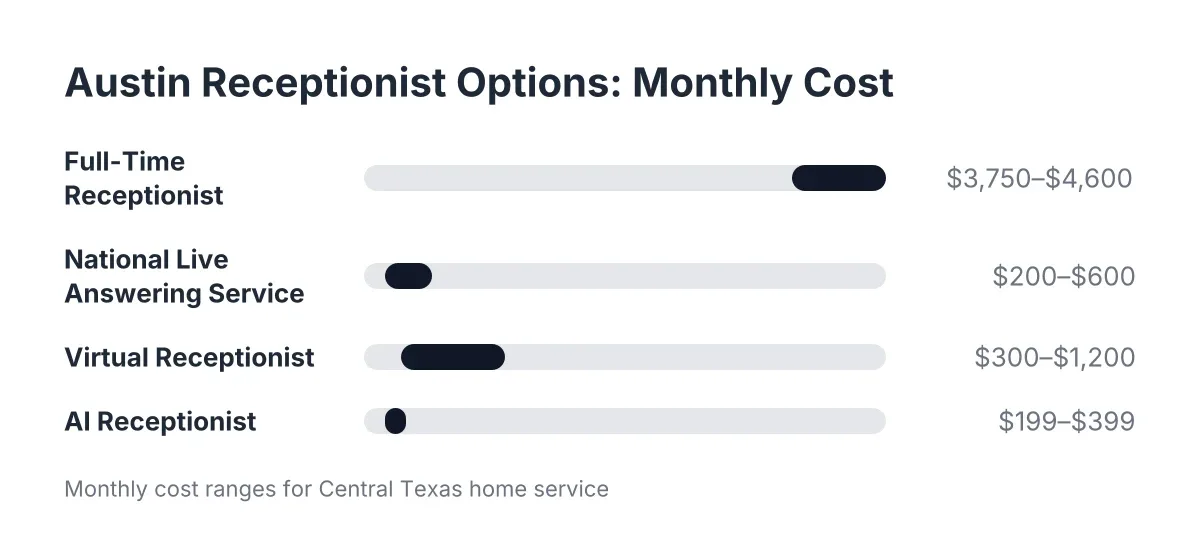
Here is the honest side-by-side for a Central Texas trade doing $200K to $500K a year. The monthly costs are realistic 2026 ranges; your quotes will vary by volume.
Option 1: Hiring a Full-Time Receptionist
A live hire is the gold standard for relationship building, and the most expensive path. According to the U.S. Bureau of Labor Statistics, the median receptionist wage was $17.90 per hour in May 2024, about $37,230 a year before benefits, payroll taxes, or overtime. Fully loaded, plan on $45,000 to $55,000 annually, or roughly $3,750 to $4,600 a month.
The bigger problem for emergency trades is coverage. One person works about 40 hours a week. Your phone rings 168 hours a week. A full-time hire covers business hours, then takes lunch, sick days, and two weeks of vacation. The 2 a.m. water heater failure and the Saturday pest emergency still go to voicemail. If 40% of your calls come in after hours, you are paying full-time money for partial coverage.
A live hire makes sense once you have enough daytime volume to keep someone busy with dispatch, invoicing, and follow-up on top of phones. For a crew of one to ten techs, that day usually has not arrived yet.
Option 2: A National Live Answering Service
A live answering service puts a human on the line 24/7, typically for $200 to $600 a month depending on minutes. That solves the coverage gap. What it does not solve is the local knowledge gap.
National call centers work from scripts. The agent answering your line at midnight is also answering for a dentist in Ohio and a law firm in Phoenix. They do not know that Pflugerville and Georgetown are both in your service area, that Austin summers turn AC calls into emergencies, or that a "small leak" under a slab foundation in Central Texas clay soil is not small. Most take a message and promise someone will call back, which means you still return calls between jobs and the lead still waits.
Overage charges bite here too. Answering services bill by the minute, and a chatty caller describing their roach problem for eight minutes costs you real money. During peak season, when call volume doubles, so does your bill.
Option 3: A Virtual Receptionist
Virtual receptionist services sit between the two: a remote human, often shared across a handful of clients, who answers with your business name, takes messages, and sometimes books appointments into your calendar. Pricing typically lands between $300 and $1,200 a month depending on minutes and whether booking is included.
The upside is a human voice with more personalization than a big call center. The downsides are the same structural ones: limited hours on cheaper plans, per-minute pricing that punishes busy months, and a person who has never driven past a job site in Leander. For a solo operator with modest call volume and mostly daytime inquiries, a virtual receptionist can be a solid fit. For an emergency trade with round-the-clock demand, the hours and the meter work against you.
Option 4: An AI Receptionist
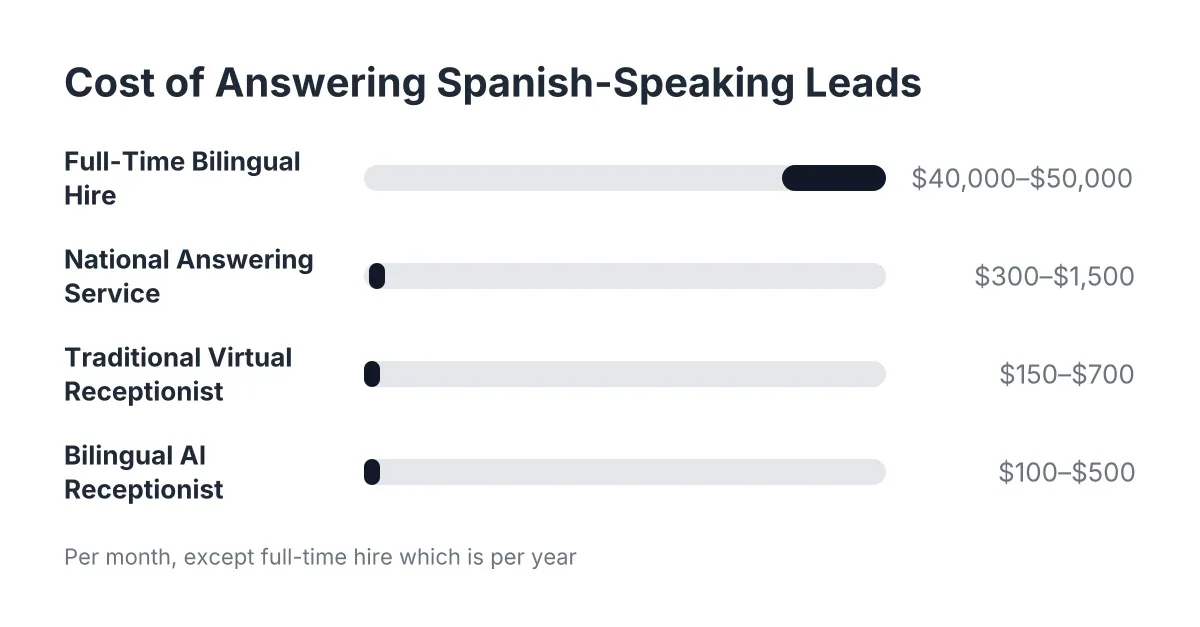
An AI phone answering service answers every call instantly, 24/7, with no per-minute meter and no staffing gaps. Plans built for home service businesses in the Austin market run $199 to $399 a month. The AI answers in your business name, qualifies the caller, captures the lead, and sends a booking link or books the appointment on the spot. In English or Spanish, on every call, without you paying extra for bilingual coverage.
The honest trade-off: an AI receptionist is not a human, and it should not pretend to be. A Five9 survey found 75% of consumers prefer talking to a real human for customer support. That preference is real. It is also measured against a good human being available, and at 11 p.m. on a Sunday your options are not "AI versus human." They are "AI versus voicemail." The same Five9 research found 84% of consumers already know companies use AI for customer service; callers are not surprised by it, they just want their problem handled. A well-built AI receptionist handles it, and hands genuine emergencies to you live.
Side-by-Side: What Each Option Delivers
| Factor | Full-Time Hire | National Answering Service | Virtual Receptionist | AI Receptionist |
|---|---|---|---|---|
| Monthly cost | $3,750–$4,600 | $200–$600 + overages | $300–$1,200 | $199–$399 flat |
| Coverage | ~40 hrs/week | 24/7 | Business hours to extended | 24/7 |
| Books appointments | Yes | Rarely, message-taking | Sometimes, extra cost | Yes, automatically |
| Bilingual | Only if you hire for it | Extra cost, if offered | Extra cost | Included |
| Handles two calls at once | No | Yes | No | Yes, unlimited |
| Knows the Austin market | Yes, over time | No | No | Yes, if built locally |
| Sick days, turnover | Yes | Agent churn | Agent churn | No |
The pattern is clear. Humans win on warmth and complex judgment. The AI wins on coverage, cost, consistency, and speed to booking. For an emergency trade where the caller with a sparking outlet picks whoever answers first, speed to booking is the metric that pays.
How AI Receptionist Home Services Appointment Booking Works for Austin Home Service Calls
An AI receptionist books appointments by answering the call, qualifying the caller against your criteria, and either sending a booking link by text or placing the job directly on your calendar. The whole exchange takes two to three minutes, and the lead is booked before they can dial a competitor. No message pad, no callback queue.
Here is the flow on a typical call:
- Instant answer. The call picks up on the first ring, in your business name, any hour, in English or Spanish depending on the caller.
- Qualification. The AI asks the questions you would ask: what is the issue, where are you located, is water actively leaking, is this a repair or a new install. Service-area screening happens here, so a caller from outside Central Texas does not eat a slot on your calendar.
- Booking. Qualified callers get a booking link texted to their phone or a time slot confirmed on the call, matched to the availability you set.
- Escalation. Callers who describe a true emergency, a burst pipe or a live electrical hazard, can be live-transferred to you or your on-call tech if you opt in.
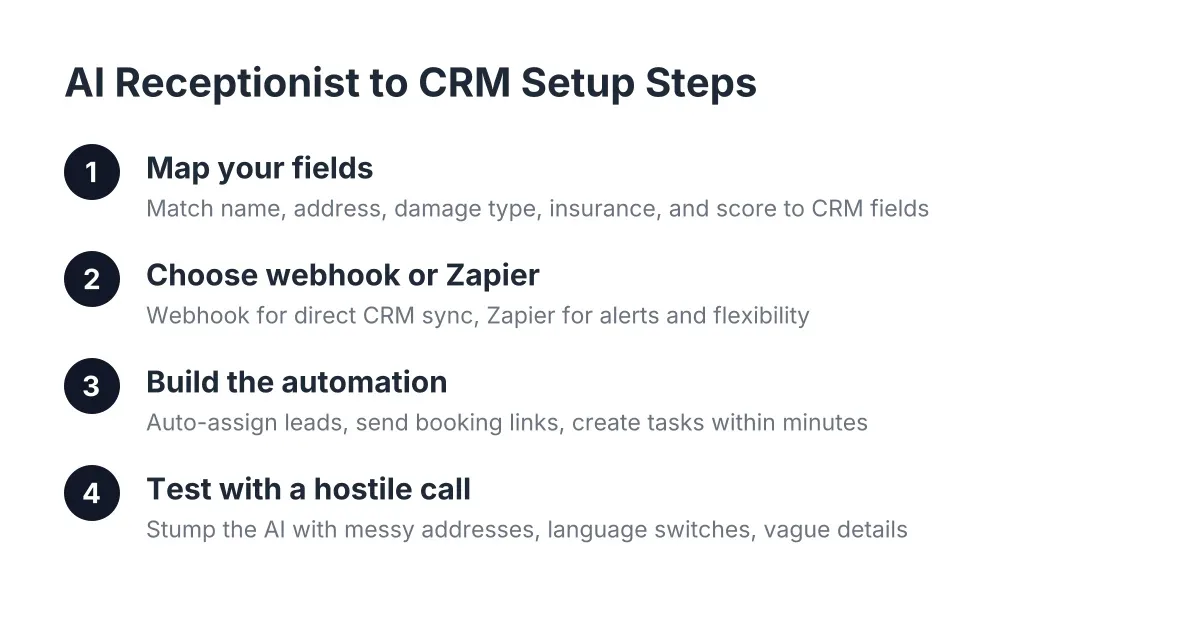
- Summary and sync. You get a call summary with a lead score, and the lead pushes to your CRM through webhooks, whether you run HubSpot, Salesforce, Zoho, or a Zapier connection into a spreadsheet.
The result is that "missed call" stops being a category. Every call becomes either a booked job, a qualified lead waiting for follow-up, or a screened-out non-fit, and you can see which is which from your phone between jobs.
Setting Up an AI Receptionist for Your Austin Home Business
Setup for an AI receptionist home services solution that Austin home service owners can complete takes about a week, and most of that week is testing, not configuration. Here is the implementation sequence that works, in order.
Step 1: Define What "Qualified" Means for Your Trade
Before anything gets configured, write down your qualification rules. For a plumber that might be: inside the service area (Austin, Round Rock, Cedar Park, Georgetown, Pflugerville, Leander), residential or light commercial, and a job type you actually take. For pest control, it might include property type and whether the issue is active or preventive. These rules become the questions the AI asks, so specificity here pays off every call afterward.
Also decide what counts as an emergency worth a live transfer. A slab leak at 2 a.m., yes. A dripping faucet, no; that gets booked for tomorrow morning. You set the line, and the AI holds it, which is more than most tired owners manage at midnight.
Step 2: Forward Your Number, Do Not Replace It
Keep your existing business number; it is on your truck, your yard signs, and years of Google reviews. Set up conditional call forwarding so calls route to the AI receptionist when you do not pick up within a few rings, or forward everything during set hours. Most owners start with overflow-only forwarding, then expand to full 24/7 routing once they trust the call summaries. Either way, the change takes minutes and reverses just as fast.
Step 3: Connect Your Calendar and CRM
Link your booking calendar so the AI offers real availability, not fictional slots. Then wire the lead flow into whatever you already use. If your CRM is a whiteboard in the shop, a Zapier webhook into a Google Sheet works fine to start. The point is that every captured lead lands somewhere you check daily, with the caller's name, number, issue, and lead score attached.
Step 4: Test It Like a Skeptical Customer
This step separates owners who succeed from owners who churn. Call your own line and try to stump the AI. Describe a weird job. Switch to Spanish mid-call. Give a Buda address and see if the service-area screening catches it. Ask for pricing on something you do not offer. Have your spouse call with a rambling story about a possum in the attic.
You will find gaps. Good. Fix the qualification rules, adjust the greeting, and test again. Two or three rounds of this and the AI handles your real call patterns, because you trained it on them. If a call type consistently trips it up, route that category to voicemail transcription or live transfer rather than forcing a bad automated experience.
Step 5: Review Your First Weekly Report and Tighten
After the first full week, sit down with your Monday morning report. Look at three numbers: calls answered after hours, appointments booked without your involvement, and leads scored high that have not been followed up. That third number is your homework list. AI call intelligence scores and summarizes every conversation, so ten minutes of review replaces an hour of listening to voicemails.
However, do not treat setup as finished after week one. Peak season changes your call mix. The rules you wrote in March need a second look before the summer rush hits and your AC-adjacent overflow calls spike.
Where an AI Receptionist for an Austin Home Service Business Earns Its Keep
The clearest proof shows up in the after-hours window, because that is where every other option except an expensive 24/7 human service simply is not there.
Consider a realistic week for a two-tech electrical outfit in Cedar Park. Tuesday, 9:40 p.m., a homeowner calls about a breaker that keeps tripping and a faint burning smell. The AI answers on the first ring, flags the burning smell as an emergency per your rules, and live-transfers to your on-call tech. That is a $600 same-night dispatch and probably a panel replacement quote after. Thursday, 7:15 a.m., a property manager calls in Spanish about ceiling fan installs across four units while your techs are loading trucks. The AI qualifies, books a walkthrough for Friday, and the summary is in your CRM before your first coffee. Saturday, two calls come in at the same minute; both get answered, because the AI does not have a hold queue.
None of those three leads required you to touch your phone. Two of them would have hit voicemail under a daytime-only human, and at least one would never have called back. That is the recapture math: at $199 to $399 a month, one saved after-hours job typically covers the cost, and the rest is margin.
There is also a wider-market angle worth knowing. An NFIB survey found only 24% of small employers currently use AI tools in their business. In a market where three out of four competitors still let after-hours calls hit voicemail, answering every call is a competitive edge, not table stakes. The same NFIB research found 98% of small employers using AI reported no change in employee headcount, which matches how trades actually use this: the AI answers the phone so your people can stay on the tools, not instead of your people.
When the Other Options Still Win
An AI receptionist is not the right answer for every business, and pretending otherwise would waste your money.
- Hire a human when you have steady daytime volume plus dispatch, billing, and vendor coordination that need one accountable person in the office. The AI can still cover nights and overflow behind them.
- A national live answering service fits multi-location operations that need scripted human coverage across markets and already have the ops staff to manage the vendor.
- A virtual receptionist suits low-volume, appointment-light businesses where a personal human touch on 10 daytime calls a week matters more than 24/7 coverage.
- Skip all of it if your call volume is under a few calls a day and you genuinely answer them. Fix the problem you have, not the one a vendor describes.
Complex commercial bids, warranty disputes, and upset recurring customers also deserve a human callback, not an automated resolution. A good setup routes those to you with a summary and a score rather than trying to close them on the call. And if your business has legal or compliance-sensitive intake, confirm the recording and consent rules for Texas with your attorney before turning on call recording.
Making the Call
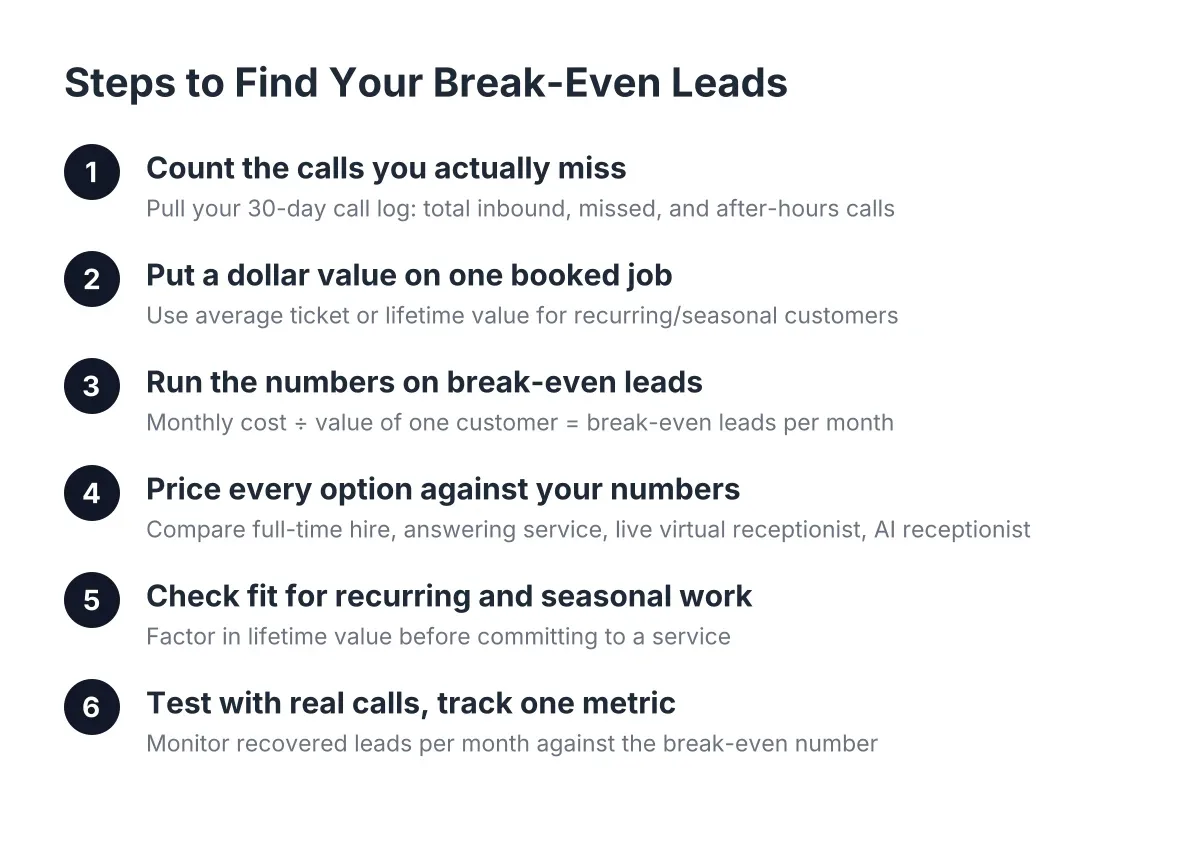
Run your own numbers before you commit to anything. Count last month's inbound calls, estimate how many went unanswered, and multiply by your average job value. That figure, not any vendor's pitch, tells you what the phone problem costs and what a solution is worth.
Then match the tool to the gap. If your gap is daytime admin capacity, hire. If it is after-hours coverage, overflow during the summer rush, bilingual callers, and appointment booking while your crew is on site, an AI receptionist home services platform Austin home trades can test on their own line this week is the option built for exactly that gap. The best part of the AI option is that testing it costs you a phone call: dial the line, throw your hardest customer scenario at it, and judge the answer yourself. No sales call, no contract, just the same test your customers will run every time your phone rings.
If you're losing revenue to missed calls, NeverMiss ATX can help.
Prefer to talk it through? Call (512) 980-9267 — a quick call is usually the fastest way to get a straight answer for your situation.