AI Receptionist HubSpot Salesforce Integration: The Lead Capture Workflow for Austin Trades
You already made the call. You are done losing insurance jobs to voicemail, and you know a full-time hire cannot answer 60 simultaneous calls the morning after a hailstorm. Now the question is execution: how do you connect an AI receptionist to HubSpot, Salesforce, or Zapier so every captured lead lands in your pipeline with damage details, insurance info, and a priority score attached? This guide walks through how to set up an AI receptionist CRM sync step by step, prices it against the alternatives you already rejected, and shows you what a post-storm lead capture workflow actually looks like when it works.
We built this for Central Texas trades specifically. Roofing, restoration, plumbing, electrical, pest control. The businesses where a missed call is not an inconvenience; it is a $7,500 insurance job that just went to the competitor who picked up.
Why the CRM Connection Is the Whole Point
An AI receptionist that answers calls but does not sync to your CRM is half a product. It captures the lead, then leaves it stranded in a dashboard you will not check until Thursday. For a storm-driven operator, that gap is fatal.
Here is why speed matters more in your trade than in almost any other. According to MIT Sloan School of Management and InsideSales.com, the odds of successfully contacting a lead drop 100-fold, and the odds of qualifying that lead drop 21-fold, when the callback happens at 30 minutes instead of within 5 minutes. After a hailstorm, that math compounds. Every homeowner calling you is also calling three competitors. The first company to confirm an inspection wins the claim.
Therefore, the workflow you are building has one job: shrink the distance between "phone rings" and "lead is in your pipeline, scored, with insurance details, and someone is moving on it." The CRM sync is the plumbing that makes that possible.
How the AI Receptionist Lead Capture Workflow Works End to End
The full workflow runs in five stages, and it happens whether you are on a ladder in Pflugerville or asleep at 2 a.m. during a freeze event.
- Call answered. The AI receptionist picks up on the first ring, 24/7, in English or Spanish depending on the caller. No busy signal, no voicemail, no hold queue, and no cap on simultaneous calls.
- Lead capture and qualification. The AI asks the questions you configured: address, type of damage, when it happened, insurance carrier, whether a claim is filed, and callback preference. For a burst pipe at 11 p.m., it captures severity and can live-transfer if you opted in.
- Scoring and summarization. AI Call Intelligence scores the lead and writes a plain-English summary. A homeowner in Cedar Park with confirmed hail damage and an open claim scores higher than a tire-kicker asking about gutter cleaning.
- CRM sync. The lead, transcript summary, score, and contact details push to HubSpot, Salesforce, Zoho, or anywhere Zapier reaches, within seconds of the call ending.
- Action. Your CRM automation takes over: assign to a crew lead, trigger a booking confirmation, or fire a text. From the dashboard, one-click call bridging connects you to the lead directly.
Notice what is not in that list: you, standing in a parking lot, listening to 40 voicemails and typing names into your phone. The workflow removes manual data entry entirely, which is where most storm-surge leads die.
Setting Up an AI Receptionist to Sync With Your CRM
Connecting an AI receptionist to HubSpot or Salesforce sounds like an IT project. It is not. For most Austin home service businesses, the sync goes live in under an hour using either a native webhook or a Zapier connection, and no developer is involved.
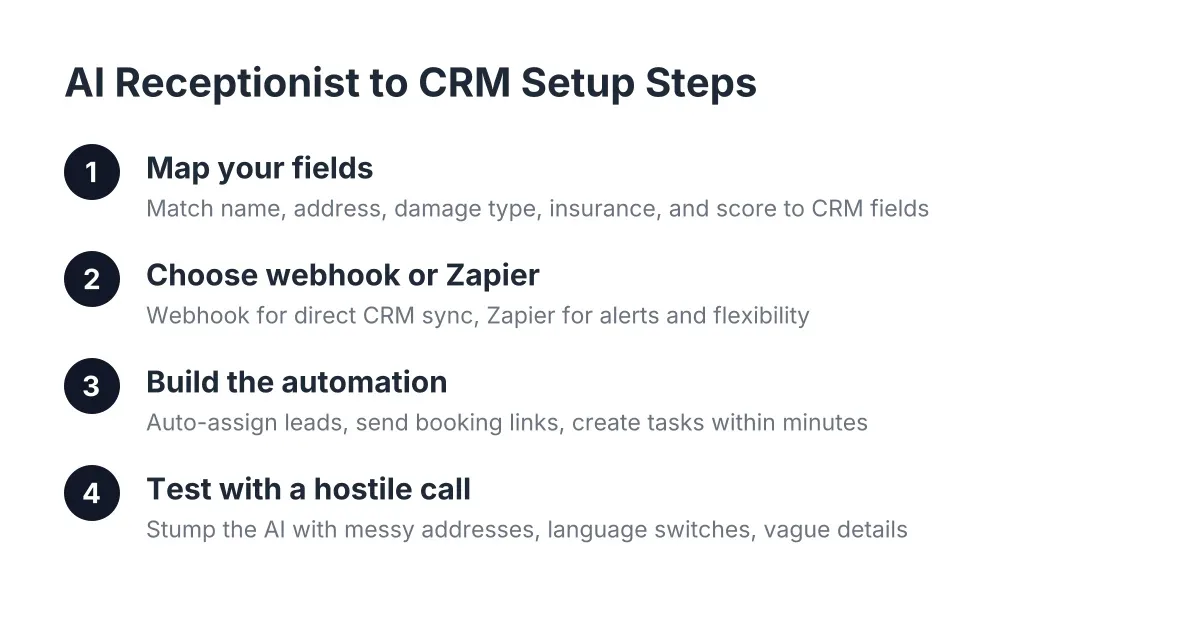
Here is the practical setup path, step by step.
Step 1: Map your fields before you connect anything
First, decide what a "complete" lead looks like for your business. For a roofing or restoration operator, that usually means:
- Caller name and mobile number
- Property address and neighborhood (Round Rock, Georgetown, and Leander get triaged differently after a localized hail cell)
- Damage type and severity in the caller's own words
- Insurance carrier and claim status
- Preferred inspection window
- Lead score and call summary
Match each of those to a HubSpot contact property or Salesforce field. If a field does not exist yet, create it now. A "Claim Filed: Yes/No" checkbox in your CRM is the difference between sorting 200 post-storm leads in ten minutes versus reading 200 summaries one by one.
Step 2: Choose webhook or Zapier
Next, pick your connection method. A direct webhook pushes lead data straight into HubSpot or Salesforce the moment a call ends; it is the fastest and most reliable route. Zapier sits in the middle and gives you flexibility: you can route the same lead to your CRM, a Slack channel, and a Google Sheet your office manager watches during surge weeks.
For emergency trades, we recommend both. Webhook to the CRM for the system of record, Zapier for the "someone needs to see this right now" alerts.
Step 3: Build the automation that acts on the lead
The sync alone does not book jobs. Your CRM automation does. In HubSpot, that might be a workflow: when a new contact arrives with lead score above your threshold and claim status "filed," assign to the owner, send the booking link by text, and create a task due in 15 minutes. In Salesforce, the same logic runs as a Flow.
The MIT Sloan finding above tells you exactly what that automation should optimize for: contact inside five minutes. Build the workflow so a high-value insurance lead cannot sit untouched for half an hour, even at 3 a.m. on a Sunday.
Step 4: Test it with a hostile call
Finally, call your own number and try to stump the AI. Give a messy address. Switch to Spanish halfway through. Describe hail damage vaguely, then mention your carrier by name. Then open HubSpot or Salesforce and check that every field landed where you mapped it. Fix mismatches now, in calm weather, not the morning after a supercell rolls through Travis County.
What This Looks Like During an Actual Storm Surge
Suppose a hailstorm hits northwest Austin on a Tuesday evening in spring 2026. Say you run a six-person roofing crew, and by Wednesday morning your phone volume has jumped 300 to 400%, which is the standard post-storm spike for weather-driven trades. On a normal week you get 15 calls a day. This week it is 70, many of them simultaneous, and each qualified insurance job averages around $7,500.
With voicemail or a single office manager, here is the honest outcome: you answer maybe 20 of those 70 calls. The other 50 hear a busy signal or a greeting, and most of them dial the next roofer on Google. Even at a conservative 30% close rate on the calls you missed, that is 15 lost jobs. At $7,500 each, the storm cost you over $110,000 in a week, and your competitor just booked a year of work in 48 hours.
Now run the same Wednesday through the workflow above. All 70 calls get answered on the first ring, including a large share that come in overlapping. Each caller gets qualified, damage details and carrier info get captured, and every lead lands in Salesforce or HubSpot with a score. By 8 a.m. you open your pipeline, sort by score, and see 22 filed-claim leads at the top. Your crew leads start booking inspections from the dashboard with one-click call bridging, highest-value claims first.
That is the entire argument for the integration in one illustrative morning. Surge capacity plus structured claim intake plus instant CRM sync equals market share captured while competitors are still returning voicemails.
Pricing the Options Against Real Austin Call Volumes
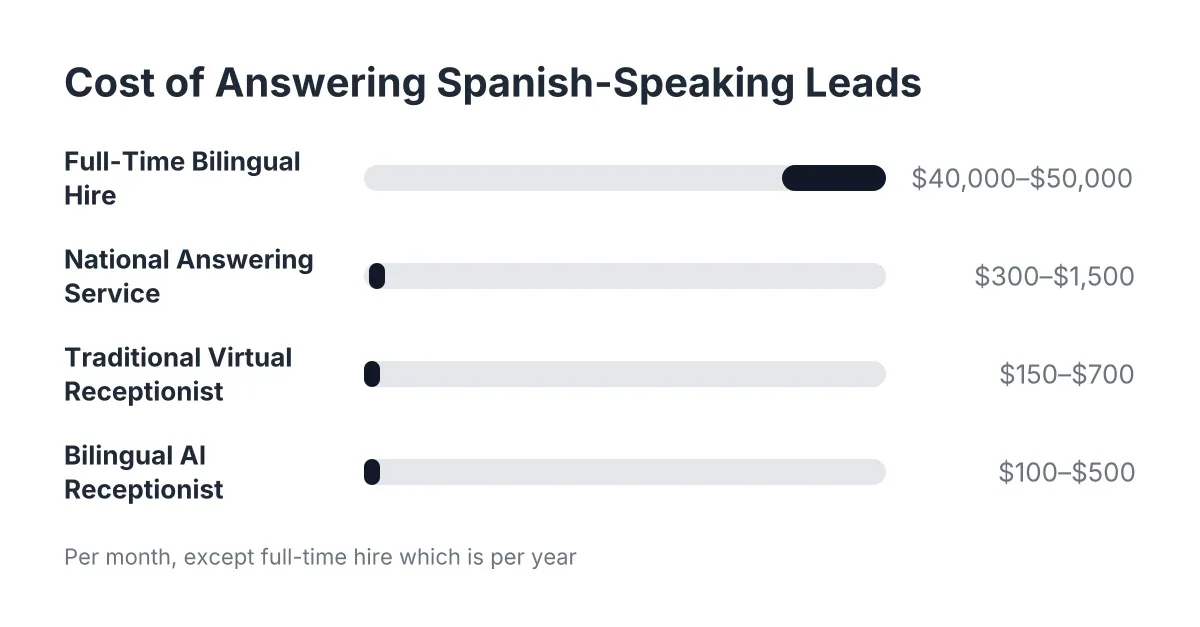
You have four ways to answer the phone, and they are not close in cost once you price them against actual trade economics. Here is the unfiltered side-by-side.
Full-time receptionist. According to the U.S. Bureau of Labor Statistics, the median receptionist wage was $17.90 per hour in May 2024, about $37,230 per year before benefits, payroll taxes, or overtime. That buys you one person, 40 hours a week, who takes lunch, gets sick, and physically cannot answer three calls at once. For a trade where a meaningful share of pest control calls come in after hours, and storm calls spike overnight, a 9-to-5 hire covers less than a quarter of your actual demand.
National answering service. Typically $1 to $2 per minute or per-call pricing that balloons during exactly the weeks you need it most. A 400% surge means a 400% bill. Worse, the agent reading a script in another state does not know that Georgetown and Cedar Park got hit by different storm cells, and cannot triage a burst pipe from a drip.
Traditional virtual receptionist. Human-staffed virtual receptionist services run $100 to $400 per month for a small block of minutes, with steep overage fees. They handle normal volume fine. However, they hit the same wall during a surge: a finite pool of humans means hold queues when 30 calls land in the same hour.
AI receptionist with CRM sync. Flat monthly pricing in the $199 to $399 range for most Central Texas trades, unlimited simultaneous calls, 24/7 coverage, bilingual on every plan, and direct HubSpot, Salesforce, Zoho, or Zapier sync included. The surge that breaks the other three options is the exact scenario this one is built for. One recovered $7,500 insurance job covers roughly two years of the service.
The honest comparison is not "which sounds most human." It is "which one answers call number 47 at 11:40 p.m. and puts the claim details in your pipeline before midnight."
Can an AI Receptionist Capture Insurance Details Accurately?
An AI receptionist can capture insurance claim details reliably because the intake runs from a structured script, not an agent's memory. It asks for the carrier, claim number, filing status, and damage description in a fixed sequence, records the answers verbatim, and writes them to mapped CRM fields, so nothing depends on someone's handwriting at hour ten of a surge shift.
This is worth saying plainly because detail quality is the objection storm operators raise most. A human answering call 50 of the day gets tired and skips questions. The AI asks the same questions on call 1 and call 500. Every call also produces a summary and transcript, so if a carrier disputes intake details months later, you have a record.
That said, know the boundary. The AI captures and structures claim information; it does not give coverage advice or interpret policy language, and it should not. Complex claim disputes belong with your public adjuster or attorney. The AI's job is making sure the raw intake is complete and in your CRM within seconds, which is where most claim-intake errors actually start.
Bilingual capture matters here too. A meaningful share of Central Texas homeowners prefer Spanish, and a lead who has to struggle through English after their roof just took hail is a lead half-lost. Every call gets handled in the caller's language, and the summary lands in your CRM in yours.
What Happens Inside Your CRM After the Call
Once the AI receptionist CRM sync is live, the CRM stops being a place you type things into and becomes a place work gets assigned from. Concretely, here is what each platform does with an inbound lead.
In HubSpot, the lead arrives as a new or updated contact with the call summary on the timeline. Workflows can then route by score, fire the booking link by SMS or email, notify the right crew lead, and set a follow-up task with a five-minute SLA. Your Monday morning report and HubSpot's own dashboards will start agreeing with each other, because they are reading the same data.
In Salesforce, the same payload creates a Lead or Contact, and a Flow handles routing. Storm operators running insurance work often add a "Claim Value Estimate" field and route anything above a threshold straight to the owner's phone. During a surge, that single rule is your triage system: high-value filed claims first, unfiled inquiries second, non-storm work queued for the following week.
For everything else, Zapier fills the gaps. Push leads to a shared spreadsheet for your subcontractor crews, ping a group text when a live-transfer emergency comes in, or log every after-hours call to a channel your office manager reviews at 7 a.m.
Common Setup Mistakes That Cost Leads
Most integration failures are configuration problems, not technology problems. Watch for these four.
- Unmapped fields. If the AI captures the insurance carrier but no CRM field exists to receive it, the data lands in a notes blob nobody sorts by. Map every question to a field before launch.
- No speed-to-lead automation. Syncing a lead that then sits unassigned for six hours recreates the voicemail problem inside your CRM. Build the assignment and the SLA task on day one.
- Testing only in calm conditions. A workflow that works for one call may bottleneck at 30. Confirm your CRM automation has no per-hour limits or duplicate-detection rules that silently drop surge leads.
- Forgetting the after-hours path. Decide in advance which call types justify a live transfer at 2 a.m. (active flooding, electrical burning smell, sewage backup) and which get booked for the morning. The AI enforces whatever triage rules you set, but you have to set them.
Answering the Question You Started With
Business owners searching for an AI receptionist with HubSpot and Salesforce integration are usually asking a simpler question underneath: can this replace the hire I cannot afford or the national service that fails me during surges? For emergency and storm-driven trades in Austin, the numbers answer it. A full-time hire covers 40 hours and one call at a time. A national call center charges by the minute and scales its price with your worst week. The AI receptionist answers unlimited simultaneous calls around the clock, in both languages your customers speak, and delivers every lead into your pipeline structured, scored, and ready to book.
The integration is not a nice-to-have bolted onto the answering. It is the mechanism that turns a chaotic post-storm phone surge into a sorted pipeline of high-value claims by breakfast. Set up the field mapping, build the five-minute automation, test it with a hostile call, and the next hailstorm becomes the best sales week of your year instead of the most expensive missed opportunity.
If you're losing revenue to missed calls, NeverMiss ATX can help.
Prefer to talk it through? Call (512) 980-9267 — a quick call is usually the fastest way to get a straight answer for your situation.