Appointment Booking Automation Terms Explained: A Plain-English Glossary
If you run a home service business in Central Texas and you keep hitting words like "IVR," "webhook," or "Acuity" while shopping for a booking system, this appointment booking automation glossary is for you. It explains the terms you will see in sales pages, quotes, and setup emails in plain English. Read it once and you can compare providers line by line, ask sharper questions, and spot the difference between a real AI receptionist and a glorified voicemail. No prior tech knowledge needed.
- AI Receptionist
- Acuity
- Booking Link
- IVR (Interactive Voice Response)
- AI Website Chatbot
- Lead Capture
- Lead Qualification
- After-Hours Answering
- Live Transfer
- Call Bridging
- Bilingual Support
- Call Scoring and Summarization
- Webhook
- CRM Sync
- Integration
- Per-Call vs. Flat-Rate Pricing
- Onboarding
The Core Tools and Systems
AI Receptionist
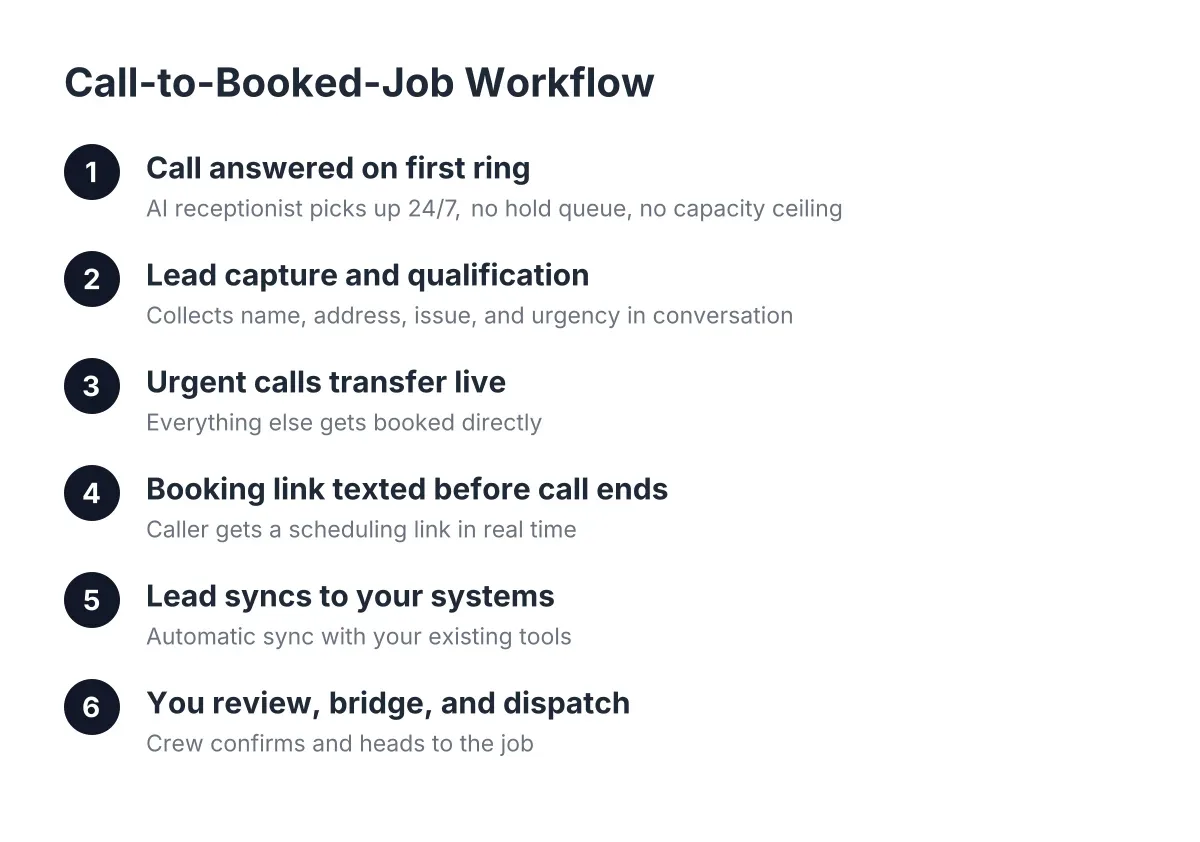
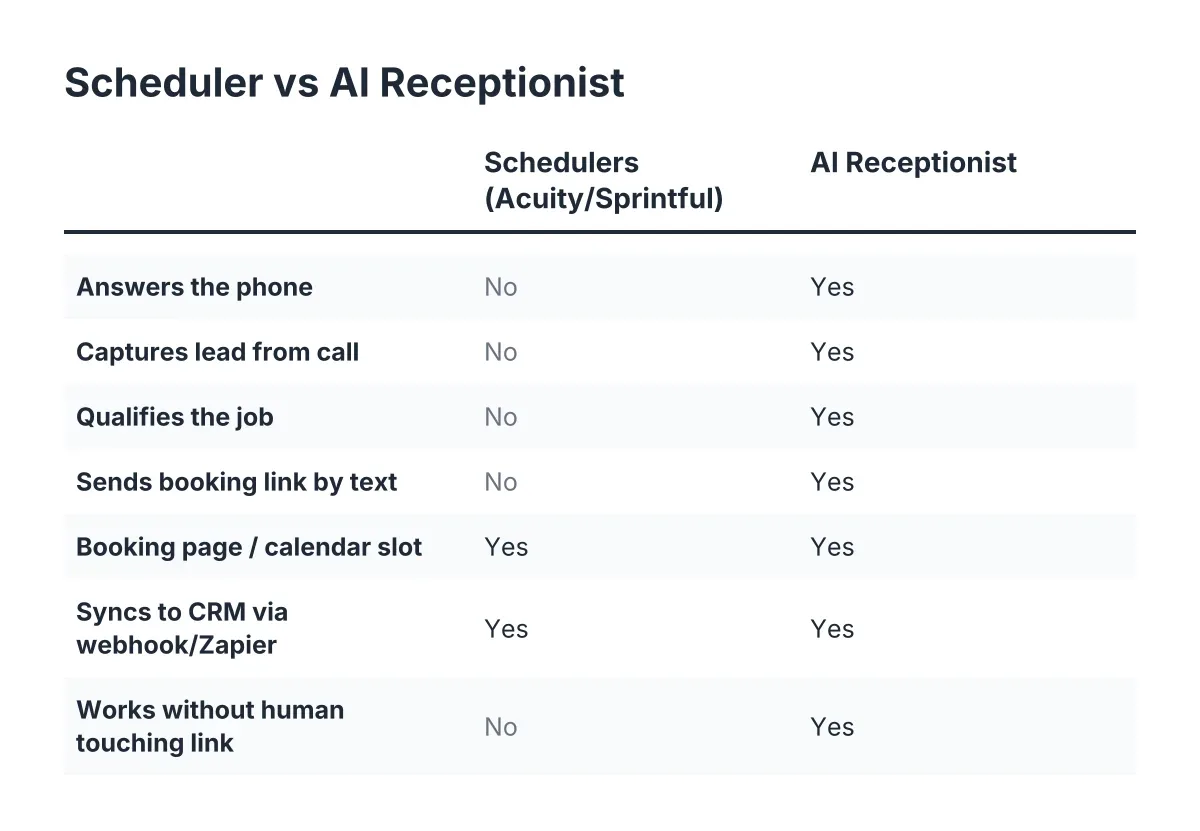
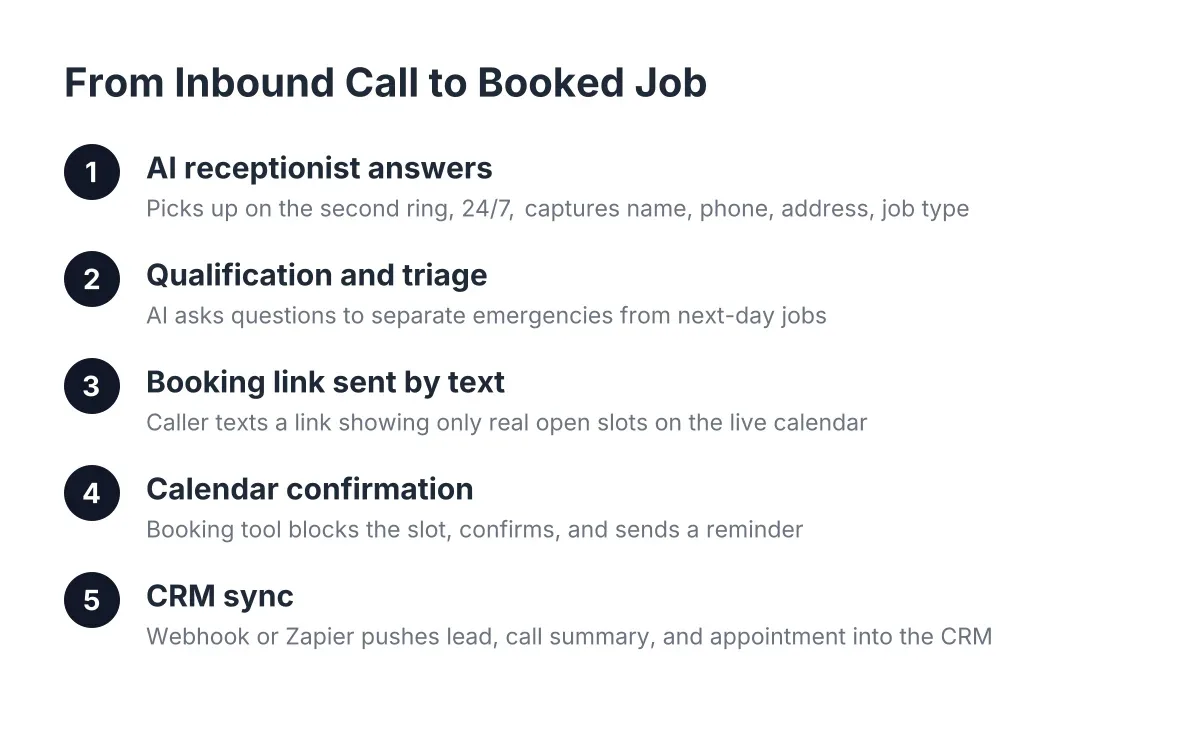
An AI receptionist is software that answers your phone calls with a natural-sounding voice, asks callers what they need, captures their details, and books appointments without a human picking up. Unlike voicemail, it holds a real two-way conversation, so a homeowner with a burst pipe at 11 p.m. gets answered, qualified, and booked instead of hanging up and calling your competitor. When a provider says "AI receptionist," ask whether it answers 24/7 and whether it handles Spanish. The good ones do both. If you want proof, call one and try to stump it.
Acuity
Acuity is a popular online scheduling tool that lets customers pick an open time slot on your calendar and book themselves in. When a provider mentions "Acuity integration," they mean their system can send booking links or push appointments directly into that calendar. For you, the practical question is simpler: does the booking system connect to the calendar you already use? If it does, appointments land where your crew can see them, with no copying between apps.
Booking Link
A booking link is a web address that opens your live calendar so a customer can pick an available appointment time themselves. An AI receptionist can text or email this link during or right after a call, which means the customer books while their interest is hot. Booking links matter because they close the loop: instead of "someone will call you back," the caller walks away with a confirmed time. Ask any provider whether their system delivers booking links automatically or whether you have to send them by hand.
IVR (Interactive Voice Response)
IVR is the old-style phone menu that says "press 1 for service, press 2 for billing." It routes calls but does not hold a conversation, capture lead details, or book anything. Some providers dress up an IVR as automation, so it pays to know the difference. If the system cannot ask a caller "Is this an emergency or can it wait until morning?" and act on the answer, it is a menu, not a receptionist.
AI Website Chatbot
An AI website chatbot is a text-based assistant that lives on your website, answers visitor questions, captures leads, and delivers booking links. It covers the customers who research online at midnight instead of calling. Paired with an AI receptionist on the phone line, it means every channel a customer uses ends the same way: contact details captured and an appointment booked. Note the distinction in vocabulary: the phone product is an AI receptionist, not a chatbot; the chatbot lives on the website.
The Process: From Ring to Booked Job
Lead Capture
Lead capture means collecting a potential customer's name, contact details, and job description the moment they reach out, so no inquiry disappears. For a trades business, every uncaptured call is a job that went to someone else. A capable system captures leads from phone calls and website chats alike, then hands them to you organized and ready to work. If you are losing jobs because you are on a ladder when the phone rings, this breakdown of the missed-call problem and its booking fix walks through exactly how lead capture stops the bleeding.
Lead Qualification
Lead qualification is the step where a system asks a caller questions to figure out whether they are a real prospect and what the job actually is. A qualified lead comes with context: the AC quit, the house is in South Austin, the homeowner wants someone today. That context lets you decide in seconds whether to call back now or book them for Thursday. Providers that skip qualification hand you a pile of phone numbers; providers that do it well hand you jobs.
After-Hours Answering
After-hours answering means your phone gets answered outside your working day, including nights, weekends, and holidays. Plumbing and HVAC emergencies do not respect business hours, and in a 95 degree Austin summer, a dead AC call at 9 p.m. is often the most valuable call of the week. A 24/7 AI receptionist means after-hours callers get booked instead of leaving a voicemail you find the next morning, after they have already hired someone else.
Live Transfer
A live transfer is when an automated system connects an urgent caller directly to you or your on-call tech in real time, instead of taking a message. Good systems make this opt-in and rules-based: routine calls get booked, genuine emergencies ring your cell. This is the credible answer to "what if it is a real emergency?" Ask any provider how their system decides which calls to transfer and which to book.
Call Bridging
Call bridging means connecting two phone calls together through the system, such as clicking a lead in your dashboard and having the system dial both you and the customer. One-click call bridging turns "I will call them when I get off site" into a ten-second action between jobs. It matters because speed wins leads: the first business to reach a homeowner usually gets the work.
Bilingual Support
Bilingual support means the system holds full conversations, captures leads, and books appointments in more than one language, most commonly English and Spanish. In Central Texas, a Spanish-speaking caller who reaches an English-only line often hangs up, and that job is gone. Systems that offer Spanish on every plan, rather than as a paid add-on, remove that barrier entirely. If this is your situation, here is a step-by-step guide to setting up bilingual appointment booking for Spanish-speaking customers.
Call Scoring and Summarization
Call scoring and summarization means the system grades each call by how likely it is to become a job and writes a short recap of what the caller said. Instead of listening to twenty recordings at the end of the day, you scan a list: hot lead, routine booking, spam. This is sometimes sold under the label "AI call intelligence." The practical benefit is triage: you spend your callback time on the calls that pay.
Automating Your Booking Workflow
Webhook
A webhook is an automatic message one piece of software sends to another the instant something happens, such as a new lead pinging your CRM the moment a call ends. You never see the webhook itself; you see its result, which is your lead data appearing where you need it without anyone typing it in. When a provider mentions "lead webhooks," they are saying their system can push data to your other tools automatically. That is a good sign for scope, since it means less manual work for you.
CRM Sync
CRM sync means your booking system automatically copies leads and appointments into your customer relationship manager, the software where you track customers and jobs. Common CRMs in the trades world include HubSpot, Salesforce, and Zoho, and connector tools like Zapier bridge the rest. Sync matters because a lead trapped in one app is a lead you forget. It also builds your history with each recurring customer, which is where the real lifetime value in home services lives.
Integration
An integration is a pre-built connection between two software tools that lets them share data without manual work. "Integrates with your calendar" means appointments appear there on their own; "integrates with your CRM" means leads flow in automatically. When comparing quotes, list the tools you already use and ask each provider to confirm the integration for every one. Missing integrations usually mean either extra setup cost or extra typing for you, forever.
Per-Call vs. Flat-Rate Pricing
Per-call pricing charges you for each call handled, while flat-rate pricing charges a fixed monthly fee regardless of volume. Per-call plans can look cheap until a busy storm week triples your phone traffic; flat rates are predictable but can cost more in slow months. Neither is wrong, but you should know which model a quote uses before you sign. For a fuller picture of what these systems cost and why, see this guide to appointment booking automation cost, and if you are already paying for one, these eight ways to get every dollar's worth show where the ROI hides.
Onboarding
Onboarding is the setup period where a provider configures the system with your services, service area, hours, calendar, and call-handling rules. A well-run onboarding takes days, not months, and should not require you to learn new software. Ask two questions up front: who does the setup work, and how long until the system takes its first live call? Vague answers here predict headaches later, so treat onboarding clarity as part of the price.
Using These Terms
You now speak enough of the language to read any appointment booking automation quote line by line and know exactly what you are paying for. When a provider says "IVR" where you expected an AI receptionist, or charges extra for Spanish, you will catch it. Keep this glossary of appointment booking automation terms handy during sales calls, and do not be shy about asking a provider to define anything not on it.
If you're losing revenue to missed calls, NeverMiss ATX can help.
Prefer to talk it through? Call (512) 980-9267 — a quick call is usually the fastest way to get a straight answer for your situation.