Missing Leads Because You Can’t Answer Calls? Here’s the Booking Fix
You're 20 feet up in an attic in Pflugerville, it's 95 degrees, and your phone buzzes three times in your pocket. By the time you climb down, the burst-pipe caller has already reached the next plumber on Google. If you're missing leads due to missed calls emergency trades face when you can't physically answer the phone while you work, the problem isn't your hustle. It's that your booking process still requires you, live, in the moment, for every single job.
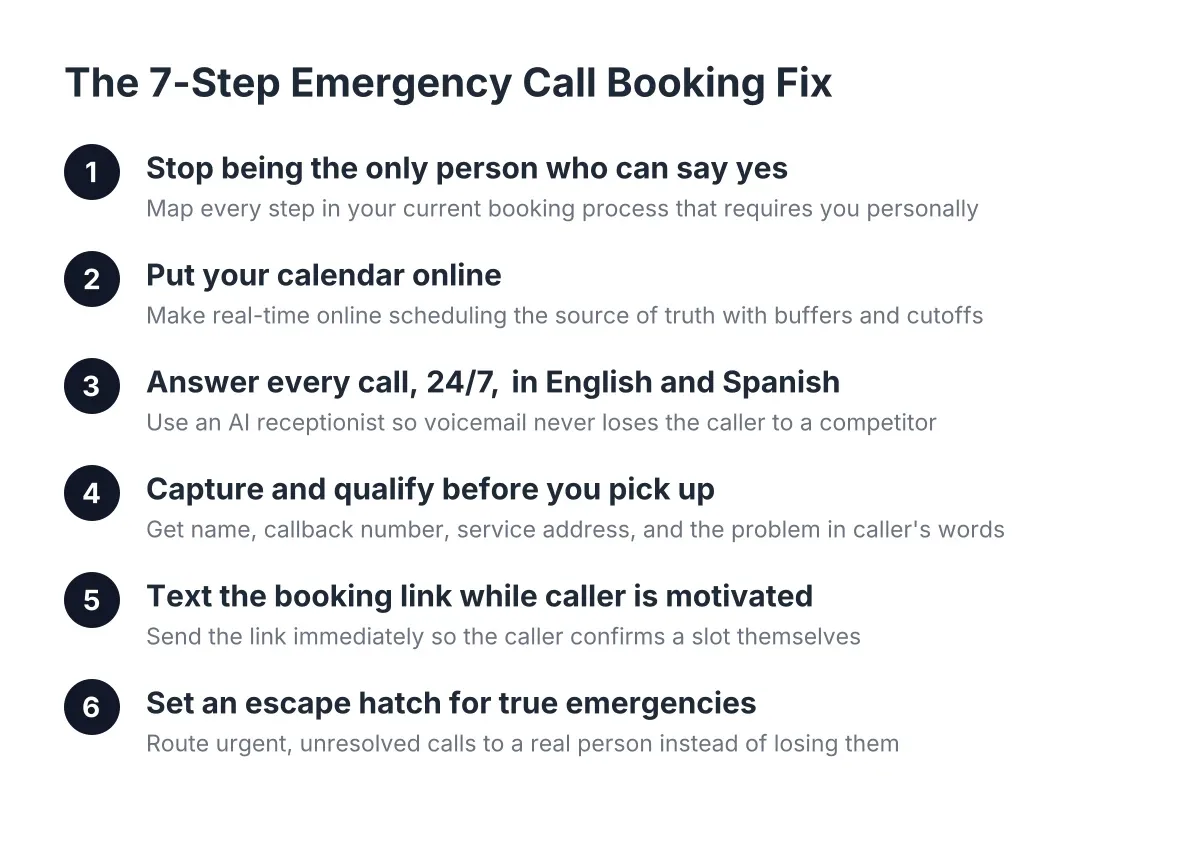
This guide walks through the exact workflow Austin home service owners use to take a job from inbound call to confirmed calendar slot without a human touching it. Seven steps, in order, each one you can set up this week.
Why Missed Calls Emergency Trades Lose the Most
Emergency callers don't leave voicemails. Someone with water pouring through their ceiling at 11pm calls you once, waits four or five rings, hangs up, and dials the next number in the search results. Routine callers might try you again tomorrow. Panic callers never do.
The math on speed is brutal. According to MIT Sloan School of Management / InsideSales.com, the odds of contacting a lead drop 100-fold when you respond at 30 minutes instead of within 5. The odds of qualifying that lead drop 21-fold. For a plumber or electrician in Central Texas, a single missed after-hours emergency can be a $2,000 to $8,000 job, plus the water damage referral and the recurring customer behind it.
Here's the part most owners miss: answering the call is only half the fix. If you answer but then say "let me check my schedule and call you back," you've reopened the same gap. Phone tag is just a slower missed call.
Step 1: Stop Being the Only Person Who Can Say Yes
First, get honest about the bottleneck. In most one-to-ten-tech operations, exactly one person can confirm an appointment: the owner, or an office manager who goes home at 5pm. Every job has to route through that person's availability, which means your booking capacity equals your free hands, not your actual schedule.
Write down every step between "phone rings" and "job on the calendar" in your current process. For most emergency trades it looks like this: answer (or miss), listen, check the calendar from memory, negotiate a time, hang up, forget to write it down until you're back in the truck. Each step that requires you personally is a place where you're missing leads because you were on site, on a ladder, or asleep.
The rest of this guide removes you from each of those steps one at a time.
Step 2: Put Your Calendar Online and Make It the Source of Truth
Next, move your schedule into online appointment scheduling software with real-time availability. This is the foundation everything else sits on. If your calendar lives in your head or on a whiteboard in the shop, nothing downstream can book against it.
Tools like Calendly, or the built-in calendar in most scheduling software for small business, let you define bookable windows, job durations, buffer times, and blackout dates once. A drain clearing gets a 90-minute slot. A repipe consult gets two hours. Emergency slots stay held open after 6pm.
Set three rules when you configure it:
- Buffer time between jobs. Austin traffic between Georgetown and South Congress is not a 20-minute hop. Build in 30 to 45 minutes of drive time.
- Service-specific durations. Don't let a "quick question" caller book your only afternoon emergency slot.
- A same-day cutoff. Decide how late a customer can book for today, so a 4:45pm booking doesn't blow up your evening without your say-so.
One trade-off worth naming: an open calendar means customers can book times you'd rather protect. Spend an hour getting your availability rules right before you connect anything to it, and revisit them after the first two weeks.
Step 3: Answer Every Call, 24/7, in English and Spanish
Now solve the answering problem itself. Voicemail is not answering; it's a polite way of saying "call my competitor." A national answering service is answering, but it's a script reader in another state who doesn't know that "no-cool" in August is an emergency or that Cedar Park and Leander are 15 minutes apart.
This is where an AI receptionist earns its keep. It picks up on the first ring, every time, including 2am on a Saturday during a freeze. It holds a real conversation, in English or Spanish, which matters when a large share of your Central Texas customer base prefers Spanish and a monolingual answering service loses them at hello.
If the AI angle makes you skeptical, you're in good company. A Five9 survey found 75% of consumers prefer talking to a real human for support, and 84% already know companies use AI for customer service. Two things follow from that. First, callers aren't shocked by AI anymore; they're shocked by voicemail. Second, the human relationship still matters, which is why the best setups augment you rather than pretend you don't exist. The AI answers and captures; you still show up, shake hands, and do the work. Any decent provider will let you call the number yourself and try to stump it before you commit.
Step 4: Capture and Qualify Before You Ever Pick Up
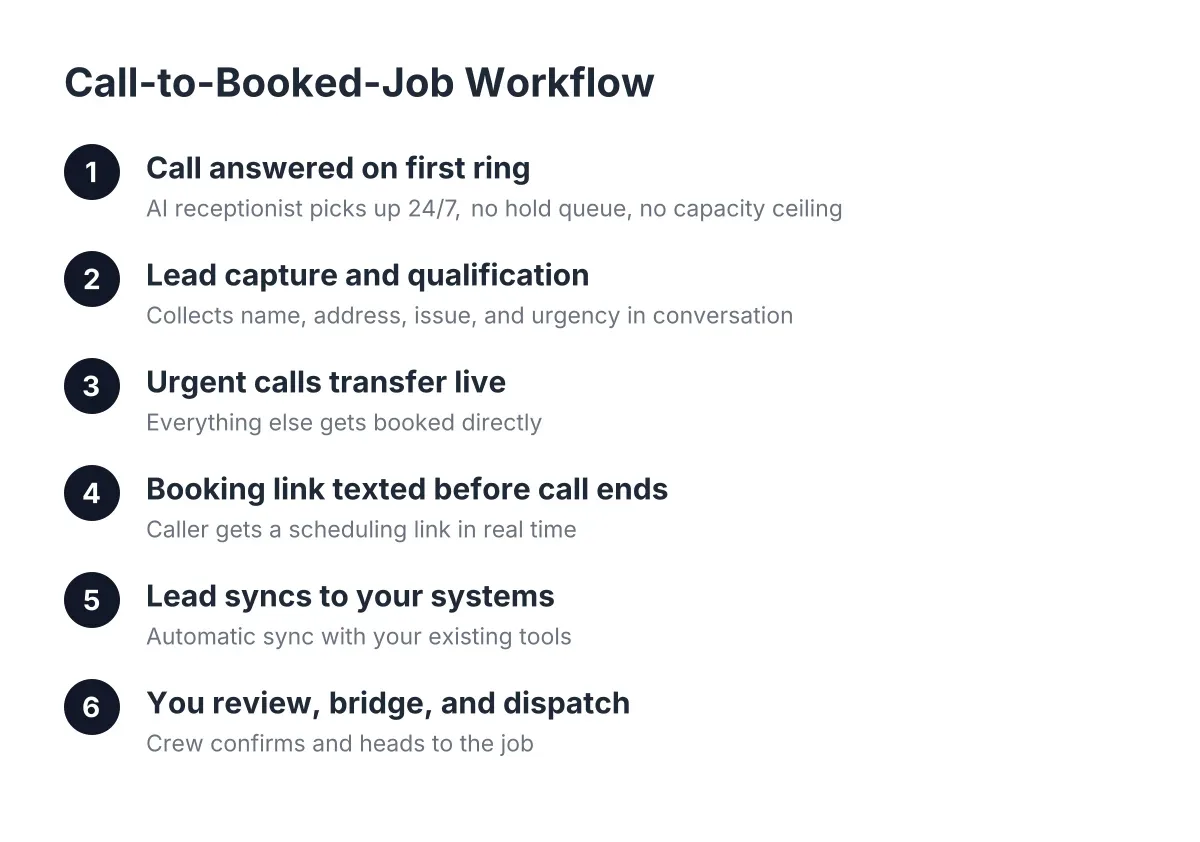
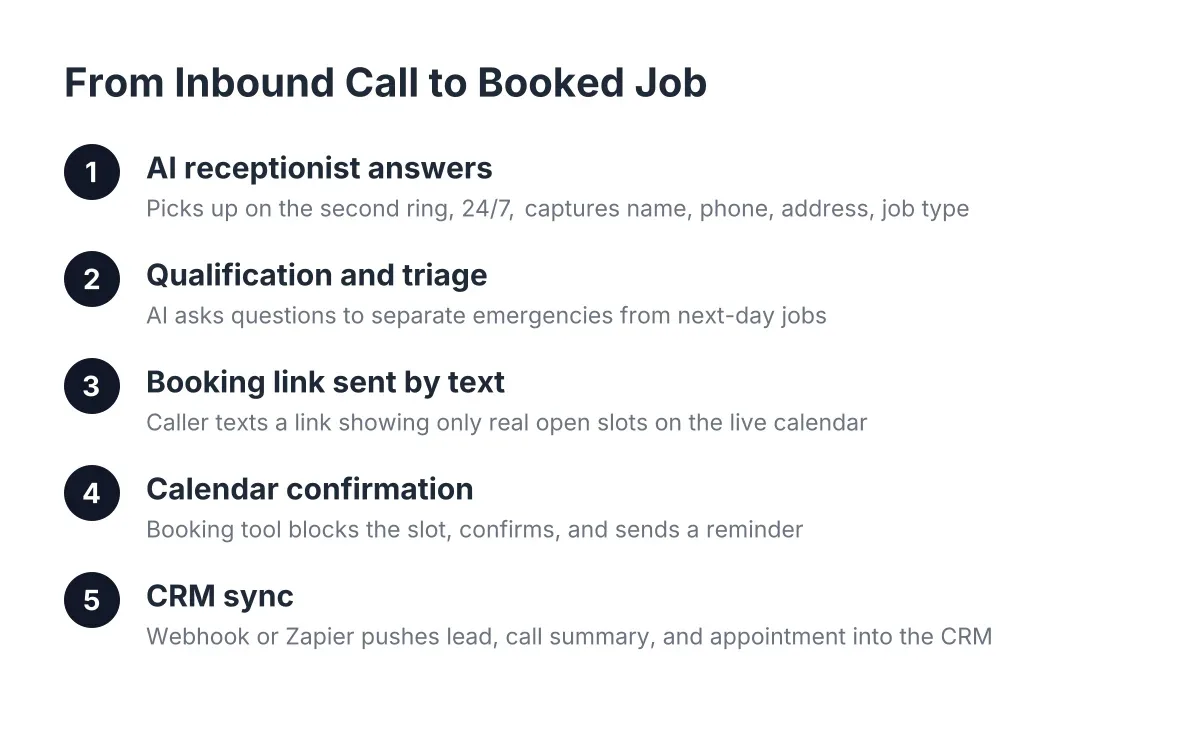
Answering is table stakes. The real value is what happens in the first 90 seconds of the call. A good AI receptionist runs lead capture and qualification the same way your best office manager would:
- Name and callback number, confirmed, not mumbled onto voicemail.
- Service address, so you know it's Round Rock and not Fort Worth before you commit.
- The problem, in the caller's words, "water heater leaking into the garage," not "plumbing issue."
- Urgency level, is this flooding right now, or a slow drip that can wait until Tuesday?
- How they found you, so you know which marketing spend actually rings the phone.
As a result, every lead arrives structured instead of scribbled. AI call intelligence scores and summarizes each conversation, so when you check your phone between jobs you see "URGENT: burst pipe, 78745, Spanish speaker, quoted arrival window" instead of a missed-call icon and a guess.
Step 5: Send the Booking Link by Text While the Caller Is Still Motivated
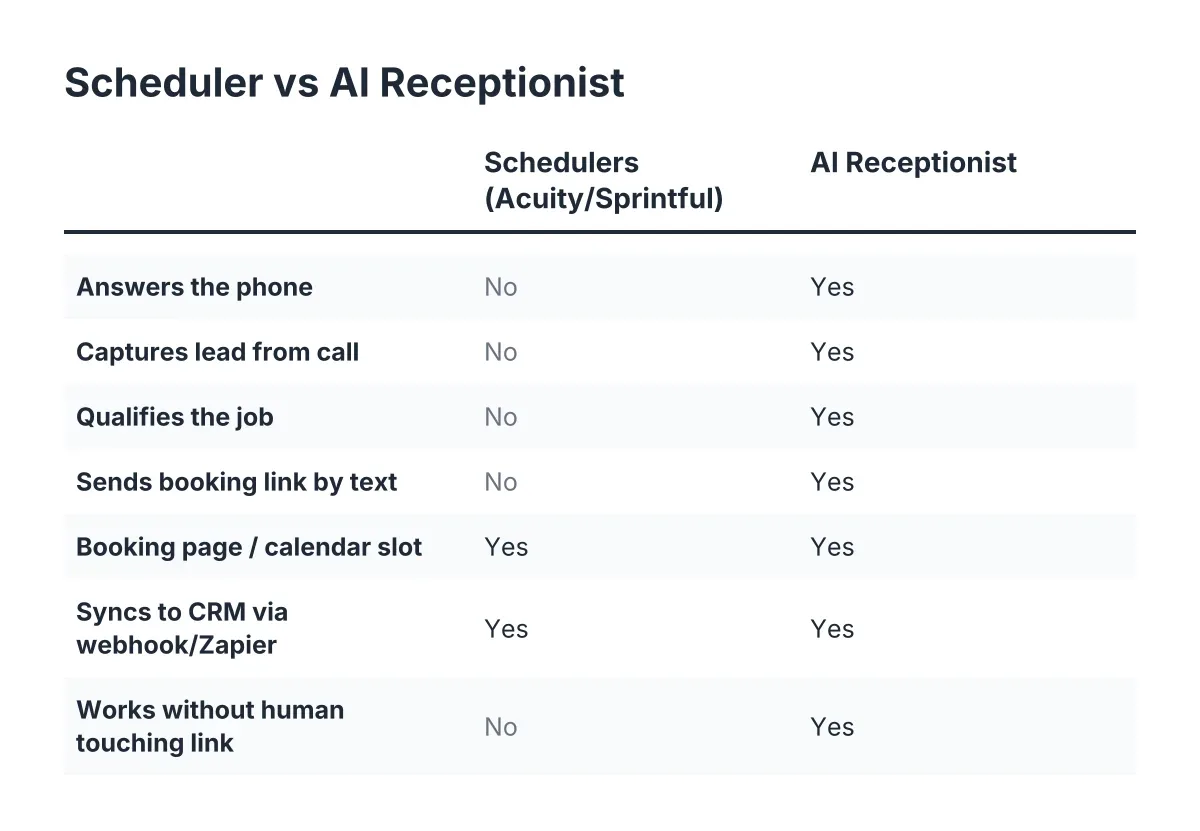
Here is the step that turns an answered call into a booked job, and it's where appointment booking automation stops being a buzzword and becomes a workflow. Once the caller is qualified, the AI receptionist texts them your booking link during or right after the call. The link opens your live calendar from Step 2. The customer taps a slot, confirms, and the job lands on your schedule while you're still elbow-deep in someone else's water heater.
Why text instead of booking verbally on the call? Two reasons. The customer sees your real availability and picks what works for them, which cuts no-shows. And you get a written confirmation trail, no "I thought you said Thursday" disputes.
Consider a real Tuesday for a two-truck plumbing outfit in Round Rock. At 1:15pm, while both techs are on jobs, a property manager calls about a slab leak. The AI receptionist answers on the first ring, captures the address on Gattis School Road, flags it urgent, and texts the booking link. By 1:22pm the property manager has booked the 4pm emergency slot. Nobody in the company touched a phone. Under the old process, that call goes to voicemail and the property manager's next call goes to a competitor.
Step 6: Set an Escape Hatch for True Emergencies and Missed Calls Emergency Trades Can't Ignore
However, not every call should end in a booking link. A gas smell, an electrical burning odor, or active flooding needs a human voice now, not a calendar slot for tomorrow. This is the objection every emergency trade owner raises about automation, and it's legitimate.
The fix is opt-in live transfer. You define what counts as urgent: flooding, no power, gas, whatever your trade's red flags are. When the AI receptionist detects one, it bridges the call straight to your cell instead of sending a link. Everything else, the routine repairs and estimates, books itself without interrupting you mid-job.
Be clear-eyed about the limits here. An AI receptionist triages by what the caller describes; it cannot smell gas or see arcing wires. Keep your transfer rules generous on the side of caution, and for anything involving gas or electrical fire, the right answer is always "hang up and call 911 first," which your call flow should say out loud.
Step 7: Sync Every Lead to Your CRM and Review the Numbers Weekly
Finally, close the loop. Every captured lead should flow automatically into whatever system you run, whether that's HubSpot, Salesforce, Zoho, or a Zapier hook into a spreadsheet. No retyping from voicemail transcripts at 9pm.
Then review one report every Monday morning: calls answered, leads captured, jobs booked, and emergencies transferred. In two weeks you'll know your after-hours call volume, your Spanish-language call share, and your booking rate. Most owners are stunned by the first number; pest control operators in particular find a big chunk of their calls land after 6pm, exactly when nobody was answering before.
If adoption worries you, you're ahead of most of your competitors, not behind them. NFIB's small business survey found only 24% of small employers currently use AI tools at all. And among those who do, 98% reported no change in employee headcount, according to NFIB. This isn't about cutting your office manager; it's about the 40 hours a week nobody was ever covering.
No Longer Missing Leads Because You Were on a Ladder
Run the seven steps back: an online calendar as the source of truth, 24/7 bilingual answering, structured lead capture, a texted booking link, live transfer for real emergencies, and CRM sync with a weekly scorecard. Each step removes one place where a lead used to leak out.
The through-line is simple. You were never missing leads because you didn't care or didn't work hard enough. You were missing them because the phone demanded a live human at the exact moment your hands were full. Take yourself out of the answer-and-book loop, keep yourself in the show-up-and-fix loop, and the burst-pipe caller at 11pm books with you instead of the next name on the list.
If you're losing revenue to missed calls, NeverMiss ATX can help.
Prefer to talk it through? Call (512) 980-9267 — a quick call is usually the fastest way to get a straight answer for your situation.