Comparing Online Schedulers: Acuity vs. Sprintful vs. an AI Receptionist for Austin Trades
If you run a roofing or restoration crew in Austin, TX, the scheduling bottleneck shows up at the worst possible time: 48 hours after a hail storm, when your phone is ringing faster than anyone can answer it. This guide compares a scheduler versus AI receptionist approach to handling that surge, walking through what online schedulers like Acuity and Sprintful do well and where they fall short when the phone is ringing constantly. We will walk the exact path a job takes from inbound call to confirmed calendar slot without a human touching it, then show how a scheduler vs AI receptionist comparison reveals which tool actually handles the work that matters most in a storm.
The short version: Acuity and Sprintful are booking pages. They do nothing until someone lands on them. An AI receptionist answers the phone, captures the lead, qualifies the job, and sends the booking link by text. For a crew fielding a post-storm surge, that difference is the whole ballgame.
The Real Problem Is Not the Calendar, It Is the Phone
Every scheduler on the market solves the same narrow problem: letting a customer pick a time slot without phone tag. That works when the customer already knows who you are and has your link in hand.
However, storm work does not start with a link. It starts with a homeowner in Pflugerville standing in their driveway looking at a hail-shredded roof, calling the first three roofers Google shows them. Whoever answers first usually gets the inspection. According to MIT Sloan School of Management / InsideSales.com, the odds of contacting a lead drop 100-fold, and the odds of qualifying that lead drop 21-fold, when the callback happens at 30 minutes instead of within 5.
Therefore, the fair way to compare these tools is not feature-by-feature on the booking page. It is: what happens between the ring and the booked slot, and who is doing that work while you are on a ladder.
How a Call Becomes a Booked Job Without a Human in the Loop
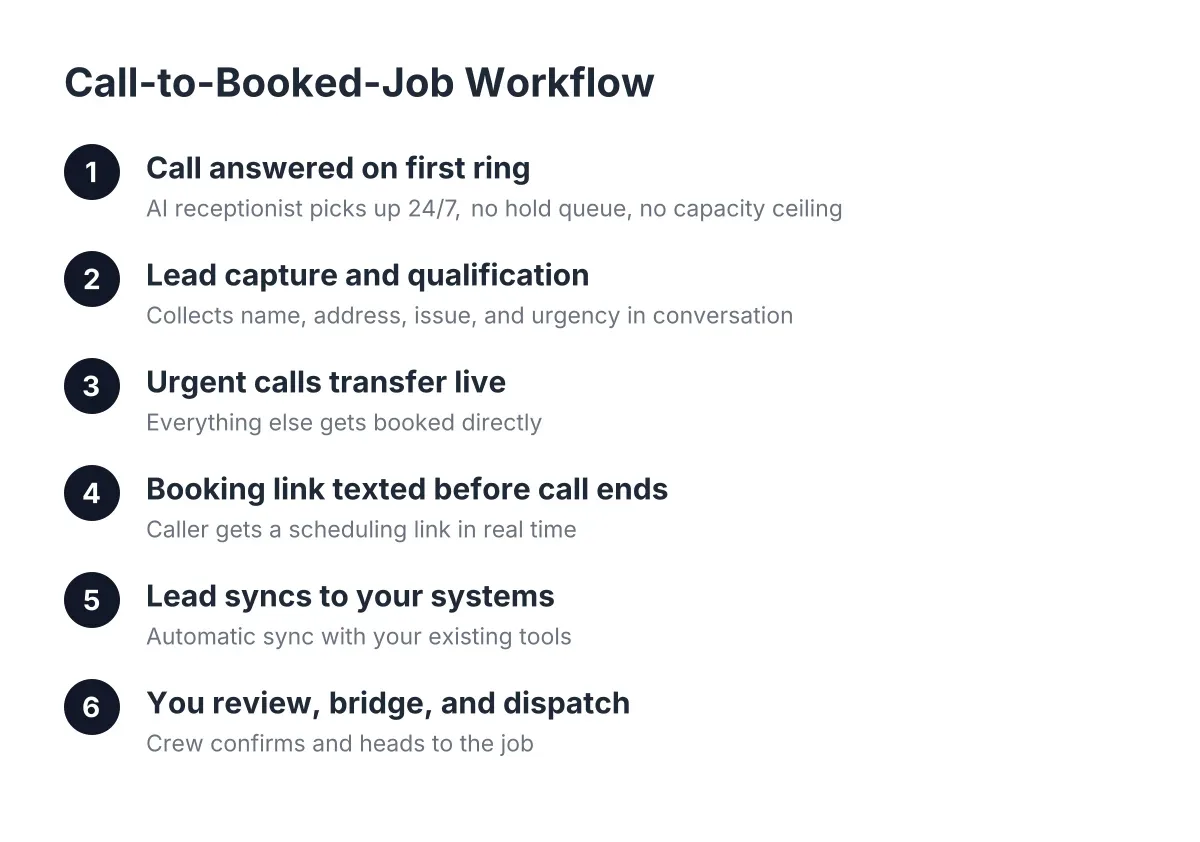
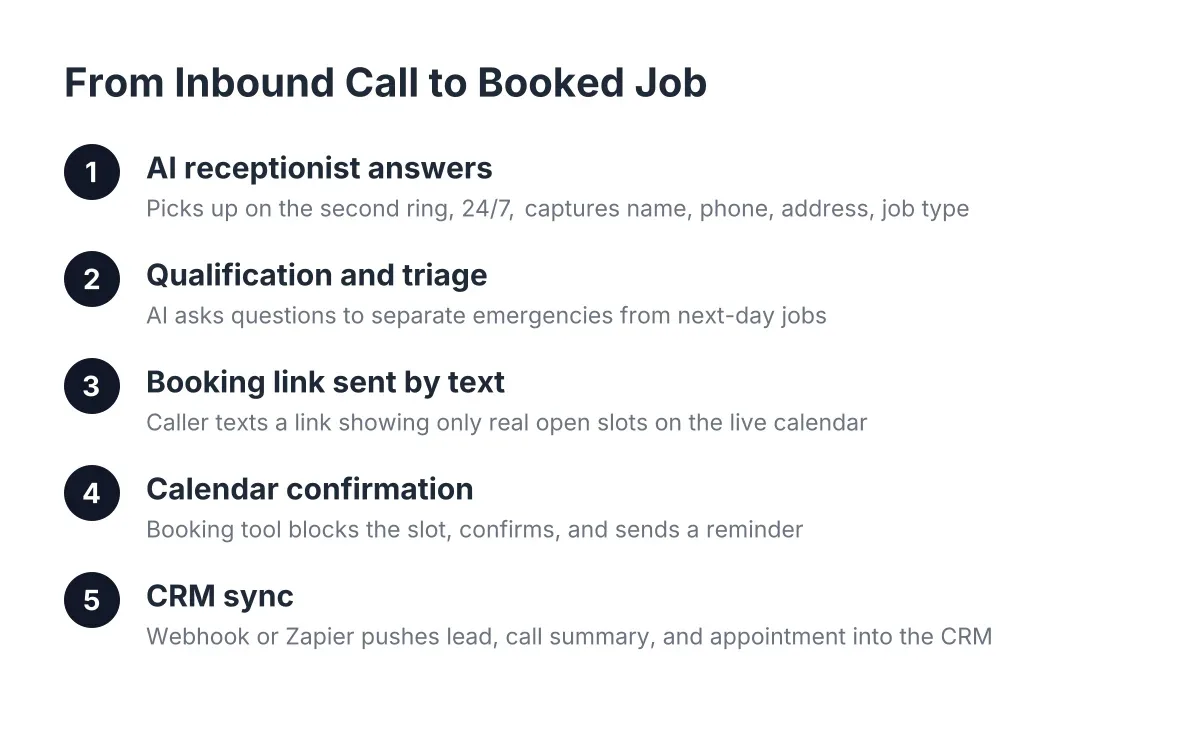
Here is the workflow Austin home service owners use today with an AI receptionist. Every step happens automatically, whether it is 2 p.m. on a Tuesday or 11 p.m. after a freeze:
- The call comes in and gets answered on the first ring. Not voicemail, not a busy signal, even if 40 other calls arrived in the same hour.
- The AI receptionist captures the lead. Name, address, callback number, and what happened: hail damage, a burst pipe, a tree through the fence.
- It qualifies the job. For storm work, that means damage details, whether an insurance claim is involved, and how urgent the situation is. Urgent calls can live-transfer to you if you opt in.
- It sends a booking link by text. The caller taps the link, sees your real availability, and picks an inspection slot. The job lands on your calendar, synced through your CRM or a webhook to HubSpot, Salesforce, Zoho, or Zapier.
- You get a summary. Call scored, details written up, lead in your dashboard with one-click call bridging if you want to follow up personally.
The caller talks to a voice, gets a text, and books in under three minutes. You touch nothing until you review the summary between jobs. That end-to-end handoff is what appointment booking automation looks like when it is built for trades instead of yoga studios.
Now let us see how each option covers those five steps.
Acuity Scheduling: What Booking Pages Do Well and Their Limitations
Acuity, owned by Squarespace, is a mature scheduling tool. As of 2026, plans run from about $20 to $61 per month depending on features like multiple staff calendars, text reminders, and intake forms.
What Acuity does well
Acuity handles step four of the workflow, and it handles it well. You get customizable intake forms, so you could ask about damage type or insurance carrier before the appointment. It syncs with Google and Outlook calendars, takes deposits, and sends automated reminders that cut no-shows.
For a solo operator who drives most leads through a website and does not depend on phone calls, Acuity is a solid, affordable choice.
Where Acuity falls short for storm work
Acuity never answers a call. If a homeowner in Round Rock calls you at 9 p.m. after a storm and gets voicemail, Acuity has no role in that interaction. There is no lead capture from the phone, no qualification, no insurance intake, and no text with a booking link unless you send it yourself.
In addition, Acuity's intake forms are only filled out by people motivated enough to reach your booking page and type. Post-storm callers are calling because calling is faster. A meaningful share will not hunt down your website.
Sprintful: Flexible Scheduling Links, Same Blind Spot
Sprintful is a leaner scheduling tool aimed at teams that want branded booking pages, custom domains, and flexible availability rules. Pricing as of 2026 starts around $9 per user per month for basic plans and climbs to roughly $49 for advanced team features.
What Sprintful does well
Sprintful's strength is white-labeling and routing. You can put the booking page on your own domain, build separate booking flows for inspections versus estimates, and route bookings to different crew leads by service area. For a multi-trade outfit covering Cedar Park, Georgetown, and Leander, that routing logic is genuinely useful.
It also plays well with webhooks and Zapier, so booked slots can flow into your CRM without manual entry.
Where Sprintful falls short for storm work
Like Acuity, Sprintful starts working only after someone reaches the link. It covers step four and part of step five. Steps one through three, answering the surge, capturing the lead, and qualifying the claim, stay on your shoulders or your office lead's.
During a normal week, that gap costs you a few missed calls. During a surge, when demand can spike 300 to 400 percent in 48 hours and the average insurance job runs around $7,500, the gap is where a year's worth of revenue leaks to the competitor who picked up.
AI Receptionist with Booking-Link Delivery: The Answering Layer Before Booking
An AI receptionist is not a scheduler competing with Acuity or Sprintful on booking-page features. It sits in front of the scheduling step and covers everything the booking page cannot: the ringing phone.
What it covers that schedulers do not
- Unlimited simultaneous answering. Fifty calls in an hour after a hail event, all answered, none sent to voicemail.
- Claim intake on every call. Damage description, address, insurance involvement, and urgency, captured in a structured summary you can hand to an adjuster conversation.
- Bilingual by default. Every call answered in English and Spanish, which matters across Central Texas where a Spanish-speaking caller who hits an English-only voicemail simply calls the next roofer.
- Lead scoring and prioritization. AI call intelligence scores each call, so you can triage the $12,000 full-replacement claim ahead of the $400 gutter repair.
- Live transfer for genuine emergencies. A burst pipe flooding a kitchen can bridge straight to you if you opt in.
- Booking-link delivery by text. The same Acuity, Sprintful, or native booking flow you already like, sent at the exact moment the caller is ready to commit.
Notice that last point. This is not an either-or decision against your scheduler. The AI receptionist can deliver whatever booking link you use, which is why comparing online schedulers like Acuity against an AI receptionist head-to-head misses the more useful framing: one is a destination, the other gets callers to it.
An honest look at the trade-offs
AI answering is not a fit for everything. A complex insurance negotiation, a commercial bid walkthrough, or a hostile adjuster call needs you, and no responsible provider claims otherwise. The AI captures, qualifies, and books; it does not replace the relationship you build on site. Consumer preference backs this up: a Five9/TEAM LEWIS survey found 75 percent of consumers prefer talking to a human for support, which is exactly why urgent calls should have a live-transfer path and why the AI's job is to get the right calls to you faster, not to keep callers away from you.
Cost also differs. Schedulers run $9 to $61 per month; an AI receptionist typically costs more because it does more, usually landing well under the cost of a part-time office hire. Judge it against the value of one saved insurance job, not against a booking page subscription.
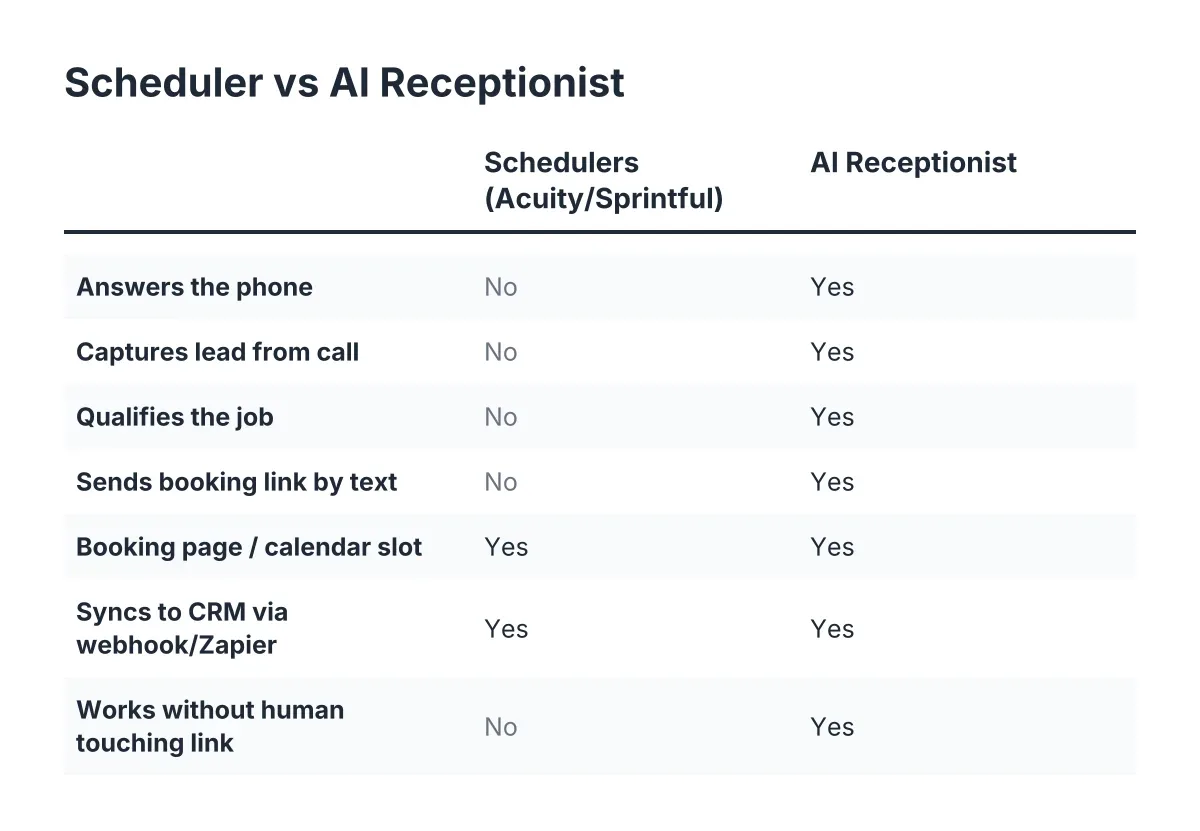
Comparing Online Schedulers, Acuity, Sprintful, and AI Answering Side by Side
Here is the five-step workflow scored across all three options:
- Answers inbound calls 24/7: Acuity, no. Sprintful, no. AI receptionist, yes, including simultaneous surge volume.
- Captures lead details from a phone call: Acuity, no. Sprintful, no. AI receptionist, yes, with structured summaries.
- Qualifies storm and insurance jobs: Acuity, only via web forms. Sprintful, only via web forms. AI receptionist, yes, on the call itself.
- Sends booking links by text: Acuity, reminders only after booking. Sprintful, limited. AI receptionist, yes, during or right after the call.
- Puts the job on your calendar: all three, yes, once the caller reaches the link.
- Bilingual phone handling: Acuity and Sprintful, not applicable. AI receptionist, English and Spanish on every plan.
- 2026 monthly cost: Acuity about $20 to $61. Sprintful about $9 to $49. AI receptionist, more, typically priced against staff costs rather than software costs.
For example, suppose a typical eight-person roofing crew in Georgetown takes 120 calls in the 72 hours after an April hail storm. Say the office lead answers 45 before burning out, voicemail catches 30, and the rest hit busy signals. In that scenario, with an average job near $7,500 and even a modest close rate on the 75 unanswered calls, the missed-call cost runs into six figures. A booking page alone changes none of that math. Answering does.
Can You Automate Appointment Setting End to End?
Yes, appointment setting can run fully automated from first ring to confirmed calendar slot. An AI receptionist answers the call, captures and qualifies the lead, and texts a booking link tied to your live availability. The caller picks a slot, the job syncs to your calendar and CRM, and you receive a scored summary without touching the process.
The pieces you need are an answering layer, a booking link with real-time availability, and a sync into whatever system runs your jobs. Adoption is still early among small operators; an NFIB survey found only 24 percent of small employers currently use AI tools for business activity. That is a market opportunity for the crews that move first, because the homeowner side is already comfortable: Five9 found 84 percent of consumers know companies use AI for customer service.
One caveat worth stating plainly: automation is only as good as your availability rules. Block your calendar honestly, buffer drive time between Leander and Pflugerville, and review the Monday morning report so scoring thresholds match what you consider a high-value claim.
How to Choose Between Acuity, Sprintful, and an AI Receptionist
The right answer depends on where your leads come from and how spiky your demand gets. Use these rules of thumb:
- Choose Acuity if most of your bookings come through your website, your call volume is steady and low, and you want deposits and polished intake forms for $20 to $61 a month.
- Choose Sprintful if you need branded booking pages, per-service routing across crews, and webhook flexibility on a lean budget.
- Choose an AI receptionist if the phone is your primary lead source, missed calls cost you insurance jobs, you serve Spanish-speaking customers, or your demand spikes hard after weather events.
- Combine them if you already like your scheduler. The AI receptionist can answer, qualify, and deliver your existing Acuity or Sprintful link by text, which is how most Austin trades run it in practice.
When you finish comparing online schedulers, the Acuity-versus-Sprintful question turns out to be the smaller decision. Both are competent booking pages. The bigger decision is who answers when the storm rolls through Central Texas and 40 homeowners call in the same afternoon. Pick the booking page you like, then make sure something is standing in front of it that never lets a call go to voicemail. If you want to pressure-test the answering side, call an AI receptionist yourself and try to stump it with a real scenario from your last storm week. You will know within two minutes whether it can handle your callers.
If you're losing revenue to missed calls, NeverMiss ATX can help.
Prefer to talk it through? Call (512) 980-9267 — a quick call is usually the fastest way to get a straight answer for your situation.