Appointment Booking Automation CRM Explained: From Inbound Call to Booked Job
You are 20 feet up a ladder in Cedar Park, hands full of pest control equipment, and your phone buzzes twice in your pocket. Both callers hang up before you touch solid ground. This is the exact problem an appointment booking automation CRM setup solves: the call gets answered, the lead gets qualified, a booking link lands in the caller's text messages, and the confirmed job appears on your calendar and in your CRM before you finish the job you are on. A call to booked job happens automatically—no callback, no phone tag, no human scheduler in the loop.
This guide walks through that workflow step by step, exactly as Austin home service owners run it today. We will cover the tools involved, the booking-link logic, how CRM sync works with Zapier, HubSpot, Salesforce, and Zoho, and where the trade-offs sit compared with hiring staff or signing with a national answering service.
Why Solo Trades Hit a Scheduling Bottleneck
The bottleneck is not laziness or bad systems. It is physics. You cannot hold a torch to a copper fitting and answer a phone at the same time. Ask around the trades and you hear the same story: solo operators in plumbing, electrical, and pest control routinely lose a painful share of their inbound calls because they are on site, on the clock, and physically unable to pick up.
The cost of that gap is bigger than most owners guess. According to a foundational study from MIT Sloan School of Management / InsideSales.com, the odds of successfully contacting a lead drop 100-fold when the callback happens at 30 minutes instead of within 5 minutes. The odds of qualifying that lead drop 21-fold. In emergency trades, the caller with a burst pipe in Round Rock does not wait 30 minutes. They call the next plumber on the list.
Therefore the goal is not "return calls faster." The goal is to remove yourself from the booking step entirely, so a new job can land on your calendar while you are elbow-deep in someone's water heater.
From Inbound Call to Booked Job: The Complete Workflow
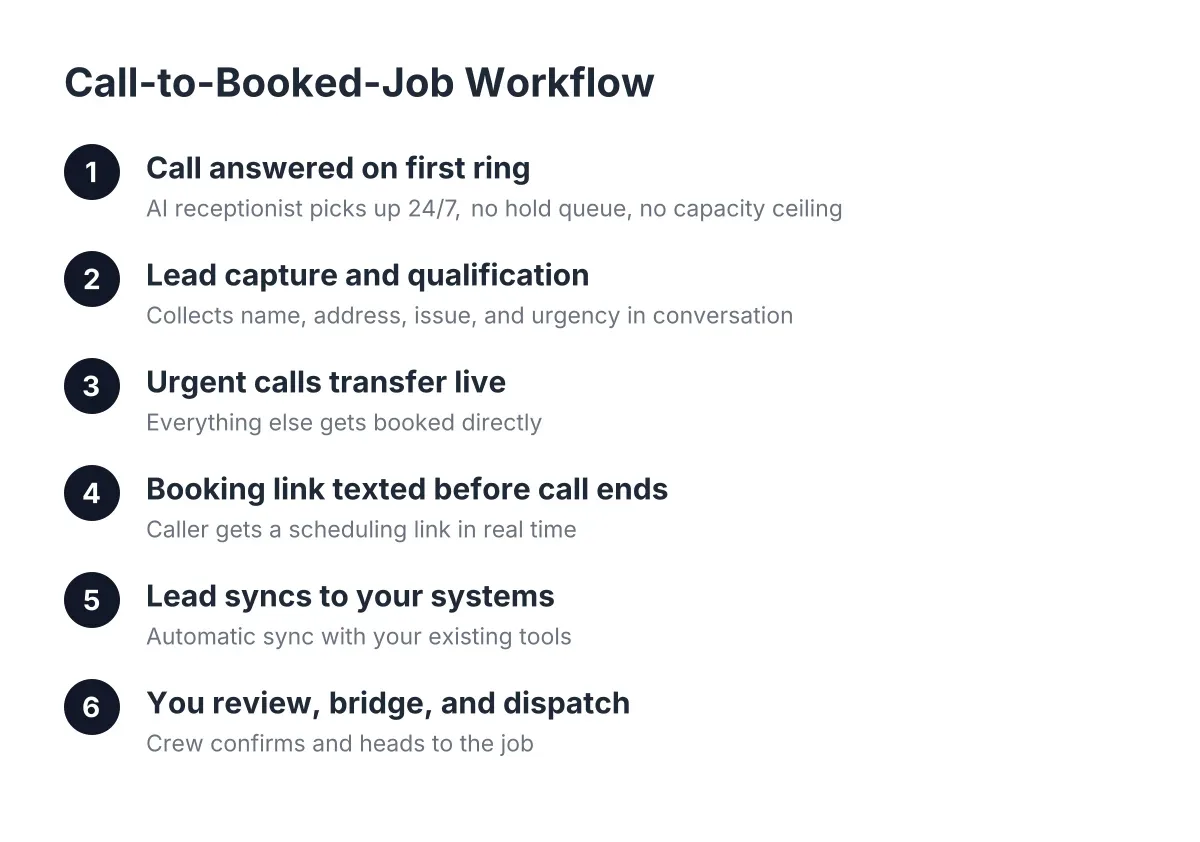
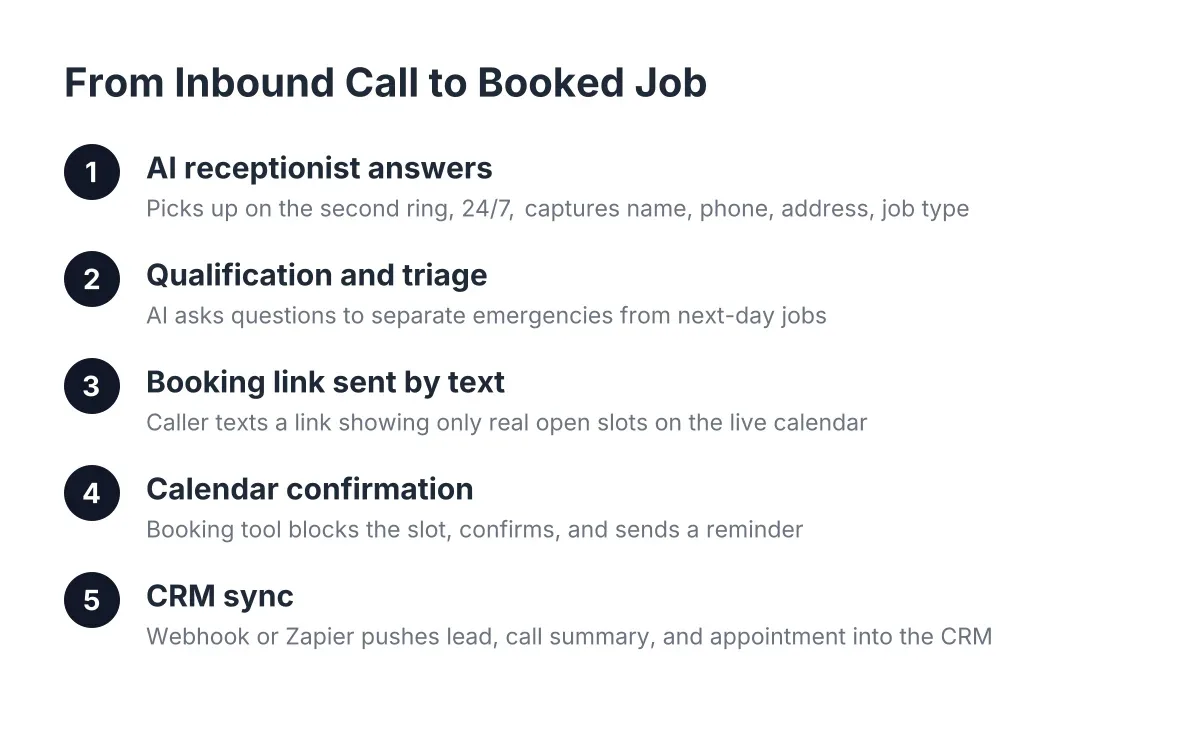
An appointment booking automation CRM workflow is a connected chain of tools that answers an inbound call or web chat, qualifies the lead, sends a booking link by text, confirms the appointment against your live calendar, and writes the whole record into your CRM automatically. The customer books themselves. You see a confirmed slot and a lead record, not a voicemail.
Break that chain into its parts and it looks like this:
- The front door. An AI receptionist answers the phone 24/7, or a website chatbot engages a visitor. This is where lead capture happens: name, phone number, address, and the nature of the job.
- Qualification. The AI asks the questions you would ask. Is this a leaky faucet or water pouring through a ceiling? Residential or commercial? Which part of Central Texas?
- Booking link delivery. For non-emergency work, the AI texts the caller a link to your online appointment booking software. The caller picks a slot that is actually open on your calendar.
- Calendar confirmation. The booking tool blocks the slot, sends the customer a confirmation, and fires a reminder before the appointment.
- CRM sync. A webhook or Zapier connection pushes the lead, the call summary, and the booked appointment into HubSpot, Salesforce, Zoho, or whatever CRM you run. Nothing gets retyped.
Each link in that chain works without you touching it. That is the whole point. The system does not replace the relationship you build on site; it captures the lead and books the job so the relationship can start.
Step by Step: How a Call Becomes a Confirmed Calendar Slot
Here is the full sequence with a realistic scenario. It is 7:40 p.m. on a Tuesday in Pflugerville. You are finishing a panel upgrade. A homeowner named Maria calls about an outlet that sparked when she plugged in a space heater.
Step 1: The AI receptionist answers on the second ring
The call never goes to voicemail. The AI receptionist picks up, greets Maria by your business name, and asks what is going on. Maria prefers Spanish, so the conversation switches to Spanish without a transfer or a hold. Bilingual handling matters in this market; a Central Texas trade that only answers in English is leaving a large share of its service area on the table.
Step 2: Qualification and triage
Next, the AI asks the questions that separate an emergency from a next-day job. Is anything smoking now? Is the breaker tripped? Maria says the outlet is dead and the breaker is off, no smoke. That is urgent but not a right-now emergency, so the AI does not trigger a live transfer to your cell. If Maria had described active sparking, an opt-in live transfer would ring you directly, because some calls should interrupt a job.
This triage step is where owners are rightly cautious about AI. A system that treats every call the same will either interrupt you for a squeaky faucet or, worse, text a booking link to someone with water flooding their kitchen. Any tool you evaluate should let you define what counts as an emergency for your trade, and it should hand genuine emergencies to a human. That is a fair limitation to hold vendors to: AI handles triage rules well, but you set the rules, and edge cases still deserve a human callback.
Step 3: The booking link goes out by text
For Maria's non-emergency repair, the AI texts her a booking link while she is still on the call. The link opens your online appointment booking software showing only the slots you actually have open, because the tool reads your live calendar. Maria picks Thursday at 9 a.m., enters her address, and gets an instant confirmation text.
Sending booking links by text instead of reading times aloud has a practical advantage: no double-booking, no "let me check and call you back," and no phone tag. The caller self-selects into a slot that already fits your day. Reminder texts before the appointment cut no-shows, which matters when a missed slot is a missed service call worth hundreds of dollars.
Step 4: The calendar and CRM update themselves
As a result, three things happen without your involvement. Thursday 9 a.m. blocks off on your calendar. A lead record for Maria, including a call summary and a lead score, lands in your CRM through a webhook or Zapier connection. And when Monday morning rolls around, the call shows up in your weekly report next to every other lead from the week.
You climbed down from the panel upgrade at 8:15 p.m. and found a booked job, not a voicemail. That is the workflow, end to end.
Where CRM Sync Fits, and Why It Beats a Notepad on the Dash
CRM sync in an appointment booking automation setup means every answered call becomes a structured lead record automatically: caller name, phone number, job type, urgency, call summary, and the booked appointment, pushed into HubSpot, Salesforce, Zoho, or through Zapier to hundreds of other tools. Nothing depends on you remembering to write it down.
For a one-person operation, the CRM piece can feel like overkill at first. It is not, for three reasons.
- Recurring customers are where the money is. A pest control customer on a quarterly plan is worth several times a one-off job. A CRM record means you know when Maria's outlet repair anniversary comes around, and you can offer a panel inspection.
- Nothing falls through. Leads captured at 2 a.m. do not live in a voicemail you forgot to check. They sit in a pipeline you can review from your truck, with one-click call bridging to ring the lead back from a dashboard.
- You see patterns. Call intelligence scoring shows which lead sources produce booked jobs and which produce tire-kickers. That shapes where you spend marketing money next quarter.
However, be honest about your starting point. If you currently track jobs in a paper notebook, jumping straight to Salesforce is a mistake. Start with the AI receptionist plus a simple booking tool, let the webhook push leads into a Google Sheet through Zapier, and graduate to a full CRM when the volume justifies it. An appointment booking automation CRM stack should grow with you, not bury you in setup work during your busy season.
Choosing the Pieces: Booking Tools, AI Receptionists, and CRMs Compared
You are assembling three components, and each has real options at different price points. Here is how to evaluate them as a trade owner, not a software reviewer.
The booking layer
Calendly is the name most people know, and the Calendly free tier handles one event type with calendar sync, which covers a solo operator offering a standard service call. TidyCal is a low-cost alternative with a one-time payment model that some owners prefer over a subscription. Both connect to Google Calendar and both generate the shareable links that get texted to callers.
What matters more than the brand is the checklist:
- Does it show only genuinely open slots from your live calendar?
- Can it collect the job address and a service-type question at booking?
- Does it send confirmation and reminder texts automatically?
- Does it fire a webhook or Zapier trigger when a booking lands, so your CRM stays current?
If a tool checks those four boxes, it can serve as the booking layer in your stack. As of 2026, most mainstream online appointment booking software checks all four.
The answering layer
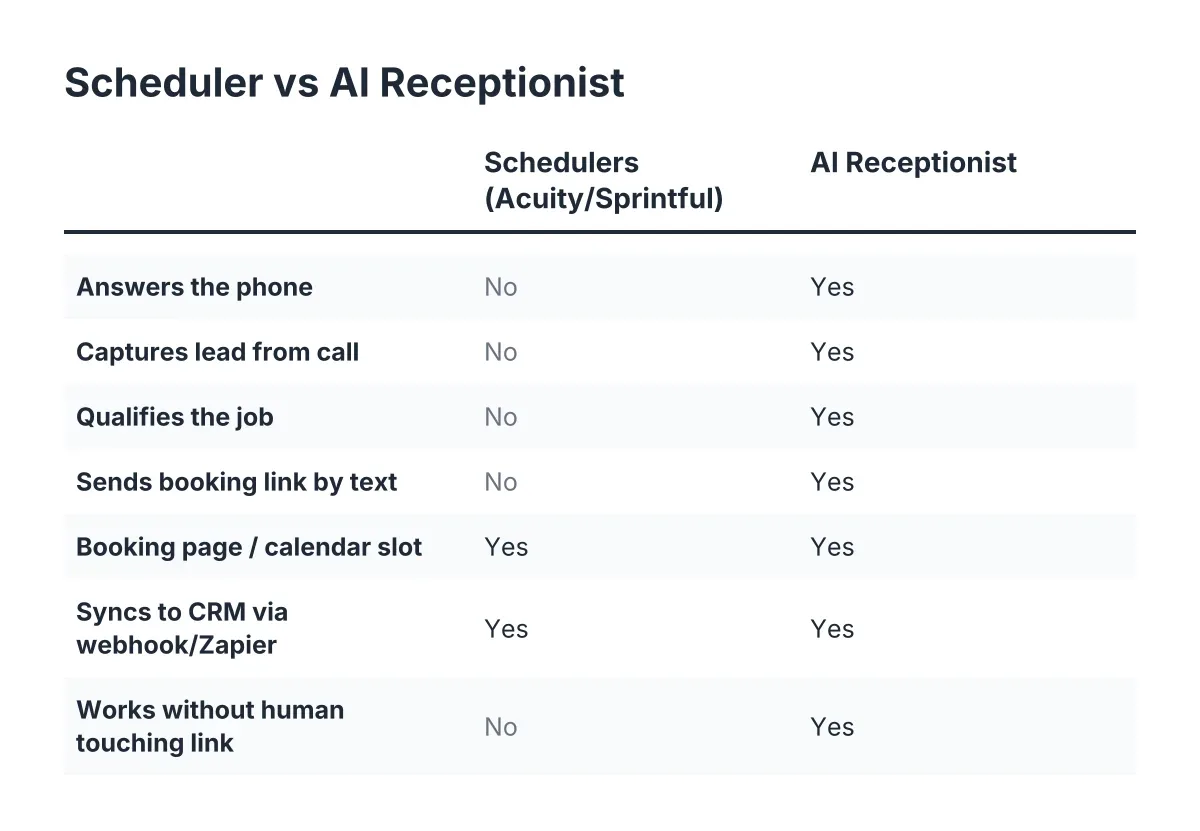
This is the piece that separates a real workflow from a pretty calendar link nobody ever receives. A booking page only works if someone delivers it to the caller, and many of your callers are ringing while you are on a ladder. Your options: hire staff, contract a national answering service, or use an AI receptionist.
At the median receptionist wage of $17.90 an hour reported by the U.S. Bureau of Labor Statistics, a 25-hour-a-week office hire works out to roughly $2,000 a month before taxes, and it covers business hours only. National answering services cost less but read from generic scripts; they do not know that Georgetown and Leander are 40 minutes apart in traffic, and after-hours coverage usually costs extra. An AI receptionist built for this market answers 24/7 in English and Spanish for a fraction of a part-time salary, and it never calls in sick during a July heat wave when your call volume triples.
Skepticism about AI call quality is reasonable, and the honest answer is to test it. Call the system yourself and try to stump it with the questions your customers actually ask. A vendor confident in its AI will invite that test; a vendor that will not let you call the AI before signing is telling you something.
Worth noting: fear that automation means cutting people does not match the data. According to the National Federation of Independent Business, 98 percent of small employers using AI reported no change in employee headcount. For a solo operator, there is no headcount to change anyway; the AI answers calls you were never going to answer from a crawl space.
The CRM layer
For solo trades, the practical progression looks like this. Start with Zapier pushing leads into a spreadsheet or a lightweight CRM. Move to HubSpot's free tier when you want pipelines and follow-up reminders. Consider Zoho or Salesforce when you have a small crew and an office manager who lives in the CRM daily. The webhook from your AI receptionist does not care which one you pick; it pushes the same structured lead data either way.
What to Watch Out for Before You Automate
Automation done carelessly creates new problems. Three cautions from watching Central Texas trades set this up.
First, do not automate emergency booking. A flooded kitchen in Georgetown at 2 a.m. should trigger a live transfer to a human, not a link to book Thursday at 9. Keep the emergency path human and make the AI's triage rules match your trade. Some jobs also require an on-site look before you can quote or book a time window honestly, and no booking link substitutes for a professional assessment of a slab leak or an aging electrical panel.
Second, guard your calendar buffers. If your booking tool lets customers stack appointments back to back across Austin, you will spend your margin sitting on I-35. Set travel buffers and service-area rules inside the tool before you publish the link.
Third, remember that plenty of customers still want to talk. A Five9/TEAM LEWIS survey found 75 percent of consumers prefer talking to a real human for support, and 84 percent know companies use AI for customer service, per the same Five9 research. The lesson is not to avoid automation; it is to make the automated conversation feel like a conversation, keep the human transfer path open, and show up in person as the same friendly tradesperson the AI promised. The AI books the job. You keep the relationship.
There is also a competitive read here. An NFIB survey found only 24 percent of small employers currently use AI tools for business activity. In practical terms, most of the trades you compete with in Cedar Park and Round Rock still send after-hours callers to voicemail. Answering while they do not is a durable advantage, at least until they catch up.
Putting It Together: A Realistic First 30 Days
Here is a sane rollout for a solo operator who wants results without a month of configuration.
- Week 1: Connect your Google Calendar to a booking tool, whether that is the Calendly free plan, TidyCal, or the booking system bundled with your AI receptionist. Set service types, travel buffers, and your real working hours.
- Week 2: Turn on the AI receptionist for after-hours calls only. Review every call summary that week. Adjust the qualification questions and emergency triage rules until they sound like you.
- Week 3: Extend coverage to business hours, since the calls you miss at 2 p.m. from under a sink cost the same as the ones at 2 a.m. Enable live transfer for the emergencies you define.
- Week 4: Wire the CRM sync. Start with a Zapier connection into a sheet or your existing CRM, confirm every booked job creates a record, and check your first full Monday morning report against your calendar.
By day 30 you have a working appointment booking automation pipeline: calls answered around the clock in English and Spanish, non-emergencies booked straight to your calendar, emergencies transferred live, and every lead recorded where you can see it.
The scheduling bottleneck was never a discipline problem. It was a two-hands problem. The workflow above gives you a second set of hands that answers, qualifies, books, and logs, so the only thing left for you to do is the work you actually get paid for.
If you're losing revenue to missed calls, NeverMiss ATX can help.
Prefer to talk it through? Call (512) 980-9267 — a quick call is usually the fastest way to get a straight answer for your situation.