Step by Step Setting Up Bilingual Appointment Booking for Spanish-Speaking Customers
A burst pipe does not care what language the homeowner speaks. When a Spanish-speaking customer in Pflugerville calls at 11pm about flooding and hits an English-only voicemail, they hang up and dial the next number on Google. This guide walks through step-by-step bilingual appointment booking Spanish, so that call gets answered, qualified, and booked on your calendar while you are still on site finishing the last job. No human scheduler in the loop, no phone tag the next morning.
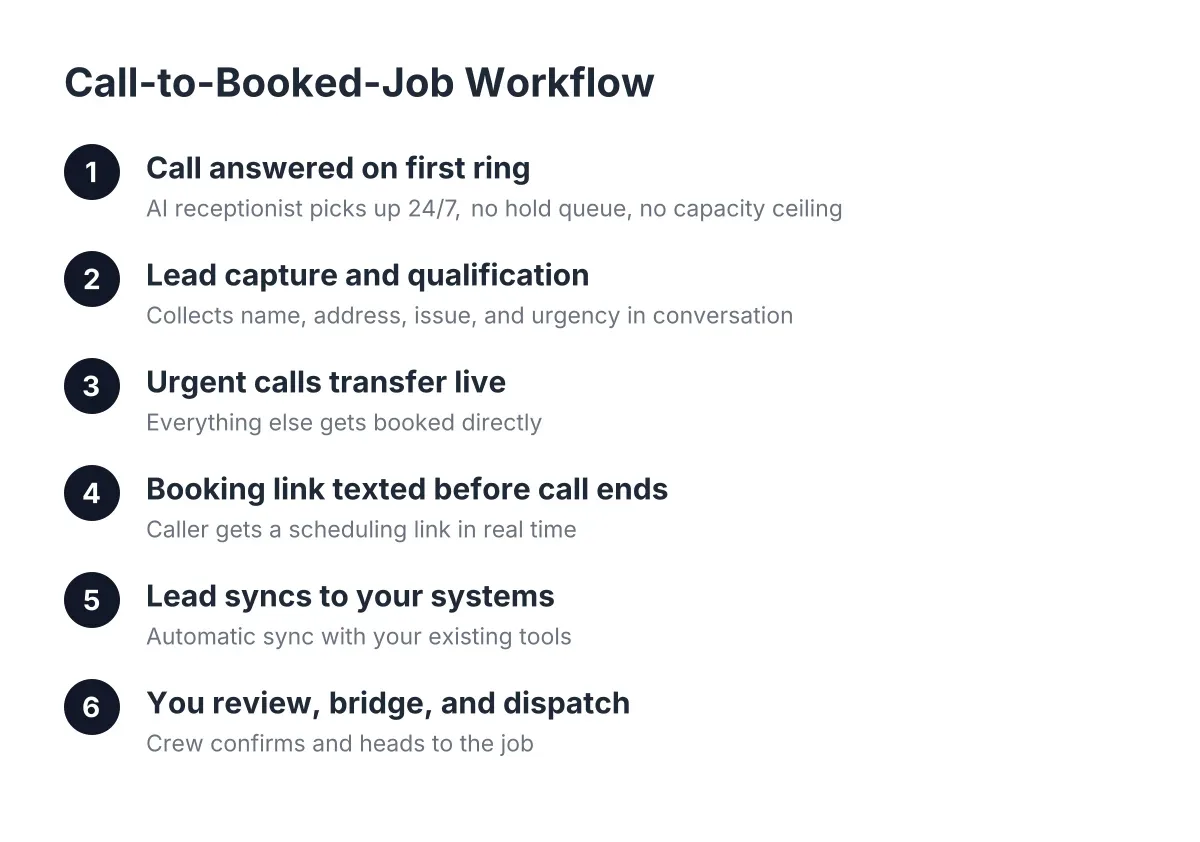
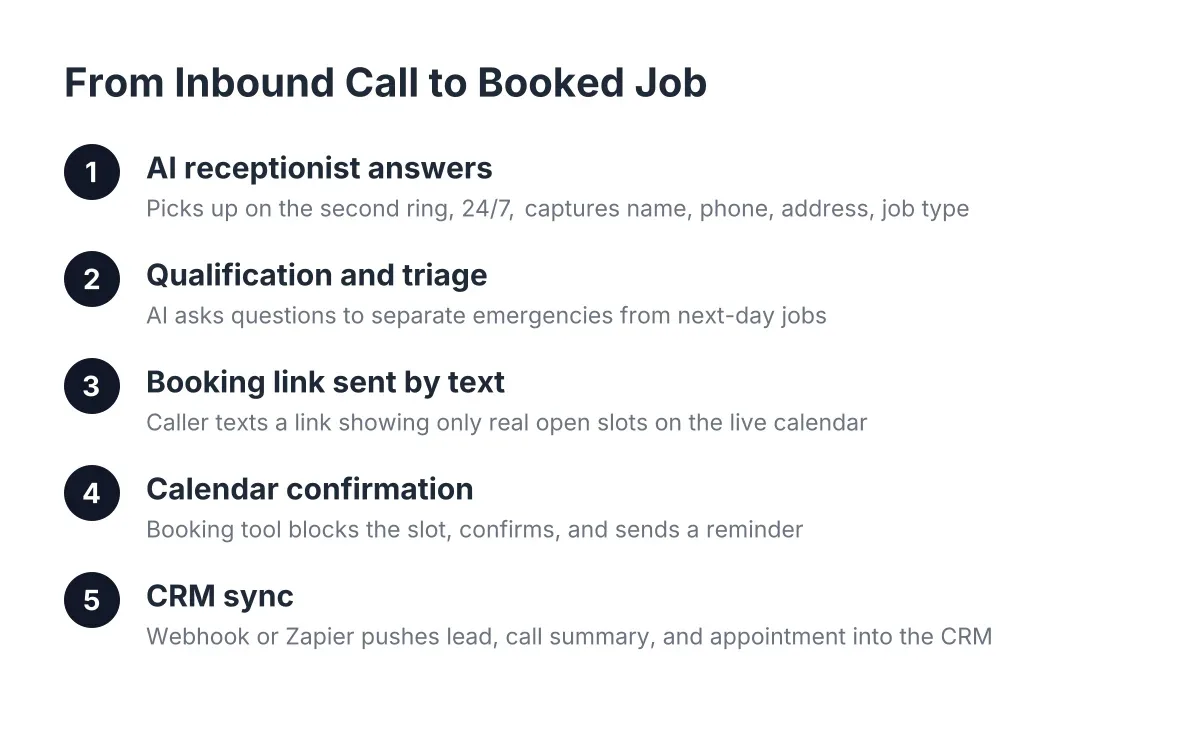
The workflow below is the exact booking-link path Austin home service owners use today: inbound call, AI receptionist answers in the caller's language, lead capture and qualification happen in that language, and a booking link lands on the caller's phone by text. The whole thing takes minutes, and it works the same at 2pm or 2am.
Why Bilingual Appointment Booking Spanish Matters in Central Texas
The math is simple. About 28.5% of Texans, nearly 7.8 million people, speak Spanish at home according to the U.S. Census Bureau (via KXAN). Closer to home, 29.6% of Austin residents age 5 and older are bilingual, and 10.3% speak English less than "very well," based on City of Austin (U.S. Census Bureau ACS data).
For an emergency trade, that is not a demographic footnote. That is roughly one in ten callers who may abandon the call if they cannot explain a no-cool situation or a flooding bathroom in Spanish. Emergency callers already bail faster than routine callers; a language barrier just speeds up the hang-up.
Speed matters just as much as language. A foundational study from MIT Sloan School of Management / InsideSales.com found the odds of contacting a lead drop 100-fold, and the odds of qualifying that lead drop 21-fold, when the callback happens at 30 minutes instead of within 5 minutes. A panicked caller with water on the floor will not wait 30 minutes. Bilingual answering on the first ring is how you win that job instead of the competitor down the road.
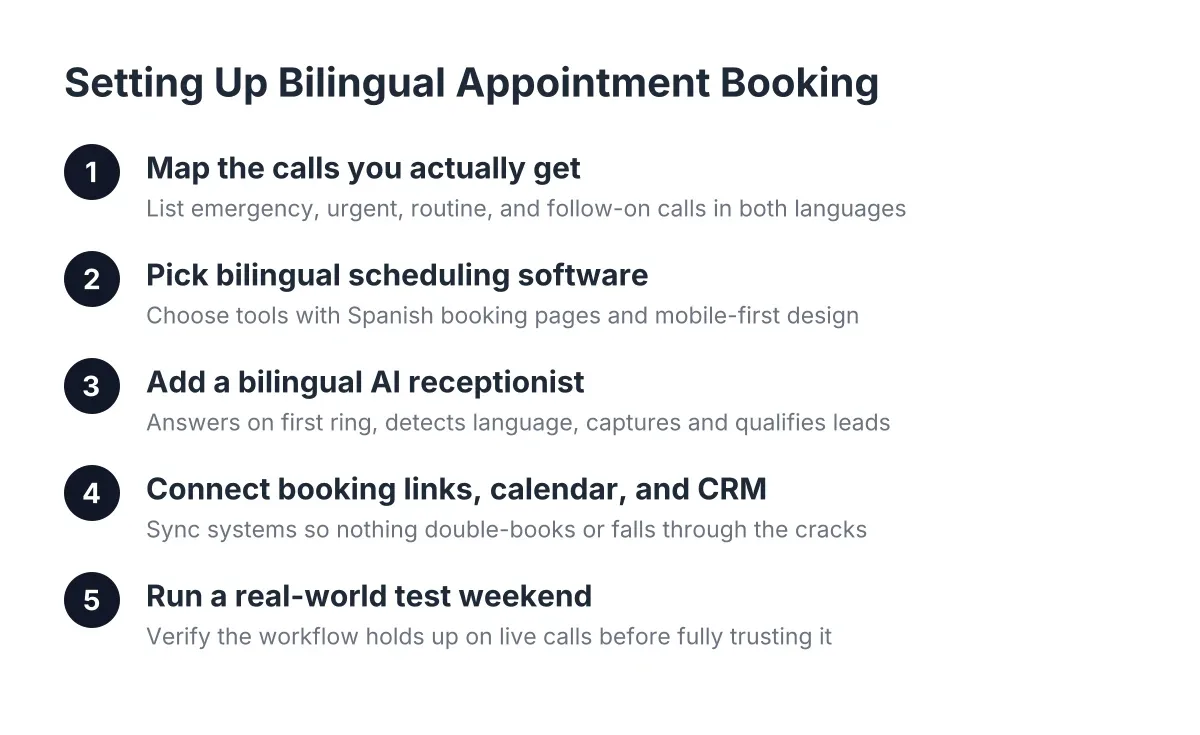
Step 1: Map the Calls You Actually Get
Before touching any software, write down the call types your business handles. For a multi-trade or general construction outfit in Austin, Round Rock, or Georgetown, that list usually looks like this:
- True emergencies: burst pipes, electrical hazards, active water damage, no-cool in a 95° August
- Urgent but bookable: leaking water heater, tripped breaker that keeps tripping, pest activity spotted tonight
- Routine work: remodel quotes, handyman punch lists, repair estimates
- Follow-on work: water damage restoration after the emergency, the recurring customer calling back
For each type, decide the outcome you want. Emergencies might warrant a live transfer to your cell. Urgent-but-bookable calls get a same-day or next-morning slot. Routine calls get a booking link by text. Write these rules in plain English first; you will translate them into system logic in Step 4.
Do the mapping in both languages
Here is where most owners skip a beat. "No hay agua caliente" and "se reventó una tubería" describe different urgency levels, and your setup needs to recognize both. A good AI receptionist handles this natively, but you still need to confirm your emergency keywords and service names are covered in Spanish, not just translated word for word. Ask a Spanish-speaking crew member or customer how they would actually describe the problem on the phone.
Step 2: Pick Scheduling Software That Speaks Both Languages
Choose scheduling software for small business use that supports Spanish-language booking pages, works on a phone screen, and connects to the tools that answer your calls. Acuity Scheduling, for example, lets you customize confirmation text and offers scheduling pages a Spanish-speaking customer can complete without guessing. Most online appointment scheduling software in this class runs $15 to $50 per month as of 2026.
Whatever tool you pick, check three things:
- Mobile-first booking pages. Your caller is standing in a wet hallway holding a phone, not sitting at a desktop.
- Language support on the confirmation. If the booking page is in Spanish but the confirmation email arrives in English, you have created confusion at the worst possible moment.
- Calendar sync that respects your real availability. The system should see the jobs already on your calendar so it never double-books you while you are on a ladder in Cedar Park.
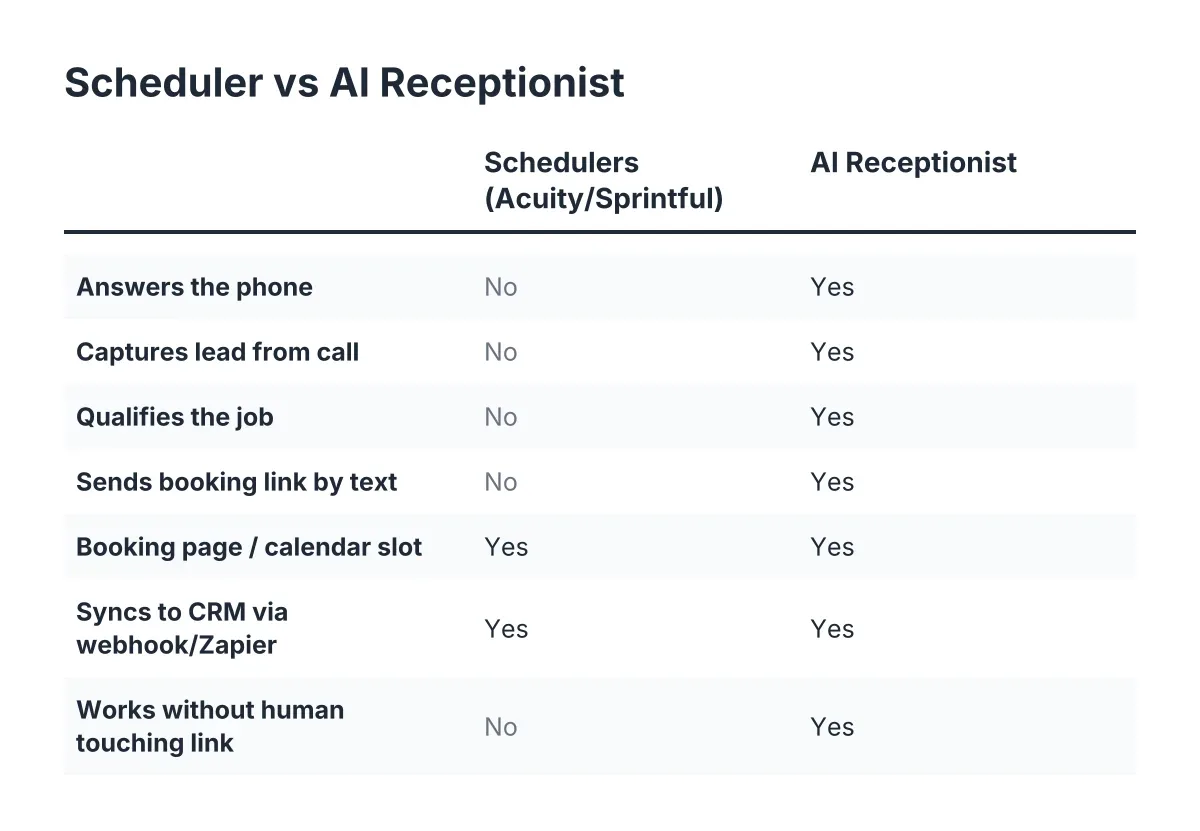
There is a trade-off worth naming. Standalone booking tools are cheap and simple, but on their own they only help people who find your booking page. They do nothing for the 11pm phone call, which is where emergency work actually comes from. That is why the phone layer in Step 3 matters more than the calendar tool itself.
Step 3: Put a Bilingual Appointment Booking Spanish AI Receptionist in Front of the Phone
An AI receptionist answers every inbound call on the first ring, detects whether the caller is speaking English or Spanish, and carries the whole conversation in that language. It captures the name, address, and problem description, qualifies the urgency, and either books the job or transfers it live, all without you touching the phone.
This is the piece that separates a real booking workflow from a fancy voicemail. Here is the sequence on a live call:
- The call rings once and the AI receptionist answers, in English or Spanish based on how the caller speaks.
- It captures the essentials: name, service address, callback number, and what is happening.
- It qualifies urgency against the rules you wrote in Step 1. "Water is actively coming through the ceiling" routes differently than "the faucet drips."
- For bookable jobs, it texts the caller a booking link on the spot. The caller picks a slot while still on the phone or right after hanging up.
- For true emergencies, it triggers a live transfer to your cell, with the address and problem already captured so you are not asking the panicked caller to repeat everything.
Consumers are not spooked by this anymore. According to Five9, 84% of consumers are aware that some companies use AI to handle customer service interactions. What they care about is getting help fast, in their own language. Meanwhile, an NFIB survey found only 24% of small employers currently use AI tools for business activity, which means most of your competitors in Central Texas still send after-hours callers to voicemail.
Test it in Spanish before you trust it
Do not take bilingual capability on faith. Call your own number and run a Spanish-language emergency script: "Tengo una fuga de agua en el baño, es urgente." Confirm the AI receptionist responds in Spanish, captures the address correctly, and applies your emergency rules. Then have someone switch languages mid-call, because real callers do that. If the system stumbles, fix the setup before a real customer finds the gap. The best providers invite you to try to stump the AI; take them up on it.
Step 4: Connect Booking Links, Calendar, and CRM
Now wire the pieces together so a booked job flows to your calendar and your records without manual entry. This is the appointment booking automation layer, and it is what removes you as the bottleneck.
The connections you need:
- Booking link delivery by text. The AI receptionist or website chatbot sends your scheduling link the moment a lead qualifies. Texted links get acted on while urgency is high; emailed links wait until morning.
- Calendar sync. Booked slots appear on the calendar you already use, blocked against your real availability.
- Webhooks or CRM sync. Push every lead into Zapier, HubSpot, Salesforce, or Zoho so nothing lives only in a call log. For a solo operator, even a simple spreadsheet fed by a webhook beats a sticky note on the truck dash.
- Call summaries. Each call should produce a summary with a score, so you can skim ten overnight calls in two minutes over coffee instead of listening to recordings.
One honest limitation: no automated system should diagnose gas leaks, electrical fires, or anything life-threatening. Configure your setup to tell those callers to contact 911 or the utility emergency line first, then capture the lead for follow-up work. Triage logic supports your judgment; it does not replace it.
Step 5: Run a Real-World Test Weekend
Before you rely on the system, test it under real conditions. Pick a weekend, leave your phone in the truck, and have three people call: one in English with a routine quote request, one in Spanish with an urgent scenario, and one who starts in English and switches to Spanish.
Check the results against a short list:
- Did every call get answered on the first ring, with no voicemail fallback?
- Did the Spanish caller get the full conversation in Spanish, including the booking link and confirmation?
- Did the urgent call trigger your live transfer rule?
- Did all three leads land in your CRM or dashboard with accurate addresses?
- Did booked jobs show up on your calendar without conflicts?
Here is the scenario this whole setup exists for. It is a Friday in July, 95° out, and you are on site in Leander finishing a bathroom remodel. At 9:40pm, a Spanish-speaking homeowner in Round Rock calls about a water heater leaking onto the garage floor. The AI receptionist answers on the first ring, calms the caller in Spanish, captures the address, flags it as urgent-but-bookable, and texts a booking link. By 9:44pm the job is booked for 7am Saturday. That is a $1,200 to $1,800 water heater replacement, plus a shot at the follow-on water damage work, captured while you never touched your phone.
Step-by-Step Bilingual Appointment Booking Spanish: Common Mistakes to Avoid
The setup steps above fail in predictable ways when owners rush them. Watch for these:
- Translating the greeting but not the workflow. A Spanish "hola" followed by English qualification questions loses the caller at question two. The entire path, from answer to confirmation text, has to run in the caller's language.
- Sending booking links by email instead of text. Emergency and urgent callers act in the next five minutes or not at all.
- Skipping the urgency rules. If every call gets the same treatment, panicked callers with real emergencies get a booking link when they needed a live transfer. Map the triage rules first.
- Choosing a national call center script over local knowledge. A caller in Georgetown describing a slab leak during a freeze needs a system configured for Central Texas realities, not a generic script written for everywhere and nowhere.
- Setting it and never testing it. Run the Spanish emergency test quarterly, and again after any change to your services or hours.
The full setup, done carefully, takes an afternoon. Steps 1 and 2 are an hour of writing and a software signup. Step 3 is a configuration conversation about your services, service area, and triage rules. Steps 4 and 5 are wiring and testing. After that, the workflow runs 24/7, in both languages, whether you are on the job, asleep, or knee-deep in someone else's crawl space. The next time a panicked caller dials at 11pm, in English or Spanish, the phone gets answered, the job gets booked, and you find it on your calendar in the morning.
If you're losing revenue to missed calls, NeverMiss ATX can help.
Prefer to talk it through? Call (512) 980-9267 — a quick call is usually the fastest way to get a straight answer for your situation.