Cost Appointment Booking Automation: 8 Ways to Get Every Dollar’s Worth in 2026
You already made the call. You signed up for appointment booking automation because you were tired of playing phone tag from a crawl space, and you wanted new jobs landing on the calendar while you were on site. Now the question is different: how do you measure the cost appointment booking automation ROI and make sure the investment carries actually pays for itself, every single month? This article walks through eight practical moves that turn a monthly subscription into booked jobs, from the exact call-to-calendar workflow Austin home service owners run today to the setup details that decide whether you capture the 11pm burst-pipe call or lose it to the next plumber in the search results.
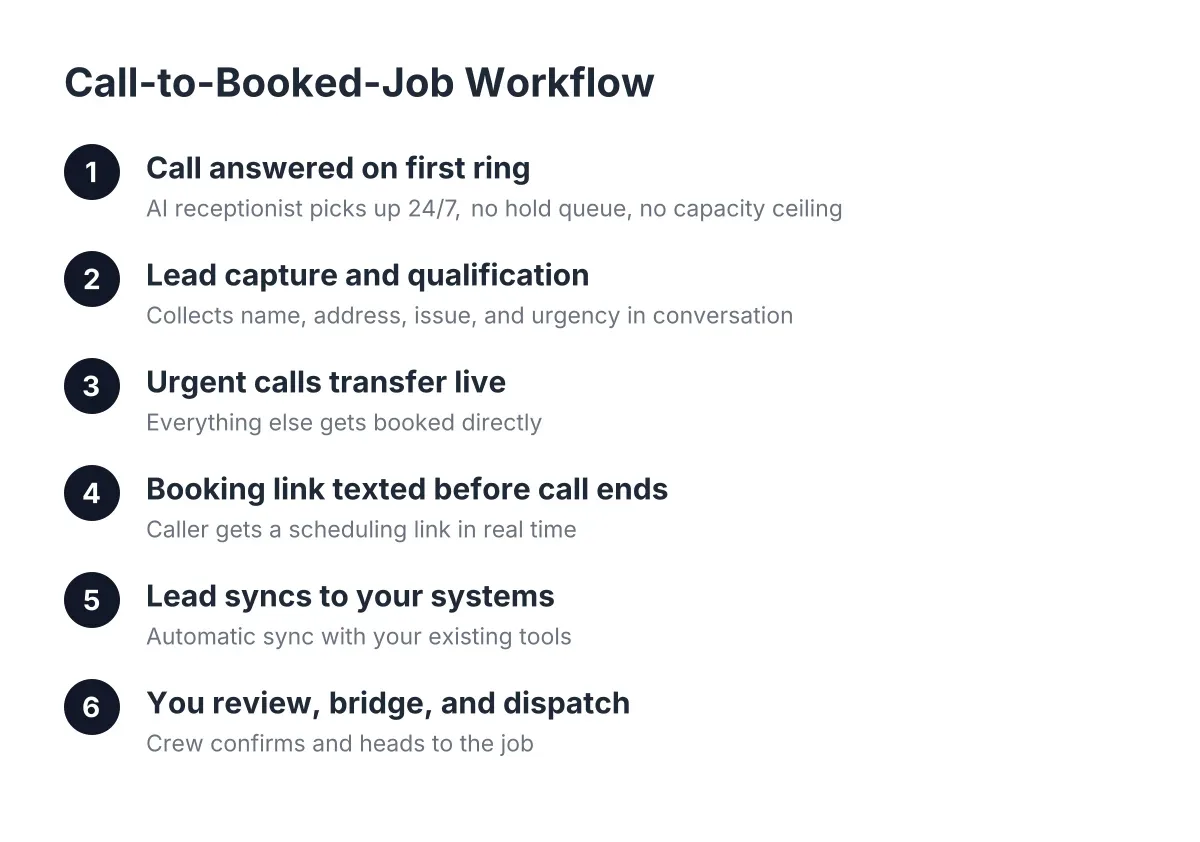
Here is the workflow we are optimizing, start to finish, with no human scheduler in the loop:
- A customer calls or lands on your website. The AI receptionist answers on the first ring, 24/7, in English or Spanish.
- The AI captures the lead: name, address, phone, and the problem. It qualifies urgency, whether that is a no-cool AC in August or a routine quarterly pest treatment.
- For urgent calls, it triggers a live transfer to you if you have opted in. For everything else, it texts the caller your booking link on the spot.
- The customer picks a slot on your real calendar. The job is booked before you have set down your wrench.
- You get a summary, a lead score, and a synced CRM record. Monday morning, a report shows you every call, every booking, and every dollar the system touched.
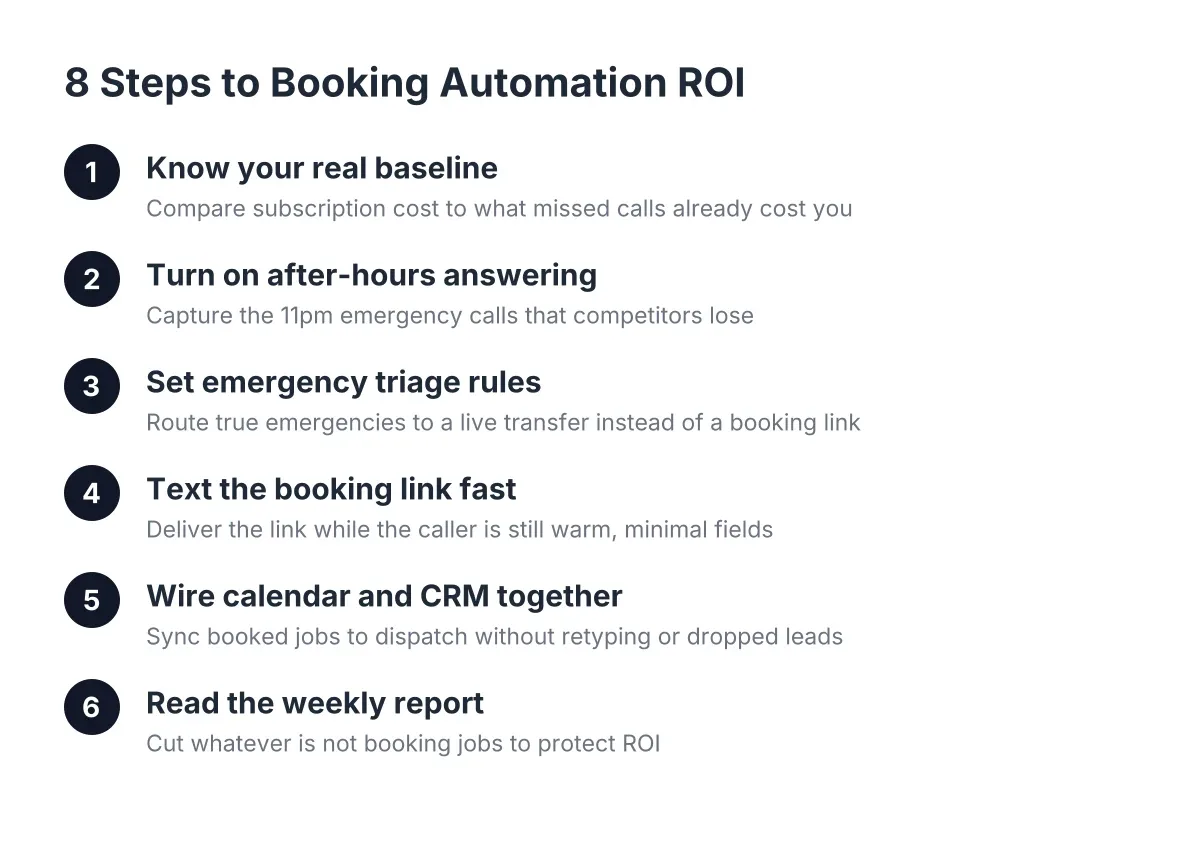
Each item below is one lever that makes that workflow cheaper per booked job. Work through them in order.
1. Know Your Real Baseline Before You Judge the Cost Appointment Booking Automation ROI
The honest comparison is not "subscription versus free." It is "subscription versus what missed calls and manual scheduling were already costing you." For reference, the median receptionist wage in the U.S. was $17.90 per hour, about $37,230 per year before benefits, according to the U.S. Bureau of Labor Statistics. Most booking automation for a solo or small crew operation runs a fraction of that annually.
Therefore, do the math on your own numbers. If your average emergency plumbing job is $650 and your average recurring pest contract is worth $1,200 over its lifetime, one saved after-hours call per month can cover the whole subscription. Write that break-even number down; every tip below exists to push you past it.
2. Turn On After-Hours Answering First, Because That Is Where the Money Hides
If you only configure one thing this week, make it 24/7 answering. Emergency callers abandon faster than routine callers; a homeowner watching water spread across their kitchen floor at 11pm does not leave a voicemail, they call the next result on Google. Speed is not a nice-to-have here. A foundational study from MIT Sloan School of Management and InsideSales.com found the odds of contacting a lead drop 100-fold when response slips from 5 minutes to 30 minutes, and the odds of qualifying that lead drop 21-fold.
An AI receptionist answers on the first ring at 2am, which means your response time is zero minutes. In addition, the follow-on work matters: the plumber who answers the burst-pipe call is usually the one who gets the water damage referral and the repipe quote. That downstream revenue never shows up on the subscription invoice, but it belongs in your cost appointment booking automation ROI calculation.
3. Set Up Your Emergency Triage Rules So Urgent Calls Reach You Live
Booking links are perfect for routine work. They are the wrong tool for a panicked caller with sparks coming out of an outlet. Configure your urgency rules so the AI recognizes true emergencies, flooding, no-cool in a heat wave, electrical hazards, and triggers a live transfer straight to your cell instead of sending a link.
Be specific when you define what counts as urgent. "Water leak" is ambiguous; "active flooding" or "water you cannot shut off" is not. The AI captures the address and the situation before the transfer, so you pick up already knowing where you are headed. That calm, informed handoff is what wins the emergency contract over a competitor whose phone rang out.
4. Deliver the Booking Link by Text While the Caller Is Still Warm
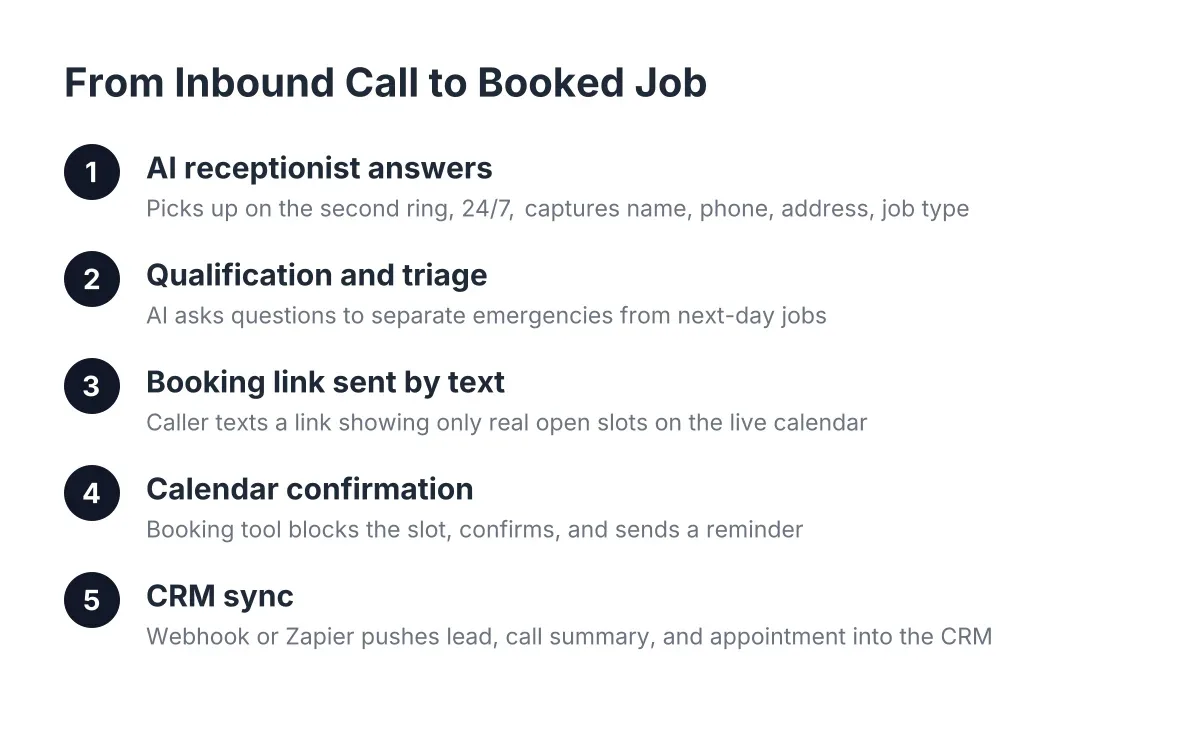
For non-urgent jobs, the booking link should hit the caller's phone before the call ends. This is the core of automatic appointment booking for contractors: the customer taps the link, sees your real availability, and picks a slot. No callback, no phone tag, no "let me check my calendar and get back to you."
Keep the link simple. One click to a calendar, three or fewer questions, done. Every extra field costs you a percentage of completions. If your online appointment scheduling app asks for a serial number or a gate code before booking, move those questions to the confirmation text instead.
5. Wire Your Calendar and CRM So Booked Jobs Flow Without Retyping
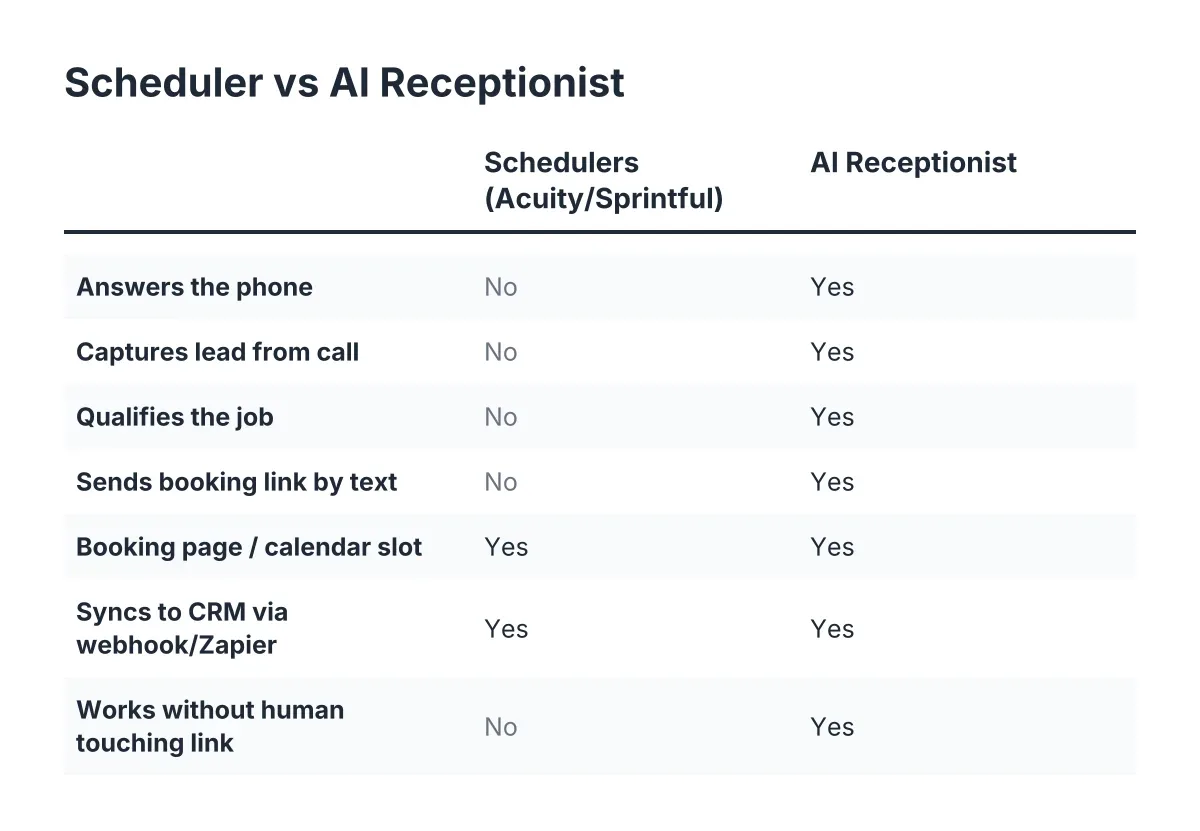
An appointment that gets booked but never reaches your dispatch board is worse than a missed call; now you have an angry customer who did everything right. Connect your appointment scheduling software to your calendar and push every lead through webhooks or a CRM sync, whether that is Zapier, HubSpot, Salesforce, or Zoho.
For a small crew, the setup checklist looks like this:
- Sync the booking calendar with the calendar your techs actually check on their phones.
- Block out drive-time buffers between slots so a Georgetown job does not butt against a South Austin job.
- Map lead fields (name, address, urgency, service type) to your CRM so nobody retypes anything.
- Test it by booking a fake job yourself and watching it land end to end.
However, note the trade-off: the tighter the integration, the more a calendar mistake propagates automatically. Audit your availability settings monthly, especially before a seasonal rush.
6. Enable Bilingual Answering, Because Central Texas Calls in Two Languages
A meaningful share of Central Texas homeowners prefer to describe a plumbing emergency or ask about a lawn care schedule in Spanish. If your booking automation only answers in English, you are paying full price for a system that captures part of your market. Make sure Spanish answering is live on your line from day one, not as an upsell you activate later.
This is also a trust signal. Consumers already expect automation; a Five9 survey found 84% of consumers are aware that some companies use AI to handle customer service interactions. What they do not expect is being understood in their own language at 10pm. That is the difference between a captured lead and a hang-up.
7. Tag Recurring Intent So One Call Becomes a Customer for Years
For lawn care, HVAC maintenance, and quarterly pest control, the first booked appointment is a lifetime-value multiplier, not a one-time ticket. Configure your qualification logic to ask whether the caller wants one-time service or a recurring plan, and tag that answer in the lead record.
For example, a Round Rock lawn care owner running spring booking season can route "recurring weekly mow" leads to a maintenance calendar and one-time cleanups to overflow slots. That single tag changes how you price, schedule, and follow up. A $60 mow is a $60 job; a recurring customer at $60 a week is $3,000 a year. Your automation should know the difference before you do.
8. Read Your Weekly Report and Cut What Is Not Booking Jobs
Automation is not set-and-forget; it is set-and-check. A weekly Monday morning report should tell you calls answered, leads captured, appointments booked, and which calls scored high but did not convert. Fifteen minutes with that report each week tells you whether your booking link questions are too long, your emergency rules are too loose, or your Saturday slots are going unfilled.
You are in good company treating this as an active tool. An NFIB survey found only 24% of small employers currently use AI tools for business activity, so most of your competitors are still letting calls hit voicemail. The same NFIB research found 98% of small employers using AI reported no change in employee headcount; this is about answering calls you were already missing, not cutting anyone.
Cost Appointment Booking Automation ROI: What the Investment Requires Compared to Doing Nothing
The cost appointment booking automation ROI for a typical Austin home service business is based on a monthly subscription, usually in the range of a couple of service calls. Doing nothing costs missed after-hours calls, phone tag during peak season, and emergency jobs that go to whoever answered first. For an emergency trade or a seasonal business, the second number is almost always larger.
Run your own version of the comparison this month. Count the calls answered after 6pm, the jobs booked without you touching the phone, and the recurring plans tagged at intake. If those numbers do not clear your break-even from tip one, revisit tips three through five; the fix is usually in triage rules or booking-link friction, not in the tool itself. One caveat: if your operation already runs a full-time receptionist or a large multi-location dispatch desk, the math changes, and it is worth talking through your call volume with someone before restructuring how scheduling works.
Get these eight pieces dialed in and the workflow does exactly what you bought it for. The phone rings, the AI answers, the link goes out, and the job lands on your calendar while you are still on a ladder in the 95° heat, hands full, business growing anyway.
If you're losing revenue to missed calls, NeverMiss ATX can help.
Prefer to talk it through? Call (512) 980-9267 — a quick call is usually the fastest way to get a straight answer for your situation.