How Much Does a Virtual Receptionist Cost in Austin?
If you run a home service business in Central Texas, virtual receptionist cost in Austin comes down to three things: how many calls you need answered, what you need done with each call, and whether you pay for software or for human minutes. An AI receptionist prices differently than a national call center, and both price differently than hiring front-desk staff. Nobody can quote you a real number without knowing your call volume and what happens after the phone rings. By the end of this guide, you will know exactly which factors move the price and how to get an accurate quote for your business.
What Drives Virtual Receptionist Cost in Austin
Five factors do most of the work in any quote you get. Here is each one, which way it pushes the price, and how to figure out where you land.
Call volume: how many calls you need answered
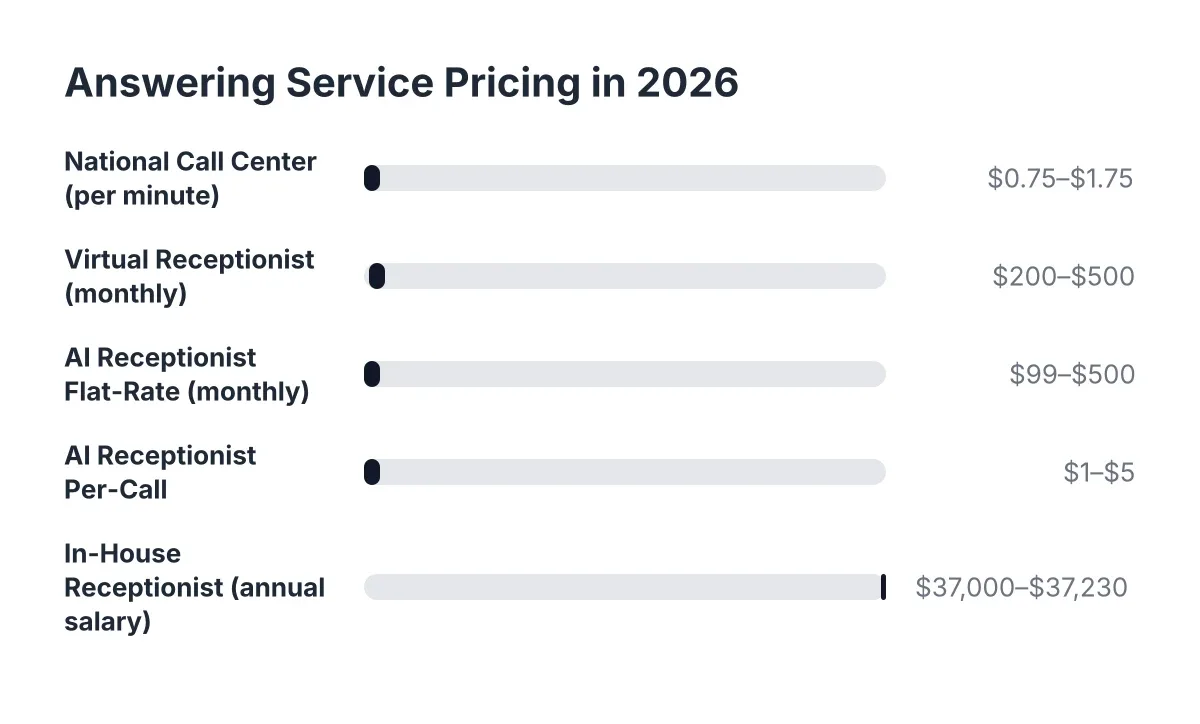
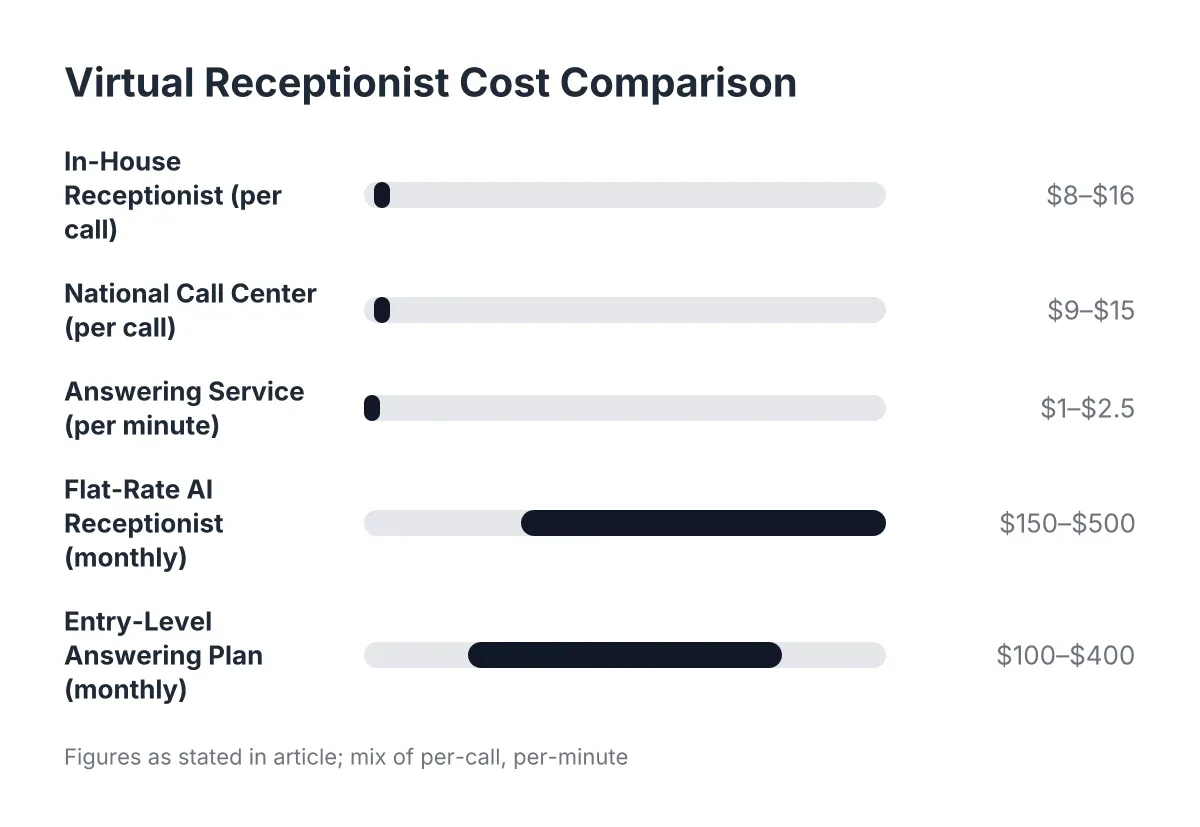
Traditional answering services bill by the minute or by the call. A plumber getting 15 calls a day pays a lot more than a landscaper getting 4. An AI receptionist flips this: software handles one call or fifty at the same time, so plans usually price by tier instead of by the minute. Check your phone bill or call log for the last 30 days. If your volume spikes during Austin's summer AC season or after a February freeze, per-minute pricing punishes you exactly when you are busiest.
What happens on the call: answering versus booking
A service that only takes messages costs less than one that qualifies the lead, answers questions about your services, and gets the appointment booked. But a message still needs you to call back, usually while you are on site with your hands full. Ask yourself what you actually need. If a missed call means a lost job, message-taking is the cheap option that costs you the most. Lead capture, qualification, and booking push the sticker price up and the real cost down.
Human minutes versus software
This is the biggest fork in virtual receptionist pricing. National call centers pay people to sit by phones, so you pay for their time, their training, and their overhead, whether they answer your calls or not. AI receptionist plans price like software: a flat monthly rate that does not climb because a heat wave tripled your call volume. If your calls are unpredictable, or heavy after-hours, the software model usually wins on cost. If you need long, complex conversations a script cannot cover, human minutes may earn their premium.
Hours of coverage: business hours versus 24/7
With a human service, nights, weekends, and holidays cost extra because someone has to staff them. That matters in the trades, where a burst pipe does not check your office hours first. An AI receptionist answers at 2 a.m. for the same price it answers at 2 p.m., because software does not sleep or bill overtime. If most of your valuable calls come after-hours, this single factor can flip which option is cheaper for you.
Extras: bilingual answering, integrations, and call intelligence
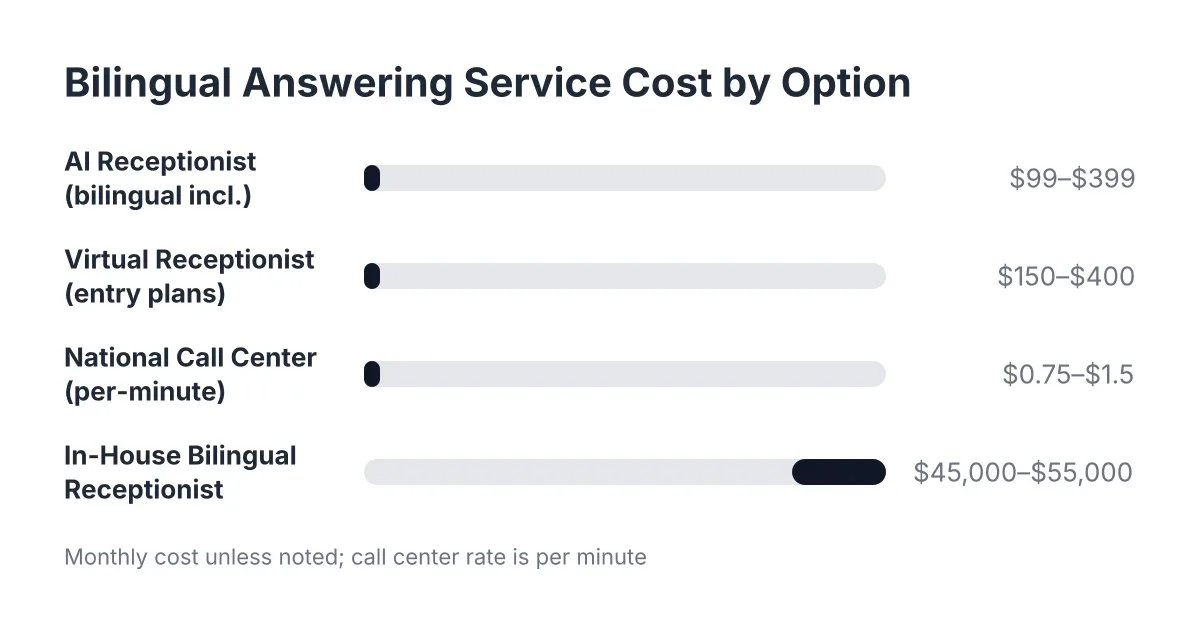
Add-ons are where quotes get padded. National services often charge extra for Spanish-language answering, CRM integration, or call summaries. Some AI plans bundle them. Bilingual support matters in Central Texas; a Spanish-speaking caller who hits an English-only line is a missed call by another name. Before you compare quotes, list what you need: bilingual answering, syncing leads to HubSpot or Zapier, live transfer for genuine emergencies, call scoring. Then check whether each quote includes those items or bills them as line items.
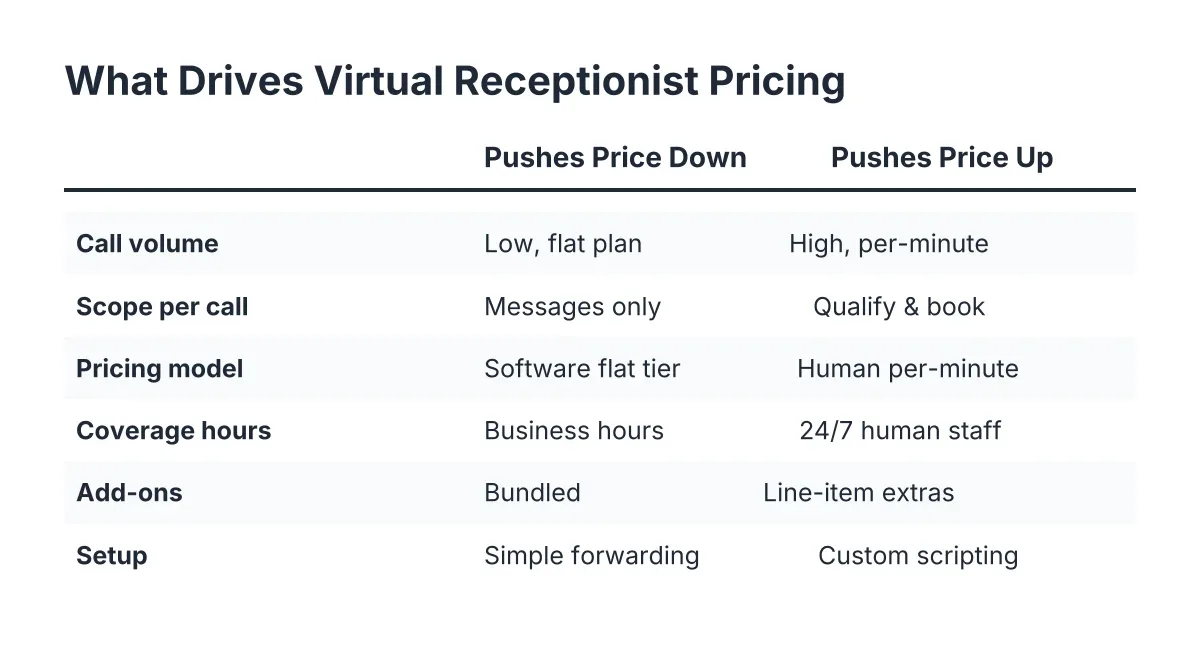
Cost Factor Table
| Factor | Pushes the price down when… | Pushes it up when… |
|---|---|---|
| Call volume | Volume is low and steady, or you are on a flat software plan | You pay per minute and volume is high or spikes seasonally |
| Scope per call | You only need messages taken | You need qualification, booking, and lead capture on every call |
| Pricing model | Software-based AI receptionist with flat monthly tiers | Human agents billed by the minute with overage charges |
| Coverage hours | Business hours only, or AI answering where 24/7 costs the same | Human staffing for nights, weekends, and holidays |
| Add-ons | Bilingual answering, CRM sync, and summaries come bundled | Each integration, language, and report is a separate line item |
| Setup | The provider handles setup with simple call forwarding | Custom scripting, training time, or onboarding fees apply |
How to Get an Accurate Virtual Receptionist Cost Estimate in Austin
Getting a real number takes about fifteen minutes of prep. Have this ready before you talk to any provider:
- Your call volume. Pull 30 days of call history from your phone bill. Note how many calls come after-hours and how many you currently miss while on the job.
- What a booked job is worth. A rough average ticket value tells you what each missed call costs, which is the number every quote should be measured against.
- What you need done per call. Message only, or qualify and book? English only, or bilingual? Do leads need to land in your CRM automatically?
- Emergency handling. Decide whether urgent calls, like a slab leak at midnight, should transfer live to you or a tech.
A good quote spells out the monthly rate, exactly what counts toward any limits, what triggers overage charges, setup fees, and contract length. If a provider cannot tell you what a busy August will cost you, that is your answer about their transparency.
Estimates differ between providers because they sell different things. A national call center quotes human labor. An AI receptionist quotes software. Comparing them on monthly price alone misses the point; compare them on cost per captured lead. The honest way to compare answering service cost across providers is to run your real call volume through each pricing model, including your worst month, not your average one.
One more test that costs nothing: call the AI before you buy. Try to stump it. Ask about a water heater swap in Spanish, describe an emergency, see if it books you. Five minutes on the phone tells you more than any pricing page.
Ways to Keep the Cost Down
- Match the plan to your real volume. Do not pay for a tier sized for a 20-truck operation when you run two crews. Start where your call log says you are, and move up when the numbers say so.
- Skip per-minute billing if your calls spike. Central Texas trades live and die by weather. Flat monthly pricing means a 95° week that doubles your AC calls does not double your bill.
- Buy answering and booking together. Paying separately for an answering service, a scheduling tool, and someone to enter leads into your CRM costs more than one system that captures the lead, books the appointment, and syncs it automatically.
- Avoid long contracts until the service earns them. Month-to-month lets you test whether captured leads and booked jobs cover the cost. If a provider needs a 12-month lock-in to make the math work, ask why.
- Get two or three quotes, but compare like for like. A cheap quote that excludes bilingual answering, after-hours coverage, or CRM sync is not cheap once you add those back in.
Virtual Receptionist Cost in Austin: Questions People Ask
Is an AI receptionist cheaper than hiring a front-desk person?
Almost always, because a hire comes with salary, payroll taxes, training, sick days, and coverage gaps at nights and on weekends. An AI receptionist answers 24/7 for one flat rate and never calls in sick during the busy season. The honest caveat: if you need someone in the office doing paperwork and dispatch too, that is a different job than answering the phone.
Why do quotes for the same service vary so much?
Because "answering service" covers everything from a voicemail-with-a-pulse to a full receptionist that qualifies and books. Providers also hide costs in different places: per-minute overages, holiday surcharges, setup fees, and paid add-ons for Spanish or CRM sync. Read what counts toward your plan limit, not just the headline monthly rate.
Do I pay extra for after-hours and weekend answering?
With human-staffed services, usually yes, because someone has to be paid to sit by the phone at 2 a.m. With an AI receptionist, no; 24/7 coverage is how the software works, not a premium tier. Since after-hours calls in the trades are often the emergencies with the biggest tickets, this is where the pricing models separate fastest.
What does a missed call actually cost me?
More than any answering plan. When a homeowner with a burst pipe hits voicemail, they call the next company on the list, and that recurring customer, along with every future job and referral, goes with them. Multiply your average ticket by the calls you miss each month while on site. For most Austin trades, that number makes the virtual receptionist cost look small.
The Bottom Line
Virtual receptionist cost in Austin hinges on call volume, what you need done with each call, and whether you buy human minutes or software. Nobody can give you an honest number without that information, and anyone who tries is guessing. Pull your last 30 days of calls, decide what a booked job is worth to you, get two or three quotes, and call each AI receptionist yourself to see if you can stump it.
If your Austin business is losing revenue to missed calls, NeverMiss ATX can help.
Prefer to talk it through? Call (512) 980-9267 — a quick call is usually the fastest way to get a straight answer for your situation.