How Much Does Lead Capture for Contractors Cost?
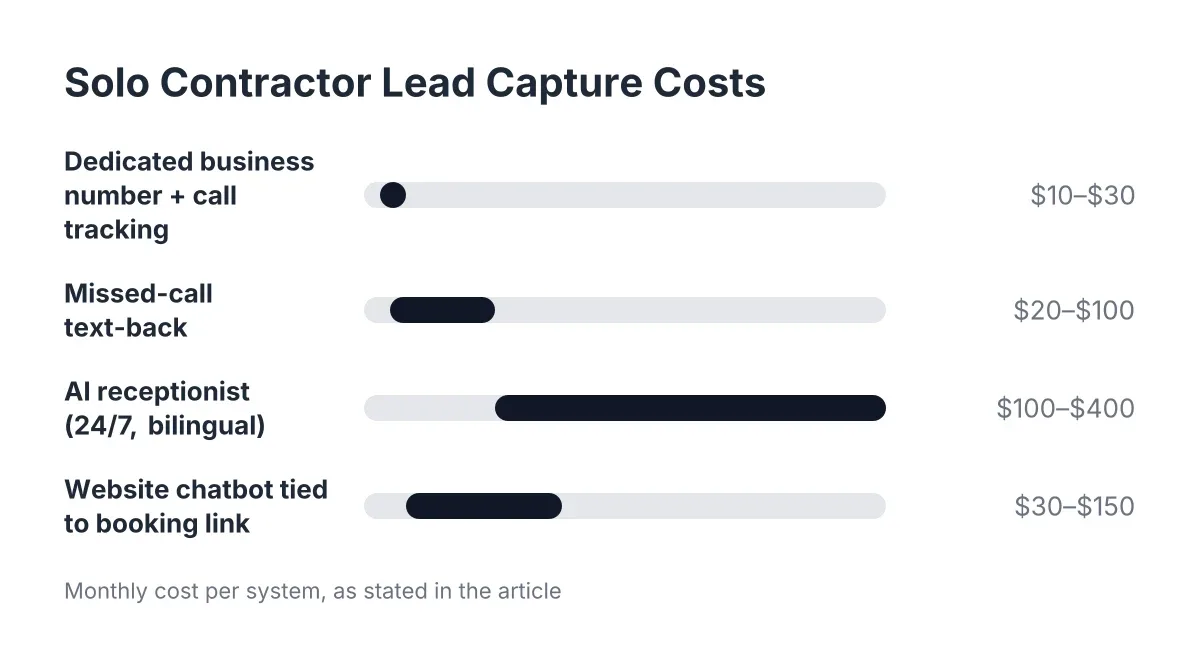
If you run a home service business in Central Texas, you have probably searched how much does lead capture for contractors cost and found a wall of made-up averages. Here is the honest answer: the price hinges on three things, how many calls and chats you need answered, how much qualification and booking you want handled, and how deep the integration goes with your CRM and dispatch tools. A one-truck plumber who needs after-hours coverage pays a different number than a five-crew HVAC outfit syncing every lead into Salesforce. By the end of this page you will know exactly what drives that number and how to get a real quote for your business, not a guess.
What Drives the Cost of Lead Capture for Contractors
There is no single sticker price because there is no single version of lead capture. These are the factors a provider will actually use to build your quote.
Call and chat volume
The biggest driver. A solo electrician getting a dozen calls a week needs less capacity than a roofing company fielding storm-season call spikes. More conversations mean more answering, more qualification, and a higher monthly price. Pull your phone records for the last 90 days. If you can count your missed calls on one hand, you are on the low end. If your voicemail fills up every week, you are not.
Coverage hours
Business-hours-only answering costs less than true 24/7 coverage. But think about when your calls actually come in. A burst pipe does not wait for Monday, and a homeowner with a dead AC unit in 95° heat calls at 9 p.m., then calls your competitor at 9:04 if nobody picks up. With an AI receptionist, 24/7 coverage is standard rather than a premium add-on, which is one reason AI pricing often beats a national call center billing by the minute for overnight shifts. Know which model you are quoting before you compare numbers.
How much the system actually does with each lead
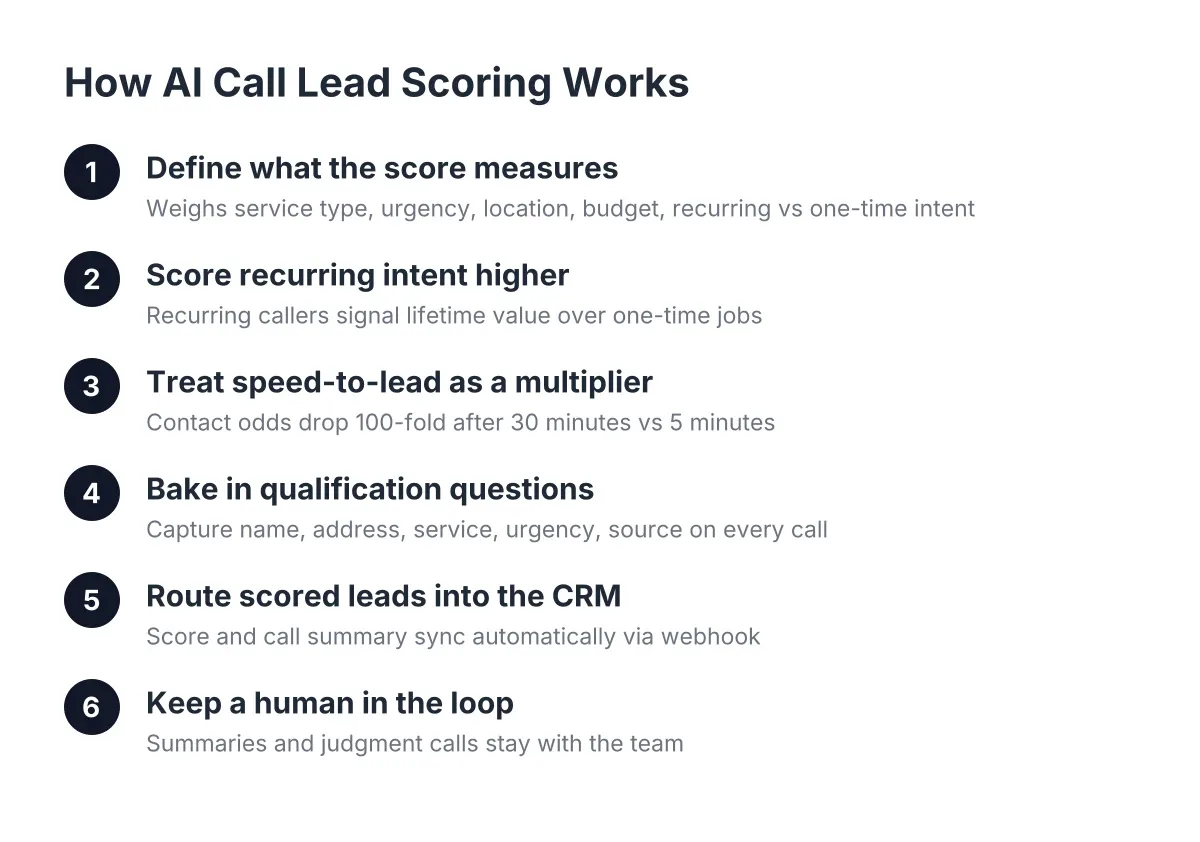
Basic lead capture takes a name and number. Full-service lead capture qualifies the caller, asks about the job, sends a booking link, and pushes a summary to your phone before you are off the ladder. Each layer of work, qualification, booking, call scoring, and summarization, adds value and can add cost. Decide whether you want a message-taker or a system that hands you a booked appointment. The second one costs more and earns more.
Integrations and lead routing
If leads just need to land in your inbox, integration cost is minimal. If you want webhooks into Zapier, HubSpot, Salesforce, or Zoho, plus one-click call bridging from a dashboard, you are paying for plumbing behind the scenes. The good news: with modern AI receptionist platforms, these syncs are usually built in rather than custom-coded. Ask whether CRM sync is included in the plan or billed as setup work. That single question separates a lot of quotes.
Language coverage
If half of Central Texas calls you in Spanish and your lead capture only speaks English, you are paying full price for half the market. Traditional answering services often charge extra for bilingual agents, and staffing a bilingual office hire costs more in salary. With some AI receptionists, ours included, English and Spanish come standard on every plan. Check whether bilingual support is baked in or bolted on. It changes both the price and the math on missed calls.
Human backup and live transfer
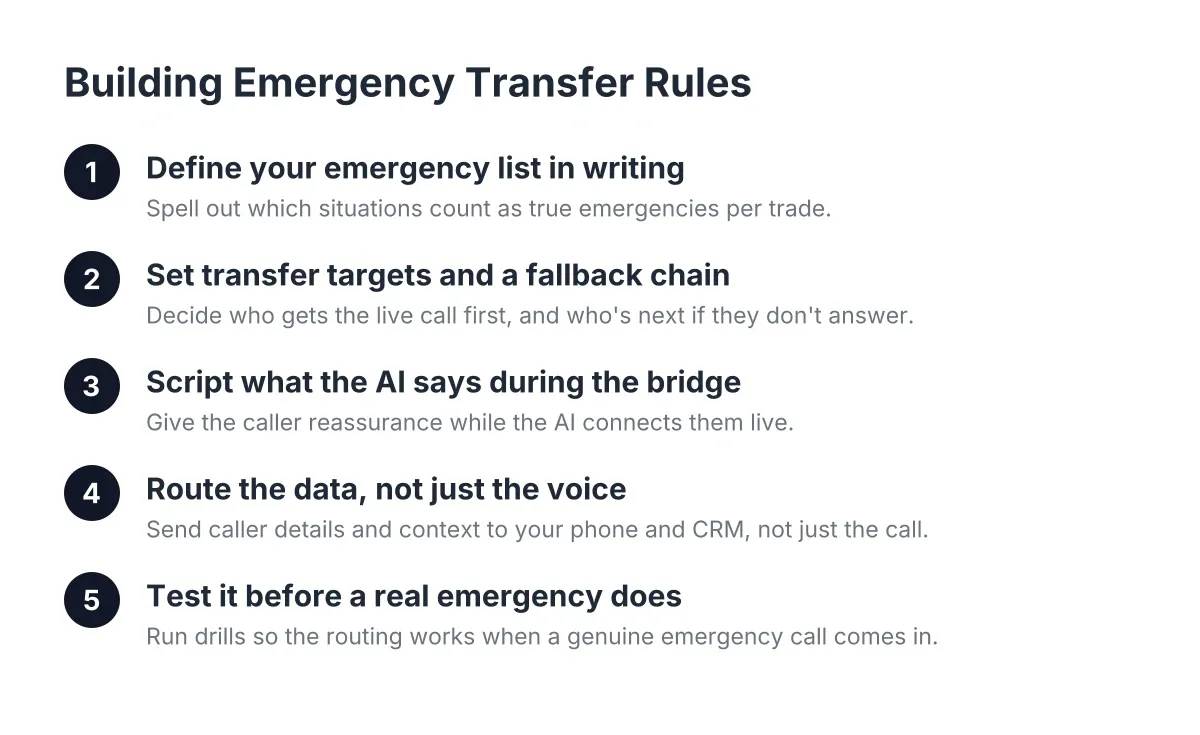
Some jobs cannot wait for a callback. If you want urgent calls, a flooding kitchen, a gas smell, transferred live to you or your on-call tech, that opt-in emergency transfer is a scope decision. It pushes cost up slightly compared with capture-and-summarize only, but for trades with true emergencies it is the difference between a captured lead and a saved customer. Know your emergency call rate before you decide.
Cost Factor Table
| Factor | Pushes the price down when… | Pushes it up when… |
|---|---|---|
| Call and chat volume | You get a handful of calls a day with predictable slow seasons | You field high daily volume or seasonal spikes like storm season |
| Coverage hours | You only need business-hours answering | You need true 24/7 and after-hours coverage (though AI often includes this by default) |
| Depth of service | You just need messages taken | You want qualification, booking links sent, call scoring, and summaries |
| Integrations | Leads can land in a simple email or text | You need CRM sync, webhooks, and dashboard call bridging |
| Language coverage | English-only genuinely covers your customer base | You need bilingual answering and the provider charges extra for it |
| Human backup | Every lead can wait for a callback | You need live transfer for urgent and emergency calls |
How to Get an Accurate Lead Capture for Contractors Estimate
Anyone quoting you a firm price before asking about your business is guessing. Here is how to get a number you can budget against.
Have this information ready:
- Your average weekly call volume, plus your best guess at missed calls (check your voicemail and missed-call log)
- When calls come in: business hours, evenings, weekends, or all of the above
- Whether you take emergency calls that need live transfer
- What tools your leads should flow into (CRM, calendar, dispatch software, or just your phone)
- Whether your customers call in Spanish, English, or both
A good quote includes:
- A flat monthly price or a clear per-conversation structure, in writing
- Exactly what is covered: answering, qualification, booking, summaries, reporting
- What counts as an overage and what it costs
- Setup fees, if any, and how long setup takes
- Whether bilingual support and after-hours coverage are included or extra
Estimates differ between providers because they are pricing different things. A national call center prices human minutes, so overnight and bilingual coverage cost more. An AI receptionist prices capacity, so 24/7 and Spanish usually come standard. Hiring a full-time office person prices a salary, plus the calls they still miss at lunch and after five. When you compare quotes, compare what each one actually captures, not just the monthly number.
Want to skip the guesswork? Call our AI receptionist and try to stump it. Ask it about a water heater swap in Spanish at midnight. Then we will quote you based on your real call volume, not a template.
Ways to Keep the Cost Down
You do not need to overpay to stop missing calls. A few legitimate levers:
-
Right-size your plan to real volume. Pull 90 days of call records before you buy. Paying for a high-volume tier when you get eight calls a day burns money. Most providers, including us, will move you up a tier when your volume grows.
-
Start with the channel that leaks the most leads. For most trades that is the phone, not the website. Add the AI website chatbot later if your web traffic justifies it. Scope tight, expand when the numbers prove it.
-
Use built-in integrations instead of custom work. If a provider offers native Zapier, HubSpot, Salesforce, or Zoho sync, use it. Custom integration hours are where quotes quietly balloon.
-
Compare at least two or three quotes on the same scope. Write down your requirements first, then hand the same list to each provider. Otherwise you are comparing a message-taking service against a full booking system and calling it apples to apples.
-
Count the cost of doing nothing. One missed after-hours call from a homeowner who becomes a recurring customer can cover months of service. When you weigh what lead capture for contractors costs, weigh it against the jobs currently going to whoever answers first.
Cost Questions People Ask
Is an AI receptionist cheaper than hiring office staff?
Usually, yes, and by a wide margin, because you are not paying a salary, benefits, or overtime for nights and weekends. A human hire also cannot answer two calls at once or work at 2 a.m. That said, an AI receptionist augments your team rather than replacing the human relationship; your people still run the jobs and the customer conversations that matter.
Do I pay extra for after-hours or weekend answering?
With traditional answering services, often yes, since human overnight shifts cost more to staff. With an AI receptionist, 24/7 coverage is typically part of the base plan because the system does not sleep. Ask every provider this question directly and get the answer in writing.
Are there setup fees or long contracts?
It varies by provider, which is exactly why you ask before signing. Look for transparent setup terms, a plan you can adjust as volume changes, and no penalty for growing. If a provider needs weeks of complex setup to answer your phone, that complexity usually shows up in the price too. Ours is built for trade owners who do not have time to babysit software.
What happens if my call volume spikes?
Storm season, a heat wave, a freeze that bursts pipes across Central Texas, spikes happen. Ask how overages are billed and whether the system can absorb a surge without dropping calls. This is where AI holds an edge: it answers every call in the spike, and you pay for a tier change, not emergency staffing.
The Bottom Line
The honest answer to how much does lead capture for contractors cost is that it depends on your call volume, the depth of service you want, and the integrations you need, and anyone quoting you before asking about those is guessing. Gather two or three quotes on the same written scope, and weigh each against what your missed calls cost you now. If you are in Austin or anywhere in Central Texas, call our AI receptionist first and try to stump it; if it handles your toughest customer question, you will know what you are pricing.
If you're losing revenue to missed calls, NeverMiss ATX can help.
Prefer to talk it through? Call (512) 980-9267 — a quick call is usually the fastest way to get a straight answer for your situation.