Solo Contractor Lead Capture: 8 Affordable Systems That Scale With You in Austin, TX
If you run your business from a truck in Austin, TX, you already know the math: every call you miss while you are on a ladder or under a sink is money walking to the next name on Google. Solo contractor lead capture is not about generating more leads. It is about making sure every lead you already earn gets answered, logged, qualified, and followed up, without you hiring an office manager you cannot afford yet.
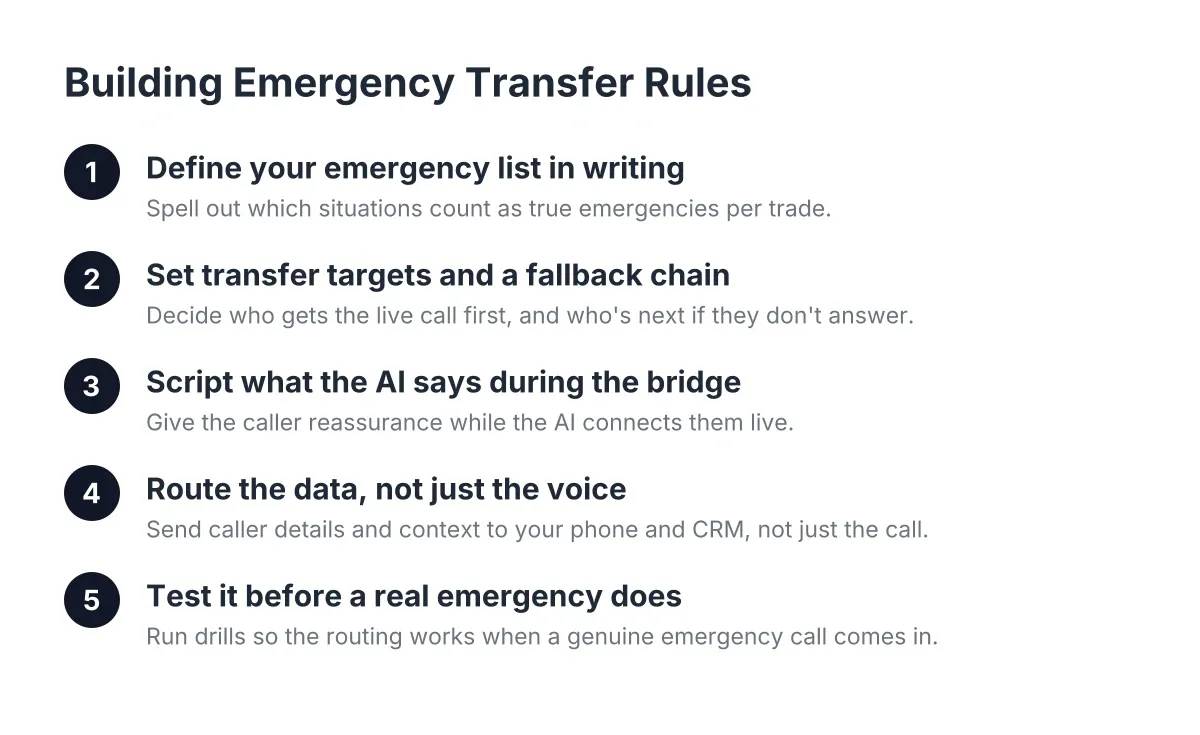
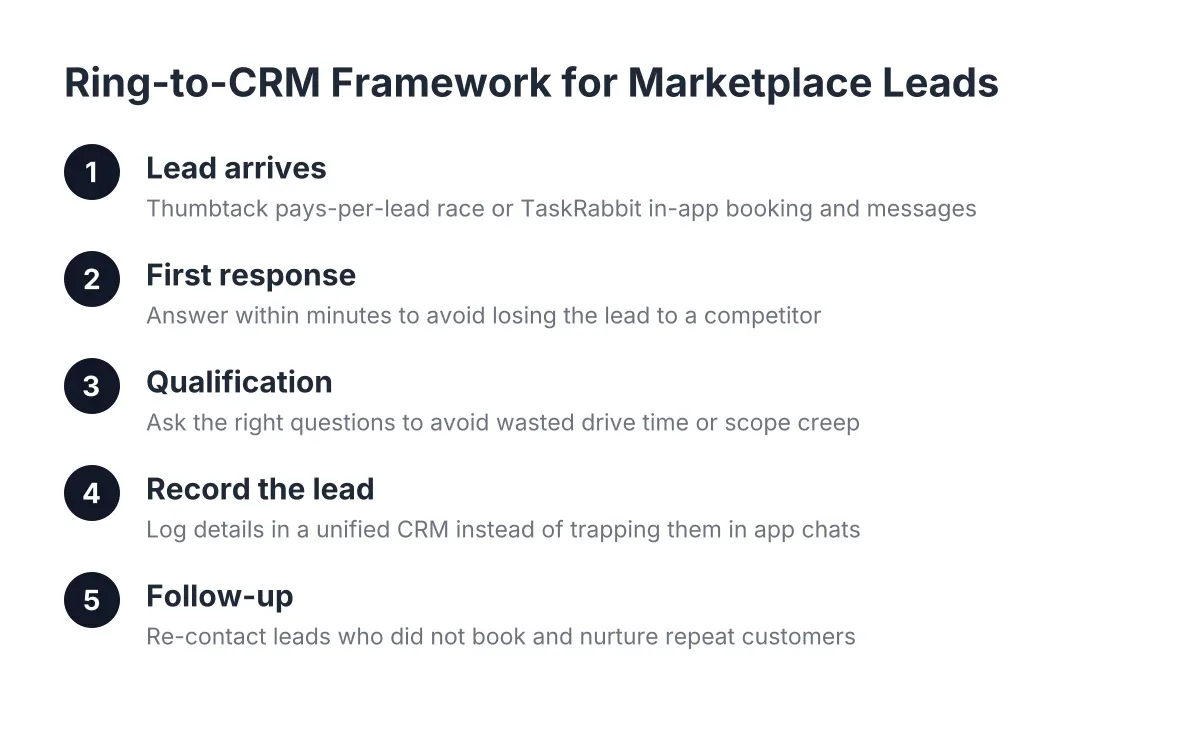
That is the framework this article covers, from the first ring to your CRM. Below are eight systems, ranked roughly by cost and complexity, that plug the gaps where leads leak. Each one works when you are a one-person shop, and each one still works when you have a crew of eight running jobs from Round Rock to Georgetown.
Why Solo Contractor Lead Capture Beats Buying More Leads
Solo contractor lead capture means catching, qualifying, and recording every inbound inquiry you already receive, instead of paying platforms for new ones. Most solo operators lose 20 to 40 percent of inbound calls to voicemail during work hours; fixing that leak costs far less than buying leads at $50 to $150 apiece.
Think about what one missed call costs you. For a lawn care or pest control owner, a new recurring customer might pay $150 a month for years. Miss that first call and you did not lose a $150 job; you lost thousands in lifetime value. For storm-driven trades like roofing, one missed call after a Central Texas hailstorm can be a $7,500 insurance job gone to whoever answered first.
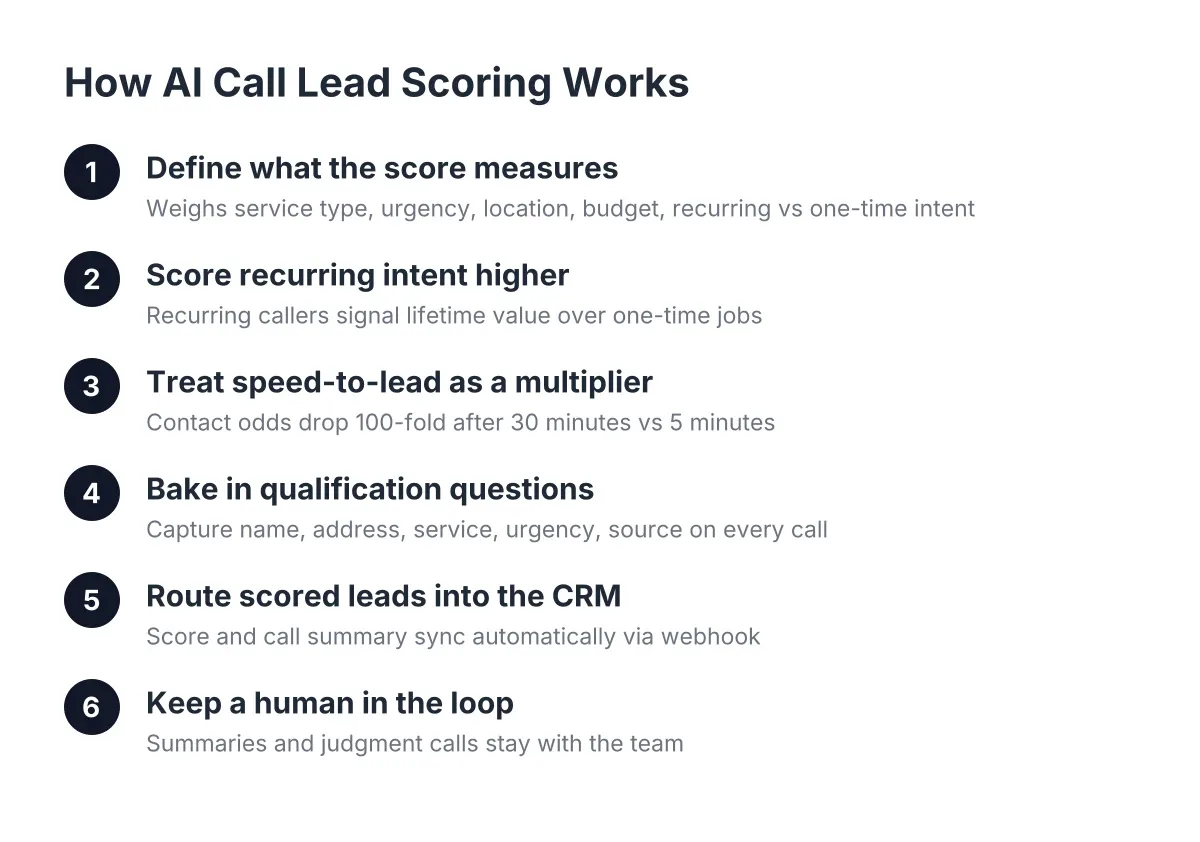
Speed compounds the problem. According to MIT Sloan School of Management / InsideSales.com, the odds of contacting a lead drop 100-fold, and the odds of qualifying that lead drop 21-fold, when the callback happens at 30 minutes instead of within 5 minutes. In the trades, "within 5 minutes" is impossible when you are on site. That is why the systems below matter.
Here are the eight systems, in the order most solo operators should adopt them:
- A dedicated business number with call tracking
- Instant missed-call text-back
- An AI receptionist that answers 24/7
- A website chatbot tied to your booking link
- A simple CRM or lead management app
- Automated lead routing with webhooks
- Lead scoring so you call the best prospects first
- A weekly review habit to find and plug new leaks
1. Start With a Dedicated Business Number and Call Tracking
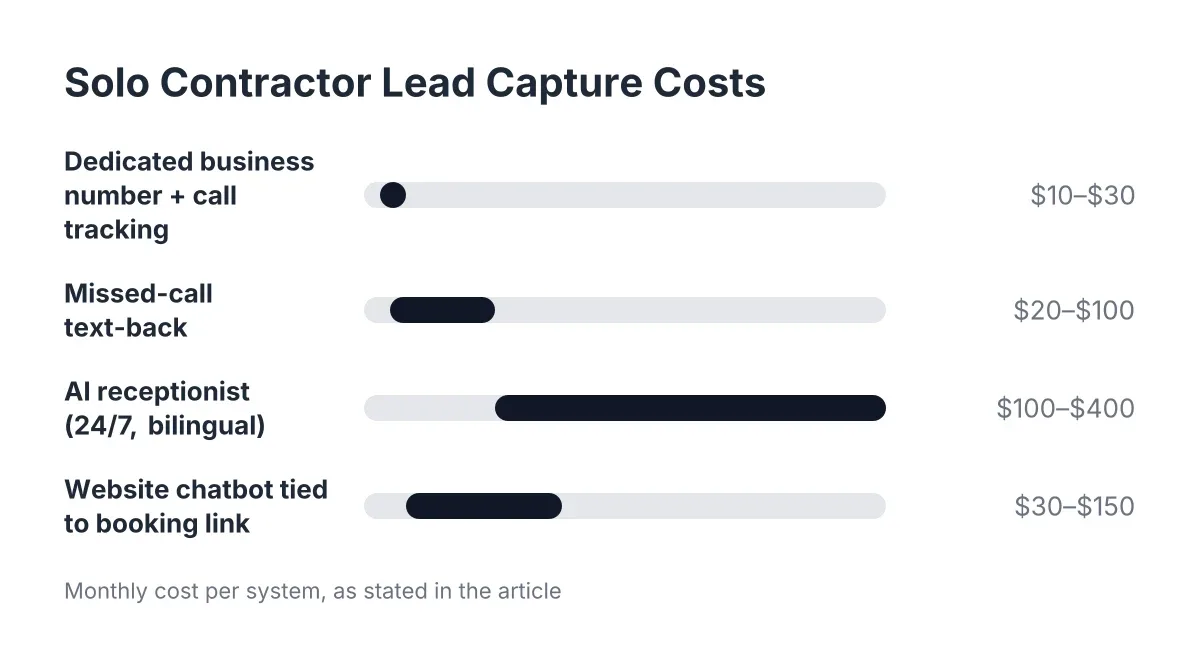
Your personal cell as your only business line is the first leak. A dedicated number, which costs $10 to $30 a month from most VoIP providers, gives you a record of every inbound call, missed or answered, so no lead disappears without a trace.
This is the foundation everything else builds on. Without a log of who called and when, you cannot follow up, you cannot measure your miss rate, and you cannot tell whether your marketing spend produces calls. Set it up first; it takes an afternoon.
One caution: if your number is printed on truck wraps and yard signs across Cedar Park and Pflugerville, port it rather than replace it. A porting mistake can take your line down for days, so confirm the timeline with the provider before you switch.
2. Add Missed-Call Text-Back So No Caller Hits Dead Air
Missed-call text-back automatically sends a text like "Sorry I missed you, I'm on a job. What do you need?" within seconds of a missed ring. Tools that do this cost $20 to $100 a month, and they keep a warm lead engaged until you can respond.
The limitation is honest and worth stating: a text is a placeholder, not an answer. A homeowner with water coming through the ceiling will not wait for a text thread. But for routine inquiries, spring booking season quotes, or a pest control estimate, text-back buys you the hours you need to finish the job in front of you.
For example, suppose a homeowner in Leander texts back "need quarterly pest service, when can you start?" You now have a logged, warm lead with contact info instead of a hang-up you never knew happened.
3. Put an AI Receptionist on the Line, 24/7 and Bilingual
An AI receptionist answers every call live, asks qualifying questions, captures the caller's name, address, and job details, and sends a booking link, all while you are on site. For Austin trades, plans typically run $100 to $400 a month, a fraction of the $3,000-plus monthly cost of part-time office help.
This is where solo contractor lead capture stops depending on your two hands. The AI answers at 9 p.m. when a Georgetown homeowner hears scratching in the attic, and it answers in Spanish when the caller prefers it, which matters in Central Texas more than national services seem to grasp. A meaningful share of pest control calls come in after hours, and an AI receptionist can turn those from voicemails into booked appointments.
Skeptical about whether AI can handle a real trades call? Fair. The honest test is to call one yourself and try to stump it with your actual customer questions. Modern systems handle qualification and booking well; genuinely ambiguous emergencies should route to a live transfer, which good local providers offer as an opt-in for urgent calls. According to NFIB, only 24% of small employers currently use AI tools, so adopting one now still puts you ahead of most competitors in your service area.
4. Capture Website Visitors With a Chatbot Tied to Your Booking Link
A website chatbot catches the leads who never call at all. Many homeowners, especially younger ones, will type before they dial; a chat widget that asks for the job type, address, and timeline, then delivers your booking link, converts those visitors into logged leads at $30 to $150 a month.
Pair it with a page built to convert. Study high-converting landing page examples in the trades and you will notice a pattern: one clear service, local proof (Austin, Round Rock, Georgetown in the text), a phone number, and a single booking button. Your chatbot should reinforce that page, not clutter it.
Worth acknowledging: a Five9 survey found 75% of consumers still prefer talking to a real human for support, so chat complements your phone line rather than replacing it. The same survey found 84% are already aware companies use AI for customer service, so a well-built chat or AI receptionist experience does not surprise anyone in 2026.
5. Get Every Lead Into a CRM, Even a Free One
A CRM is where captured leads stop being sticky notes on your dashboard. Plenty of free CRM software for small business exists, including free tiers from HubSpot and Zoho, and at the solo stage a free tier covers everything you need: contact record, job notes, follow-up reminders, and pipeline stages.
Do not overthink the tool. The rule that matters is this: every lead, from every channel, lands in one place within minutes of arriving. Phone leads, chat leads, and marketplace leads all go to the same list. If your lead capture for contractors setup requires you to manually retype anything at the end of a twelve-hour day, it will fail by Thursday.
Pick a CRM with a solid lead management app for your phone. You will work leads from the truck between jobs, not from a desk.
6. Automate the Handoff With Webhooks and CRM Sync
Manual data entry is where good systems quietly die. Webhooks and integrations, through Zapier or native connections to HubSpot, Salesforce, or Zoho, push every captured lead into your CRM automatically, with the caller's details, job type, and call summary attached.
Therefore the moment your AI receptionist finishes a call, the lead should already exist in your pipeline with a follow-up task assigned. No retyping, no "I'll log it tonight," no leads lost in a text thread. Most AI receptionist and chatbot platforms include this on standard plans; setup usually takes under an hour with Zapier.
This step is also what makes the whole stack scale. When you hire your first tech, the system already routes leads without you in the middle.
7. Score Your Leads So the Best Prospects Get Called First
Lead scoring ranks your inbound leads by value and urgency so you spend your limited callback windows on the right people. AI call intelligence can summarize each call and flag the difference between a price-shopper and a homeowner in Pflugerville ready to book weekly mowing for the season.
This matters most during spikes. Say a hailstorm rolls through Central Texas on a Tuesday night and your roofing line takes 60 calls in 48 hours. In that scenario, you cannot return them in order; you need the insurance-claim-ready, decision-stage homeowners surfaced first, with the tire-kickers queued behind them. Scoring turns a chaotic call log into a prioritized work list.
For recurring service owners, score recurring intent highest. A caller asking about monthly pest control or weekly lawn service is worth five times a one-time job and should never sit at the bottom of your callback list.
8. Review Your Lead Flow Weekly and Plug the Next Leak
A weekly review is the cheapest system on this list and the one most owners skip. Every Monday, spend fifteen minutes on four numbers: calls received, calls answered live, leads booked, and leads still waiting on follow-up. Some AI receptionist services send this as an automatic Monday morning report, which removes the excuse.
As a result, you catch leaks while they are small. Maybe after-hours calls doubled in June and none booked; that tells you exactly what to fix before July. Maybe Spanish-language callers hang up at twice the rate; that tells you your capture needs to be bilingual by default, not as an add-on.
Treat the review as part of the job, like sharpening blades or restocking the truck. The stack does the capturing; the review makes sure it keeps working as your call volume grows.
What Does a Solo Contractor Lead Capture Stack Cost in 2026?
A complete solo contractor lead capture stack in 2026 runs about $150 to $600 a month: a business line ($10 to $30), missed-call text-back ($20 to $100), an AI receptionist ($100 to $400), a chatbot (often bundled), and a free-tier CRM. That is less than the cost of one missed recurring customer per month.
Compare the alternatives. Part-time office help costs $2,500 to $3,500 a month and still goes home at 5 p.m. National answering services charge per minute, read from generic scripts, and cannot tell Lakeway from Leander. And here is a fear worth retiring: according to NFIB, 98% of small employers using AI reported no change in employee headcount. This stack is not about cutting people; it is about capturing the calls that fund your first real hire.
Start with the phone number and text-back this week. Add the AI receptionist before your next busy season, whether that is spring booking or the next storm. Every system on this list is one you can turn on without hiring, and every one keeps paying you back on the day your crew grows past just you.
If you're losing revenue to missed calls, NeverMiss ATX can help.
Prefer to talk it through? Call (512) 980-9267 — a quick call is usually the fastest way to get a straight answer for your situation.