Google Voice Business Phone vs. a Real Call System: What Emergency Trades Need
If you run an emergency trade in Central Texas, your phone is your dispatch center, your sales team, and your reputation. So when owners ask whether a Google Voice emergency trades setup is enough to run on, the honest answer is: it depends on what happens when you cannot pick up. This article walks through every real option a one-to-ten-person shop has, from free call-forwarding hacks to a full AI receptionist, ranked by cost and by how they hold up when a panicked caller has water coming through the ceiling at 11pm.
No jargon, no sales pitch. Just what each option costs, what it does well, and where it breaks.
Why Phone Management Is the Whole Ballgame for Emergency Trades
A homeowner with a burst pipe does not leave a voicemail. They hang up and dial the next plumber on the list. Emergency callers abandon faster than routine callers because panic does not wait, and there are no second chances on a $4,000 repipe or the water damage work that follows it.
The math is brutal. According to a foundational study from MIT Sloan School of Management and InsideSales.com, the odds of contacting a lead drop 100-fold, and the odds of qualifying that lead drop 21-fold, when the callback happens at 30 minutes instead of within 5 minutes. For a no-cool call in August or flooding in a Pflugerville kitchen, 30 minutes might as well be never.
So the real question is not "which phone number should I use." It is "what happens to the call when I am on a ladder, under a slab, or asleep." Every option below should be judged against that standard.
What a Google Voice Business Phone Actually Gives You
A Google Voice business phone gives you a dedicated business number that rings your existing cell, with voicemail transcription, basic call routing, and text messaging, starting around $10 to $20 per user per month on Google Workspace as of 2026. There is also a free personal tier, though it lacks business features and support. It is a phone line, not a phone answering solution.
That distinction matters. Here is what you get and what you do not.
Where Google Voice earns its keep
- A separate business number so customers stop calling your personal cell at dinner
- Voicemail transcription delivered by email or text, so you can skim messages between jobs
- Ring groups on paid Workspace plans, so a call can ring you and a helper at once
- Texting from your business number, which routine customers appreciate
- Low, predictable cost; the paid tiers run roughly $10 to $30 per user per month
For a solo handyman doing scheduled work with flexible customers, that is a reasonable setup. The price is hard to beat, and setup takes an afternoon.
Where Google Voice Business Phone Breaks for Urgent Work
However, Google Voice does not answer anything. If you are elbow-deep in a sewer line when the phone rings, the caller gets voicemail, and you already know what emergency callers do with voicemail. There is no live answering, no lead capture, no qualification, and no booking. There is no Spanish-language answering, which matters in Austin, Round Rock, and Pflugerville, where a meaningful share of emergency callers prefer Spanish.
There is also no emergency triage. A no-cool call from an elderly customer in 95° heat and a "can you quote a faucet swap next month" call land in the same voicemail box with the same priority. You sort them out later, if the caller has not already booked your competitor.
In short: a Google Voice business phone organizes your number. It does nothing about your missed calls.
The Full Menu: Every Call Option for a 1-to-10-Person Shop
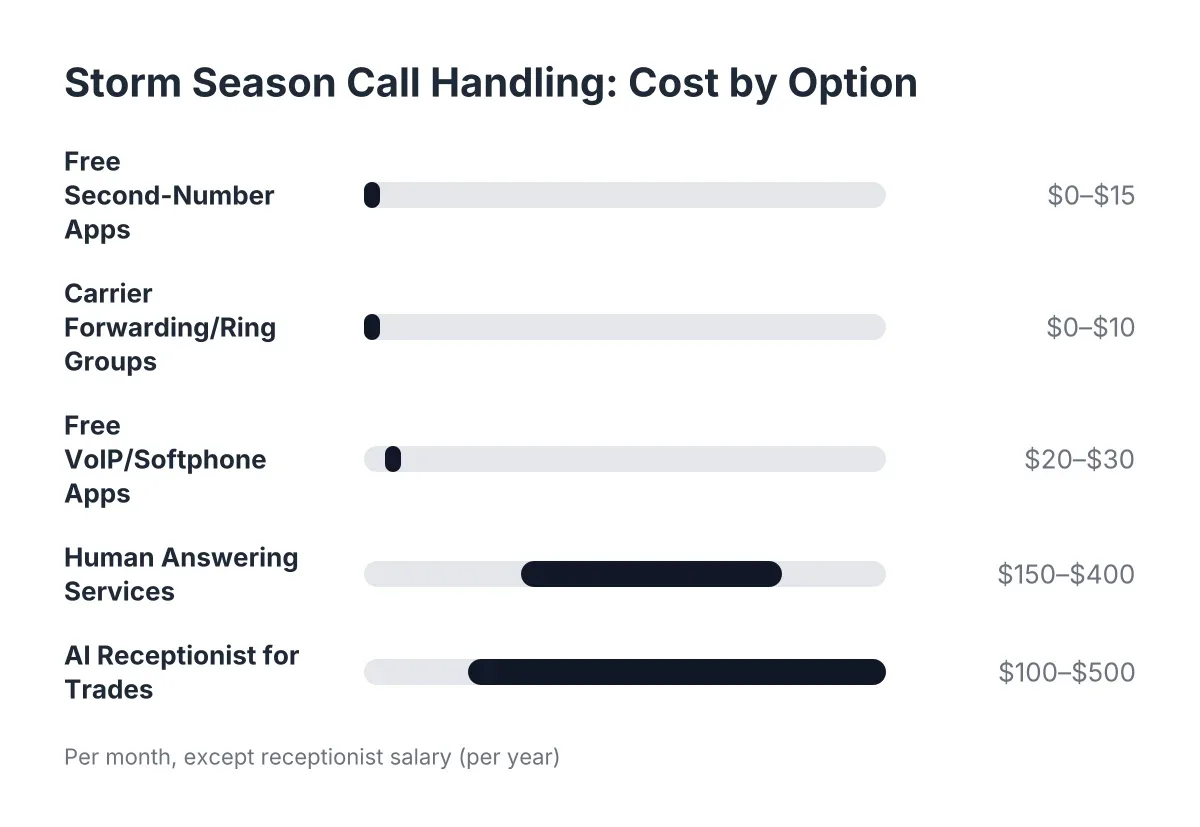
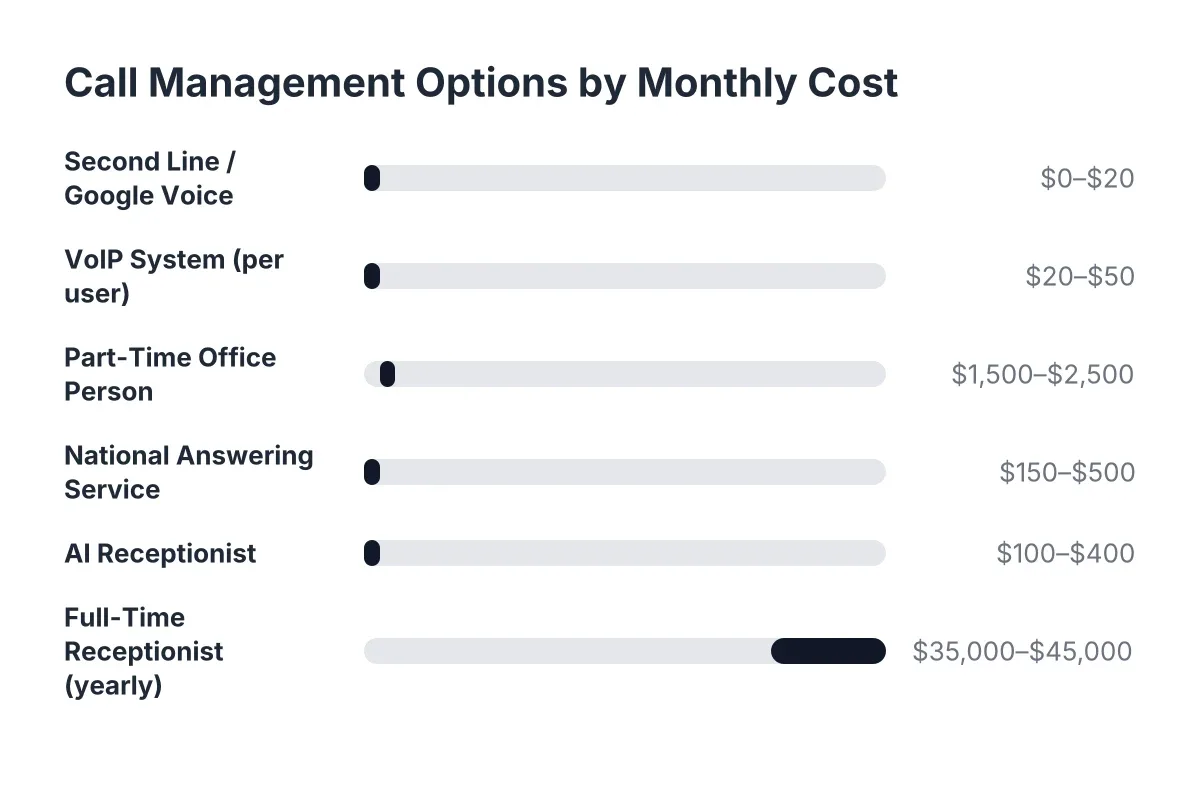
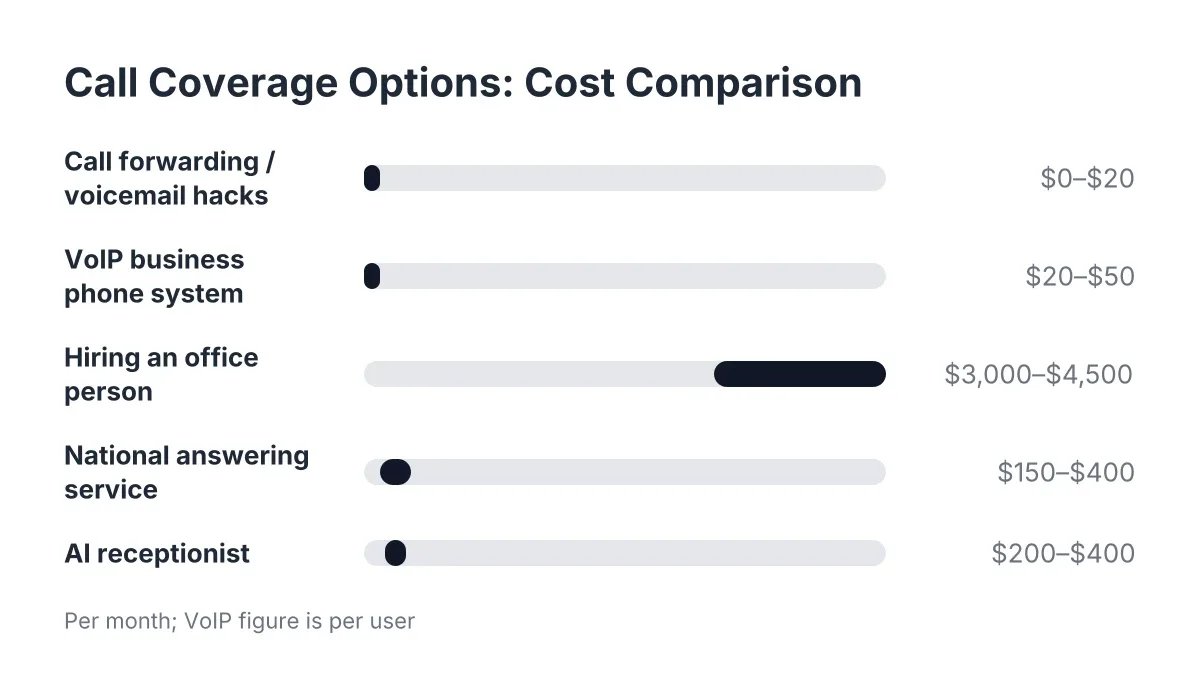
Small business call management for a trade shop comes down to five realistic options. Here they are, cheapest to most expensive, with the honest trade-offs for emergency work.
Option 1: Call forwarding and voicemail hacks (free to $20/month)
This is the Google Voice tier, or the equivalent from your carrier. Forward calls to a second phone, set a professional voicemail greeting, and get transcriptions by text.
Best for: Solo operators doing scheduled, non-urgent work with patient customers.
The catch for emergency trades: Every call you cannot physically answer is a coin flip you lose. If 40% of your pest control calls come after hours, this option ignores 40% of your pipeline.
Option 2: VoIP business phone systems ($20 to $50/user/month)
Systems like RingCentral, Nextiva, or Ooma give you auto-attendants ("Press 1 for emergencies"), ring groups, call queues, and better call routing than Google Voice. This is what most people mean by a "business phone system."
Best for: Shops with 3 to 10 techs and someone in the office at least part of the day.
The catch: An auto-attendant routes calls; it does not answer them. If nobody picks up at the end of the phone tree, you are back at voicemail. Panic callers also hate phone trees. Someone watching water pour into their living room does not want to press 2.
Option 3: Hiring an office person ($3,000 to $4,500/month)
A part-time or full-time office manager answers with warmth, knows your schedule, and can calm a panicked caller. Nothing beats a good one during business hours.
Best for: Shops past roughly $500K in revenue with steady daytime call volume.
The catch: One person covers about 40 hours a week. Emergencies do not keep those hours. You are paying $40,000 or more a year and still missing the 11pm flooding call, the Saturday electrical outage, and every call that comes in while they are at lunch.
Option 4: National answering services ($150 to $400/month plus per-minute fees)
A national call center answers 24/7 with human operators reading your script. They take a message and text it to you.
Best for: Businesses that mainly need message-taking coverage overnight.
The catch: The operator answering your Georgetown flooding call has never heard of Georgetown. They follow a script, take a name and number, and stop there. Most do not book appointments, most charge extra for Spanish, and per-minute billing spikes exactly when you are busiest, like a Central Texas freeze week. You get a message, not a booked job.
Option 5: An AI receptionist ($200 to $400/month)
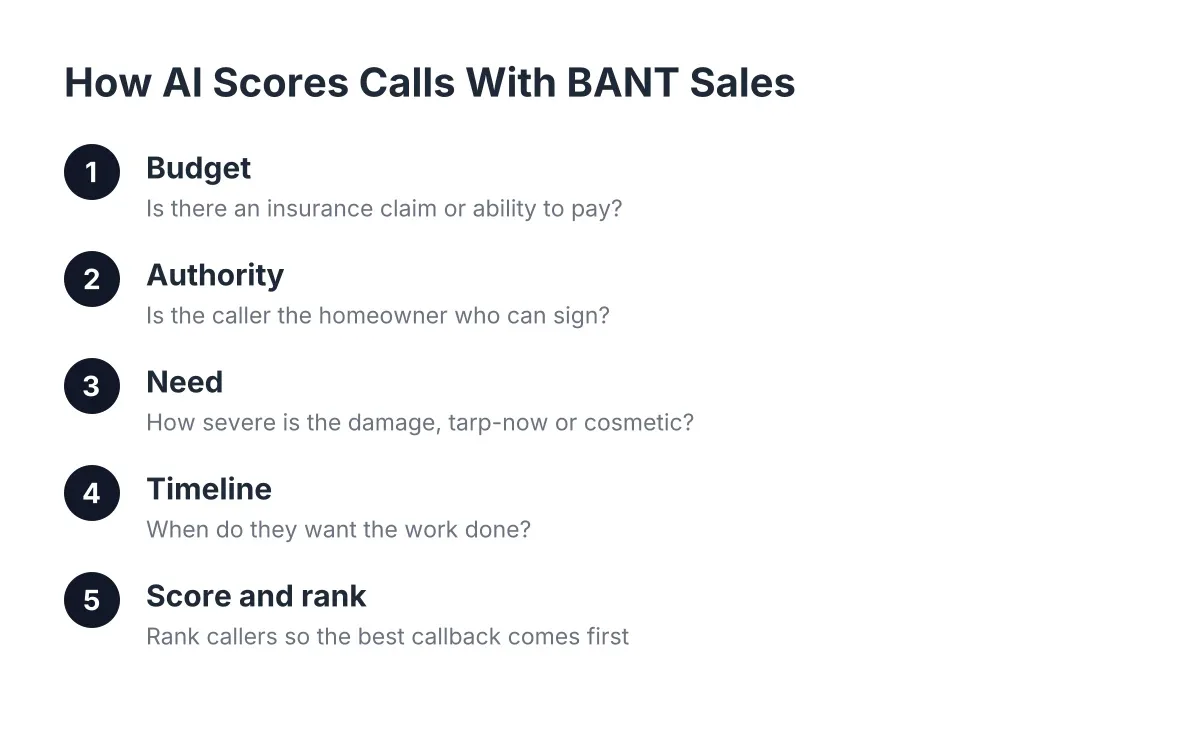
An AI receptionist answers every call on the first ring, 24/7, captures the lead, asks qualifying questions, books the appointment, and can live-transfer true emergencies straight to your cell. Good ones handle English and Spanish on every call and send you a summary with an urgency score before you have wiped your hands.
Best for: Emergency and high-urgency trades where answer speed decides who wins the job. Solo operators to small crews of 1 to 10 techs get the most leverage, because there is no office staff to lean on.
The catch: AI has limits, and you should hear them stated plainly. A complex, multi-property commercial negotiation still deserves a human conversation, and any provider who claims AI handles everything is overselling. The honest setup is triage: the AI answers instantly, books the routine work, and transfers the true emergencies to you live. Skepticism is fair; the practical test is to call one and try to stump it with a real scenario from your week.
Worth noting: adopting AI for answering does not mean cutting people. According to National Federation of Independent Business (NFIB), 98% of small employers using AI report no change in employee headcount. It answers the calls nobody was there to answer; it does not push anyone out of the truck.
Google Voice Emergency Trades vs. an Answering Solution, Side by Side
Here is the direct comparison for an emergency trade, judged on what actually decides whether you win the job.
Answer speed. Google Voice rings your cell; if you are on site, the caller hits voicemail. An AI receptionist or answering service picks up on the first ring, every time, including 2am. For panic callers, first ring is the whole contest.
Lead capture. Voicemail transcription is not lead capture. A lead in sales is a caller whose name, problem, address, and urgency you have actually recorded, ready to act on. Google Voice hopes the caller leaves that. An AI receptionist asks for it, every call, and pushes it to your CRM.
Emergency triage. Google Voice treats a flooding call and a quote request identically. A live answering layer can separate "book this for Thursday" from "transfer this to the owner right now."
Bilingual coverage. Google Voice has none. National services usually charge extra. In the Austin market, English and Spanish answering on every call is not a luxury feature; it is a chunk of your customer base.
Cost. Google Voice wins on price at $10 to $30 a month, no contest. But price the alternative correctly: one missed $3,500 emergency repipe per month, plus the follow-on water damage referral, dwarfs the gap between $20 and $300 a month.
Human touch. This one cuts the other way, and it deserves honesty. A Five9 survey found 75% of consumers prefer talking to a real human for support, and 84% know companies use AI for customer service. The practical read for a trade shop: callers prefer a human, but they prefer any competent answer over voicemail by a mile. The comparison that matters is not AI versus you personally; it is AI versus your voicemail greeting.
Can Call Management Software Take the Place of Hiring a Receptionist?
Call management software can cover most of what a receptionist does for a small trade shop: answering, lead capture, qualification, and booking, at roughly a tenth of the cost of a full-time hire. What it cannot do is run your office, chase invoices, or manage a complex commercial account. For shops of 1 to 10 techs, the software-first path usually wins on math.
Consider an illustrative Tuesday for a two-truck Cedar Park plumbing shop. Suppose both trucks are on jobs from 8am to 6pm, and seven calls come in while everyone is on site. With a Google Voice business phone alone, all seven hit voicemail; in a typical emergency trade, figure two or three of those callers dial a competitor instead of leaving a message. With an AI receptionist answering, all seven get picked up, four get booked, two get captured as quotes to call back, and the one true flooding emergency gets live-transferred to the owner between jobs. Same phone number, same trucks, radically different day.
Adoption is still early, which is an advantage for whoever moves first. According to National Federation of Independent Business (NFIB), only 24% of small employers currently use AI tools for business activity. In a market where the first shop to answer wins the emergency, most of your competitors are still letting calls ring to voicemail.
How to Choose for Your Shop
Match the tool to your call reality, not to the price tag.
- Scheduled work, flexible customers, solo operator: a Google Voice business phone or carrier forwarding is fine. Save your money.
- Growing crew with daytime office coverage: a VoIP business phone system adds the routing and ring groups you need, but plan separately for after-hours.
- Mostly need overnight message-taking, low urgency: a national answering service covers the basics, if you accept scripts, per-minute fees, and operators who do not know Leander from Laredo.
- Emergency or high-urgency trade, calls decide revenue, 1 to 10 techs: an AI receptionist is the only option on this list that answers on the first ring 24/7, captures and qualifies the lead, books the job, handles Spanish, and transfers true emergencies live, for less than one missed job per month.
Whatever you pick, run one test before you commit: call your own business number on a Saturday night and listen to what a panicked homeowner would hear. If the answer is a voicemail greeting, that is the problem to fix first. The number on your truck matters less than who, or what, picks up when it rings.
If you're losing revenue to missed calls, NeverMiss ATX can help.
Prefer to talk it through? Call (512) 980-9267 — a quick call is usually the fastest way to get a straight answer for your situation.