What Affects AI Receptionist Pricing for Austin Home Service Businesses
You already decided an AI receptionist makes sense for your business. Now you are staring at plan pages wondering why one service quotes $99 a month and another quotes $500, and what you will actually pay once real call volume hits. Understanding AI receptionist pricing in Austin affects what your bill looks like, and understanding what affects it in return, is the difference between a bill that pays for itself by the second booked job and one that surprises you in July when call volume triples. This guide walks through every factor that moves the number for a home service business in Central Texas, then shows you how to set the service up so every dollar maps to a captured lead instead of an answered robocall.
The short version: pricing is driven by how many calls or minutes you use, what the AI does on each call, where those leads go afterward, and whether the provider actually knows your market. Get those four things right and the math works. Get them wrong and you pay for minutes that never turn into booked work.
The Four Levers That Drive AI Receptionist Pricing in Austin
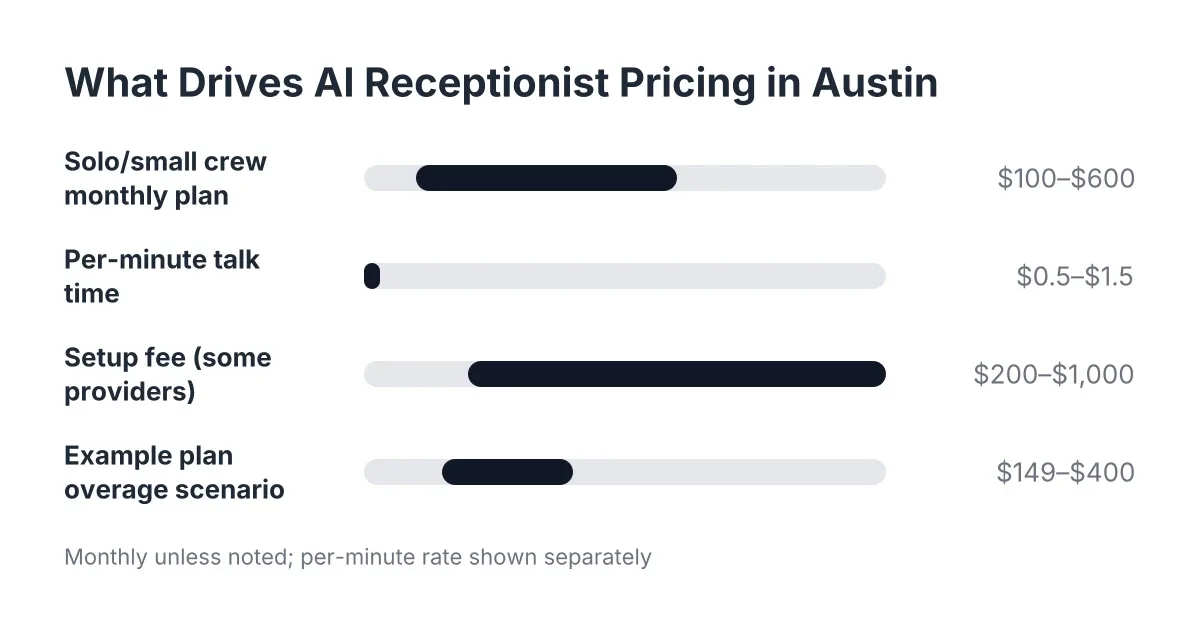
AI receptionist pricing for a home service business comes down to four levers: usage volume, capability depth, integration and delivery, and provider type. Most plans in 2026 land between $100 and $600 per month for a solo operator or small crew. Where you fall in that range depends on how you pull each lever.
Here is what each one means in practice for a lawn care, pest control, or multi-trade operation:
- Usage volume. How many calls or minutes the AI handles per month. This is the biggest variable, and it moves with your season.
- Capability depth. Does the AI just take messages, or does it qualify, book, handle Spanish, and score leads? More capability, higher base price, but also higher lead value per call.
- Integration and delivery. Where captured leads land. A text summary is cheap. Real-time CRM sync, webhooks, and call bridging cost more and save you hours of admin.
- Provider type. A national call center reselling generic AI prices differently than a local team that built its service around Central Texas trades.
Notice what is missing from that list: setup fees. Some providers charge $200 to $1,000 to configure your account. Others, particularly ones built for solo operators and small crews, include setup because the whole pitch is that you should not need a project manager to get answered phones. If a provider quotes a four-figure setup fee for a business your size, that fee is telling you their product was built for someone else.
How Call Volume and Seasonality Affect What You Pay
Call volume affects pricing more than any other single factor, because most providers price by minutes used or calls answered per month. A pest control company fielding 60 calls in February and 250 in June will see its AI receptionist pricing in Austin move with the season unless the plan is structured for that swing.
This matters for recurring service businesses specifically. Your call pattern is not flat. Spring booking season for lawn care, summer for pest, post-storm surges for roofing and general repair; your busiest months generate the calls worth the most, because a new recurring customer signed in April pays you every month through November.
Therefore, when you compare plans, do the math on your peak month, not your average month. Three pricing structures dominate in 2026:
- Per-minute pricing. You pay for talk time, often $0.50 to $1.50 per minute. Fine for low volume, painful in peak season when calls run long because a homeowner wants to describe every fire ant mound in the yard.
- Per-call pricing. A flat rate per answered call, regardless of length. Predictable per lead, but overage rates above your plan tier can double the effective cost of your busiest weeks.
- Tiered monthly plans. A flat monthly fee covering a call band, with defined overage rates. This is the most common structure for home service businesses because it makes the peak months predictable.
Whichever structure you choose, ask one question before signing: what happens in my heaviest month? Get the overage rate in writing. A $149 plan with $2-per-call overage becomes a $400 bill during spring booking season, and you want to know that in February, not on the invoice.
One honest caveat: if your call volume is genuinely tiny, under 20 calls a month with no after-hours pattern, a basic voicemail-plus-callback routine may cover you for now. The economics of an AI receptionist start working when missed calls are costing you real jobs, which for most Central Texas trades happens well before the 20-call mark once you count evenings and weekends.
What Makes Answering Cheap, and What Drives AI Receptionist Pricing: Capability Depth
The base function, picking up the phone, is the least expensive thing an AI receptionist does. What drives capability depth is the list of things the AI does after it answers. Each capability below adds cost at most providers, and each one changes what a captured call is worth to you.
Lead Qualification and Service Description on the Call
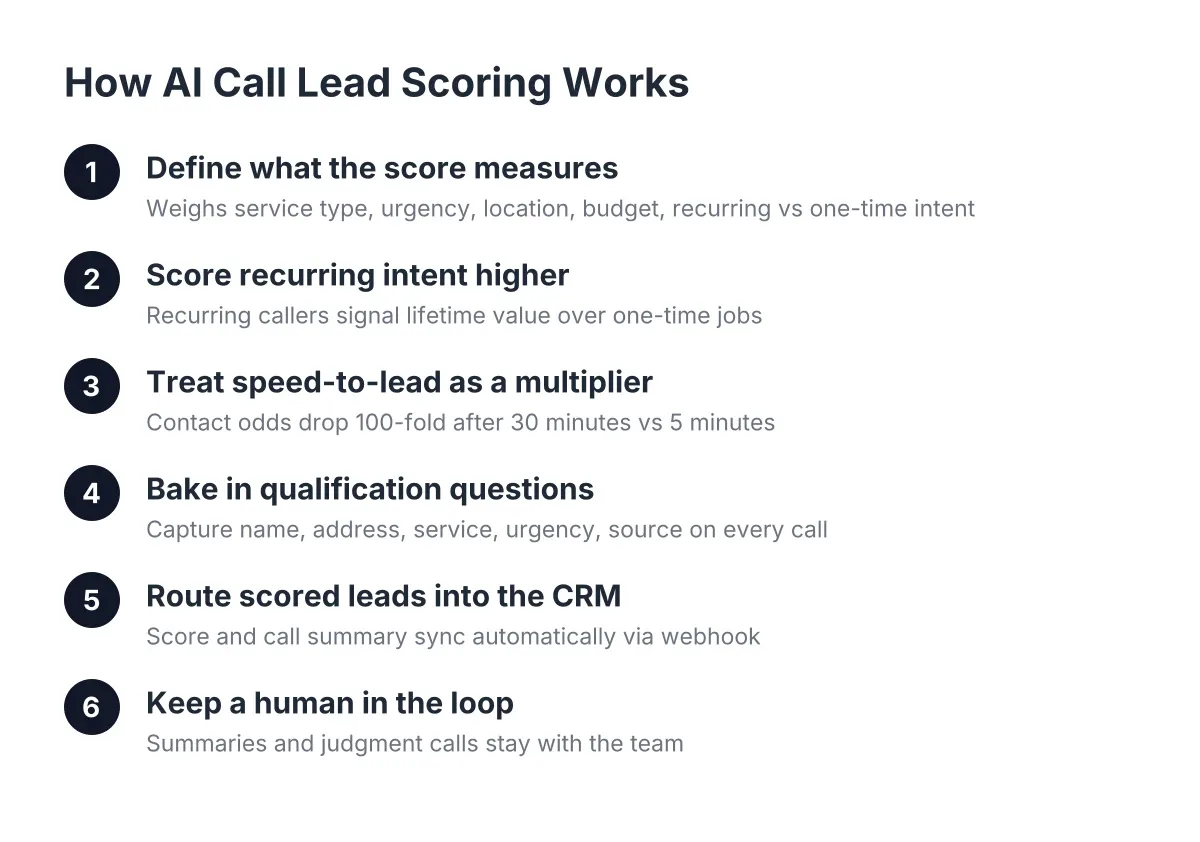
An answered call that produces a name and a callback number is a message. An answered call that produces the service needed, the property address, the timeline, and whether the caller wants recurring service is a qualified lead. Qualification logic costs more to build and run, which is why message-only plans are cheaper.
However, qualification is where the money is for a recurring service business. A new customer is won or lost on the first call, and a recurring client can easily be worth several times a one-time job over their lifetime. Paying $50 more per month for an AI that asks the right four questions is not an add-on; it is the product.
Booking, not just messaging
Some plans stop at "we'll have someone call you back." Others deliver a booking link on the call or by text, so the homeowner gets on your calendar before they hang up. Speed matters more than most owners realize. According to a study from MIT Sloan School of Management and InsideSales.com, the odds of contacting a lead drop 100-fold, and the odds of qualifying that lead drop 21-fold, when follow-up happens at 30 minutes instead of within 5 minutes. An AI that books on the first call collapses that window to zero.
Bilingual answering
In Central Texas, Spanish-language answering is not a premium feature; it is table stakes. Some national providers charge extra for it or route Spanish callers to a separate queue with longer waits. If a provider treats bilingual support as an upsell, factor that into the real price, because in Austin, Round Rock, and Pflugerville a meaningful share of your first calls will come in Spanish. A provider built for this market includes English and Spanish on every plan because the market demands it.
Emergency handling and live transfer
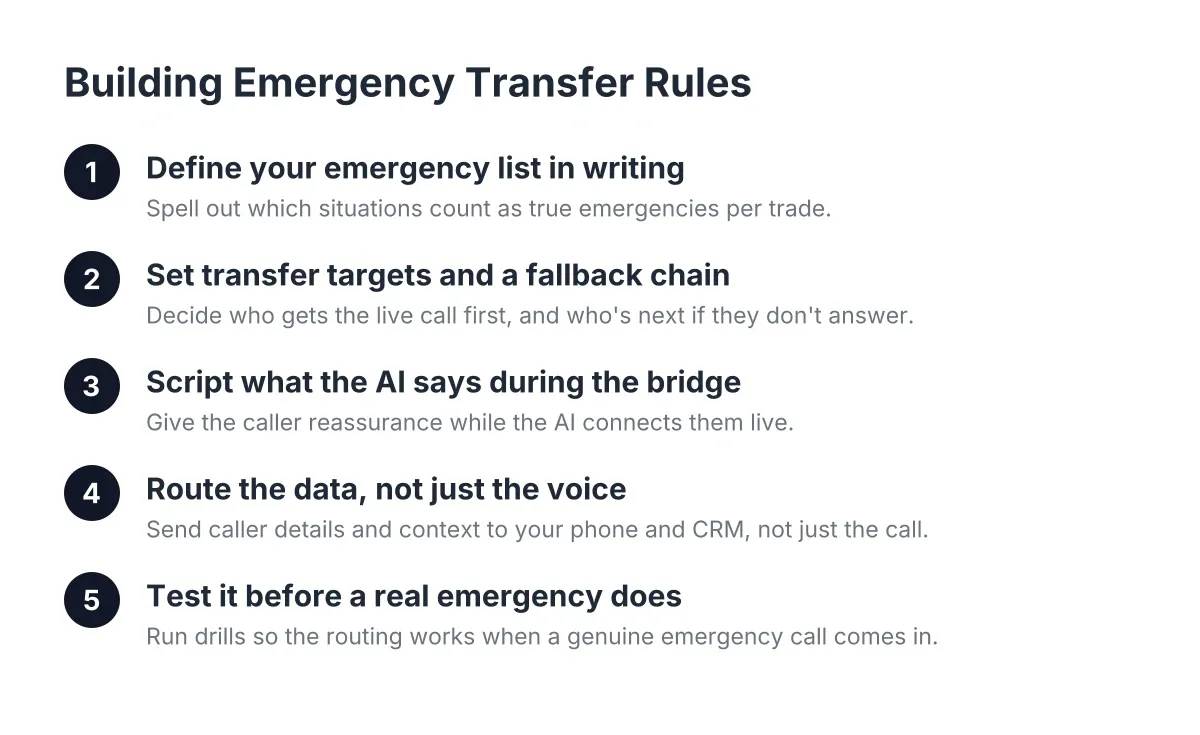
For multi-trade and repair work, some calls cannot wait for a morning callback. A burst pipe at 11 p.m. needs triage: is this urgent, and should it ring through to you right now? Live transfer for urgent calls is usually an opt-in feature, sometimes priced separately. If your work includes emergency repairs, price plans with live transfer included, because the one flooded-kitchen call it saves per quarter pays for the feature several times over.
Call intelligence and reporting
Scoring, summarization, and a weekly report tell you which leads to chase first Monday morning. This is the difference between scrolling a call log at 9 p.m. and opening one summary that says: 14 calls last week, 9 qualified, 4 booked, 2 flagged urgent. Providers price this differently; some include it, some tier it. It saves admin time rather than capturing new leads, so weigh it accordingly.
Where Leads Go Next: Integration Costs and CRM Delivery
Capturing a lead on the phone only pays off if the lead lands somewhere you will act on it. Integration is the second place plan prices diverge, and it is the piece most owners underestimate when they compare monthly rates.
At the simple end, the AI texts or emails you a summary after each call. That is often included in the base price and works fine for a solo operator. At the deeper end, leads flow through webhooks into HubSpot, Salesforce, Zoho, or a Zapier workflow the moment the call ends, tagged with qualification data and a lead score. Providers typically include basic CRM sync on mid-tier plans and charge more for custom webhook work.
For example, imagine a hypothetical lawn care owner in Georgetown running a crew of four. Before integration, their AI receptionist texts them summaries, and they retype each one into the CRM at night, when they remember. After connecting the webhook to his CRM, every call became a contact record with service type, address, and recurring-or-one-time flag attached automatically. His close rate did not change because the AI got smarter; it changed because leads stopped dying in his text history.
In addition, look at what the dashboard lets you do with a lead once it lands. One-click call bridging, where you tap a lead in the dashboard and the system connects the call, turns a five-minute find-the-number shuffle into a ten-second callback from the truck. Features like that rarely show up as line items, but they are exactly what separates a lead capture system for a home service business from a fancy answering machine. Any serious approach to lead capture for contractors has to cover this last leg, from qualified call to CRM record to fast callback, because that is where most leads actually leak.
If you already run a stack of lead capture apps, form tools, chat widgets, and a CRM, map how the AI receptionist feeds each one before you buy. Duplicate lead records across three tools cost you follow-up speed, and follow-up speed is the whole game.
Local Provider vs. National Call Center: The Price Difference Nobody Itemizes
Provider type affects AI receptionist pricing in ways that never appear on the pricing page. Two plans can cost the same $199 per month and deliver wildly different value, because one provider knows your market and one does not.
A national answering service prices for scale. Its AI is trained on generic scripts, its qualification questions are one-size-fits-all, and Spanish support may cost extra or route poorly. It answers the call, but it does not know that a Cedar Park homeowner asking about "chinch bugs in St. Augustine" is a high-intent recurring lawn treatment lead, or that a caller in August saying "AC is out and it's 95 degrees" needs urgent routing, not a next-week callback slot.
A local provider prices for fit. The AI is configured around the trades that actually operate here, the seasonal patterns of Central Texas, and the reality that your crew is on site all day with phones in pockets. Setup is faster because the provider is not learning your market from scratch. When you compare quotes, ask each provider to explain how their AI would handle three real calls from your last month. The answers will tell you more than the price table does.
There is also the hiring comparison, since the real alternative to an AI receptionist is often a part-time office hire. The median receptionist wage in the U.S. was $17.90 per hour in May 2024, about $37,230 per year before benefits, according to the U.S. Bureau of Labor Statistics. A human receptionist covers 40 hours a week; your calls come in across 168. For a pest control business, a large share of new-customer calls arrive after hours, exactly when a salaried hire is off the clock. The point is not that AI answers instead of people; it is that AI answers the 128 hours a week nobody was going to be hired for anyway. NFIB survey data backs this up: 98% of small employers using AI report no change in headcount. Owners are covering gaps, not cutting jobs.
Worth noting: adopting this is still an edge, not the norm. Only 24% of small employers currently use AI tools for business activity, according to the National Federation of Independent Business. In a market where 84% of consumers already know companies use AI for customer service, per Five9, the callers are more ready for this than most of your competitors are.
Getting Your Money's Worth: An Implementation Checklist
You have picked a plan. Now the goal is making sure every dollar of the monthly fee converts into captured, qualified, routed leads. Work through this in your first two weeks:
- Forward after-hours and overflow first. Do not flip every call to the AI on day one. Start with nights, weekends, and the calls you miss while on a ladder. That is where 100% of the captured value is new revenue, since those calls were going to voicemail anyway.
- Feed the AI your real service list. A multi-trade operation lives or dies on this step. List every job type you take, the ones you refer out, and your service area by city: Austin, Round Rock, Cedar Park, Georgetown, Pflugerville, Leander. The AI can only qualify against what it knows.
- Define your qualification questions. For recurring service: property size, current problem, one-time or recurring interest, and preferred start date. Four questions, no more. Longer scripts lose callers.
- Set urgent-call rules before you need them. Decide what triggers a live transfer: active water leak, no AC in summer heat, safety issue. Write the triggers down and test them.
- Connect the CRM sync in week one. Even a simple Zapier connection beats retyping texts at night. Every lead should exist as a record within a minute of hangup.
- Call your own number and try to stump it. Call in English, then Spanish. Ask about a job you do not offer. Describe an emergency. What the AI gets wrong in your test, fix in your configuration before a real customer finds it.
- Read the Monday report for four weeks straight. Track calls answered, leads qualified, jobs booked, and after-hours share. By week four you will know your cost per captured lead, which is the only pricing number that matters.
That last metric deserves a moment. If your plan costs $249 per month and captures 20 qualified leads you would otherwise have missed, you are paying about $12.50 per lead. For a recurring customer worth thousands over a service lifetime, that is not an expense line worth agonizing over. If the number is not working after a month, the fix is usually configuration, not cancellation; sharpen the qualification questions and check where leads are leaking after the call.
The Bottom Line on AI Receptionist Costs in 2026
Plan pages will keep listing prices side by side, but the number that matters is not the monthly fee. It is what each answered, qualified, booked call is worth against what a missed first call costs a recurring service business, which is the entire lifetime value of a customer who called your competitor next.
Price the four levers deliberately: volume for your peak season, capability that includes qualification and bilingual answering by default, integration that puts leads in your CRM without retyping, and a provider that knows the difference between a Georgetown lawn account and a generic inbound call. Configure it in your first two weeks, test it yourself, and read the Monday report. Do that, and the pricing question answers itself by the second booked job of the month.
If you're losing revenue to missed calls, NeverMiss ATX can help.
Prefer to talk it through? Call (512) 980-9267 — a quick call is usually the fastest way to get a straight answer for your situation.