How to Set Up 24/7 Call Answering in One Day, No Staff Required
If you run a roofing, restoration, or contracting crew in Central Texas, you already know the math: the phone rings while you are on a ladder, and the job goes to whoever answers first. The good news is you can implement a 24/7 call answering setup in a single day without hiring anyone. This guide walks through every real option a one-to-ten-person trade shop has, from free call-forwarding hacks to an AI receptionist, ranked by cost and how well each one actually holds up when a hailstorm drops 80 calls on your line in an afternoon.
Speed matters more than most owners realize. According to MIT Sloan School of Management / InsideSales.com, the odds of contacting a lead drop 100-fold, and the odds of qualifying that lead drop 21-fold, when the callback happens at 30 minutes instead of within 5 minutes. For storm-driven work, where the whole neighborhood calls three roofers in ten minutes, that stat is the entire business case.
Here is the one-day plan, step by step.
Step 1: Pick the Coverage Model That Fits Your Crew
Choosing the right coverage model is the first decision, and it comes down to four realistic options for a small trade shop. Each one can technically answer calls around the clock, but they differ sharply in cost, lead capture quality, and how they perform during a post-storm spike.
Rank them like this:
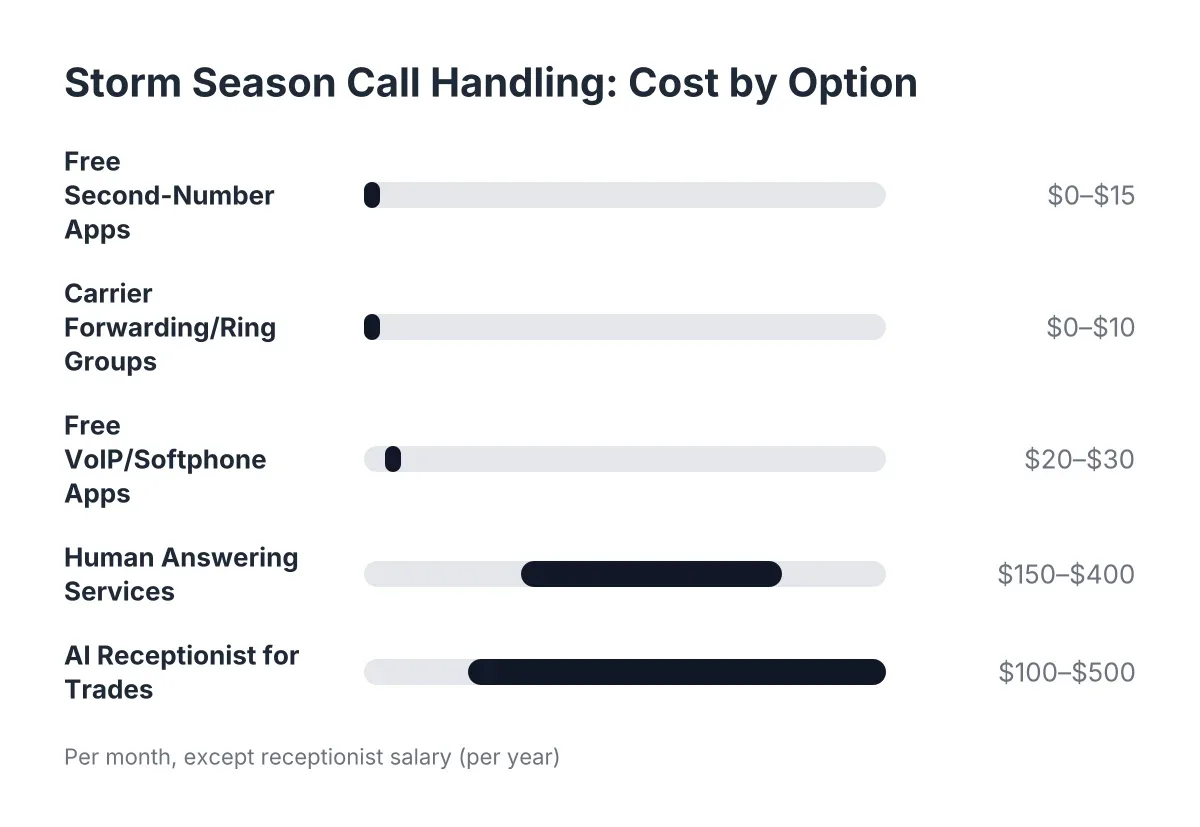
- Call forwarding to your cell (free to $10/month). Fine for a solo operator on a slow week. Falls apart the moment you are on site, in a crawlspace, or asleep. Zero coverage during the 48 to 72 hours after a storm when everyone calls at once.
- Voicemail with a strong greeting (free). Better than nothing, but not much. Most missed callers simply dial the next company on the list rather than leave a message, which is why voicemail is a lead-loss tool dressed up as a lead-capture tool.
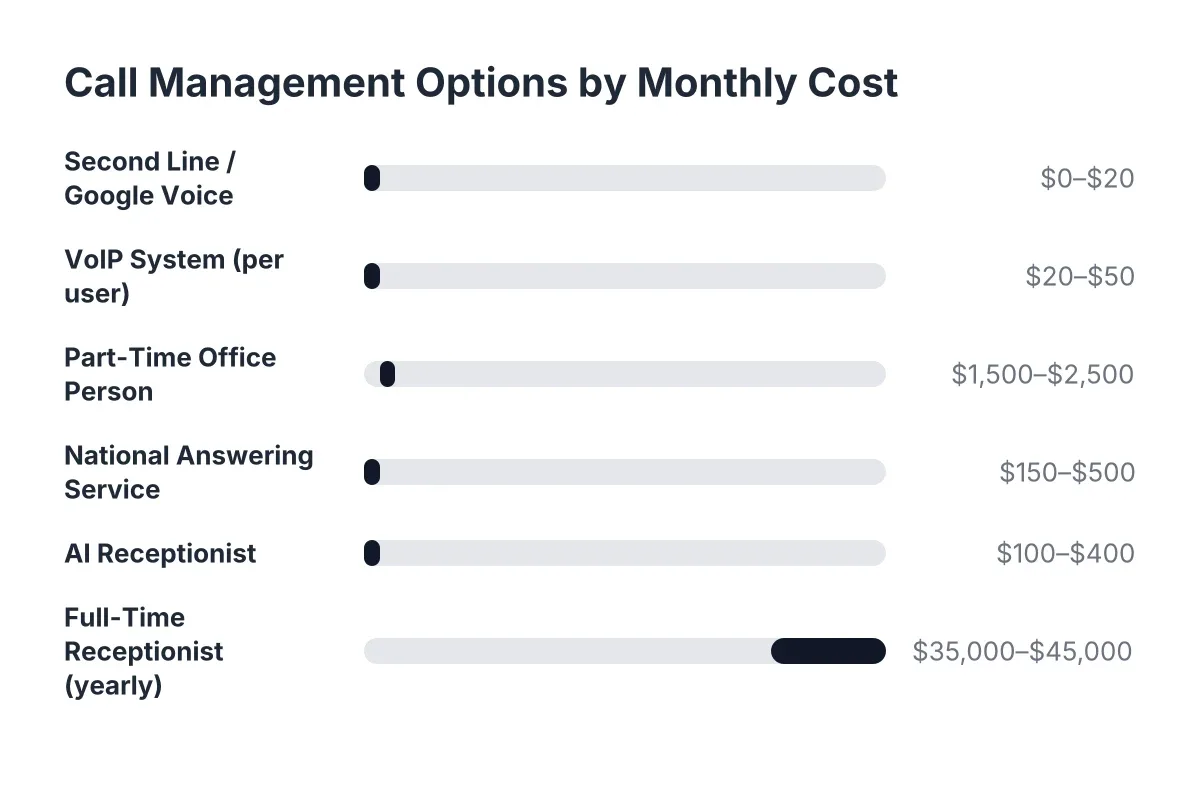
- A national answering service ($200 to $600/month, per-minute overages). Live humans, which callers like. The trade-offs: agents who have never heard of Pflugerville, per-call pricing that explodes during peak season, and scripts too generic to qualify an insurance claim.
- An AI receptionist ($100 to $400/month, typically flat). Answers every call instantly, handles unlimited simultaneous calls, captures and qualifies every lead, and books appointments. This is the only option on the list that does not degrade when call volume spikes 20x after a hailstorm.
For storm and event-driven trades, simultaneous call handling is the deciding factor. A human service with five agents physically cannot answer 100 calls at once. An AI receptionist can, which is why the rest of this guide assumes that model while noting where the others still make sense.
One honest caveat: if your work involves genuine life-safety emergencies, keep a live-transfer path to a human on call. AI handles intake and triage well, but a gas leak call should reach a person fast. Good systems offer opt-in live transfer for exactly this.
Step 2: Set Up 24/7 Call Answering on Your Existing Number
You can set up a complete 24/7 call answering setup without changing your phone number, and this is the step that trips up the fewest people once they see how it works. You keep the number on your truck wraps and yard signs. Additionally, you simply forward it.
There are two forwarding modes, and the choice matters:
- Conditional forwarding. Calls ring your cell first, then roll to the AI receptionist after 3 or 4 rings, or when your line is busy. Best for owners who still want first crack at calls during the day.
- Full forwarding. Every call goes straight to the AI receptionist, which answers on the first ring, captures the lead, and books the appointment. Best during peak season, after-hours, or any week you are booked solid.
Setting either up takes about ten minutes. You dial a carrier code or flip a setting in your phone app, point it at the number your provider gives you, and test it. Most owners start with conditional forwarding during business hours and full forwarding after-hours, then move to full forwarding once they trust the summaries they are getting.
Therefore, "one day" is not marketing shorthand. The forwarding itself is a ten-minute task; the rest of the day goes to the configuration steps below.
Step 3: Design Your Intake Script Around Real Jobs and Build Your 24/7 Call Answering Setup
An answering system is only as good as the questions it asks. Before you go live, write down what your best office person would ask on a roofing or restoration call, because that becomes the qualification script.
For storm-driven trades in Central Texas, a solid intake covers:
- Name, callback number, and property address
- What happened and when (hail date matters for insurance claims)
- Whether they have filed or plan to file an insurance claim, and with which carrier
- Whether there is active water intrusion or the damage is contained
- How soon they need someone on site
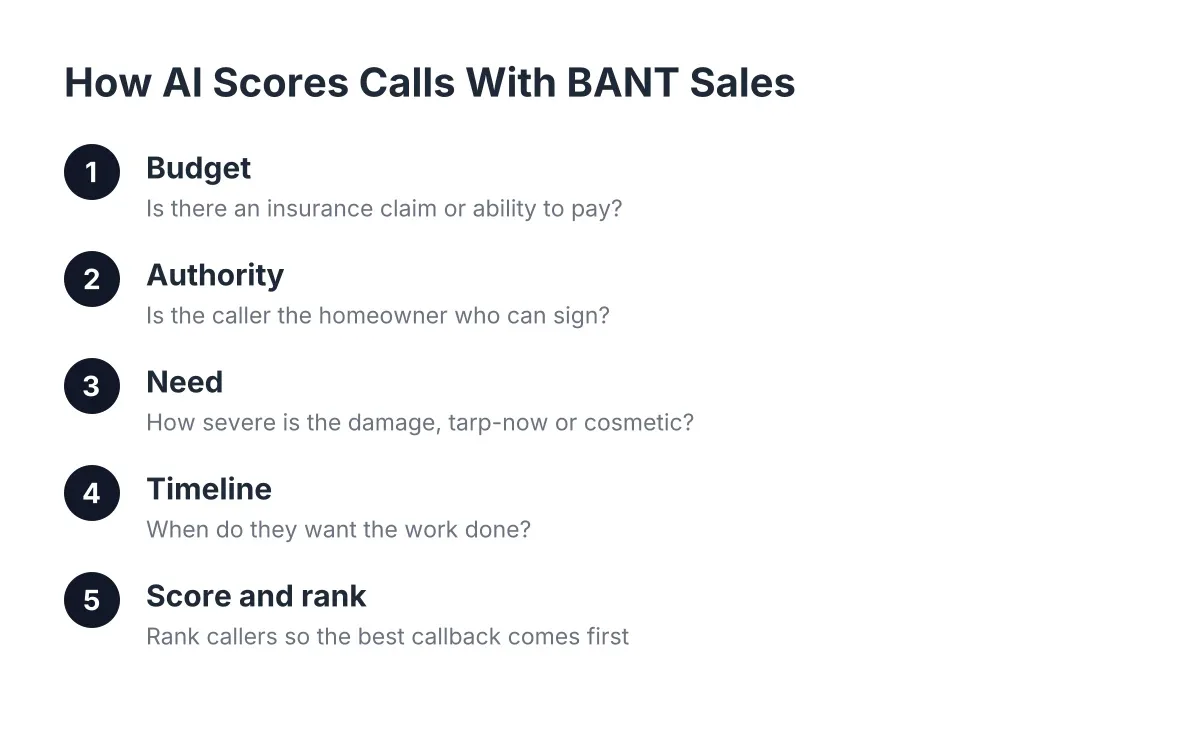
This is where sales qualification frameworks earn their keep in the trades. You do not need anything elaborate; a simple urgency-plus-fit score works. A caller with active water coming through a ceiling and an open claim is a today lead. A caller pricing out a re-roof for next spring is a this-week lead. Configure your AI receptionist to score calls this way so your Monday follow-up list is already sorted by revenue at risk.
In addition, make sure the script works in Spanish, not as an afterthought but as a default. A meaningful share of Central Texas homeowners prefer Spanish on the phone. If your 24/7 call answering setup greets them in English only, you are missing calls you never even see. Any AI receptionist worth paying for handles both languages on every plan, with no separate line and no upcharge.
Step 4: Connect Booking and Lead Delivery Before You Go Live
Answering the call is half the job; getting the lead to you is the other half. Before you flip the forwarding switch, wire up where every captured lead lands.
Set up three delivery paths:
- Instant text or email summary after every call, with the caller's info, the issue, and a lead score
- CRM sync through Zapier, HubSpot, Salesforce, or Zoho, so leads land where you already track jobs
- Booking link delivery, so qualified callers get a link and book themselves into your calendar without a callback
That last one changes the follow-up game. Suppose a Georgetown homeowner calls at 9:40 p.m. after a hail event. The AI receptionist answers on the first ring, captures the claim details, texts her a booking link, and she books an inspection for Thursday morning before she goes to bed. You wake up to a booked job and a call summary, not a voicemail from someone who already called two competitors. That is an illustrative scenario, but it is exactly the sequence the setup enables.
If you run more than one crew, add routing rules now: urgent water-damage calls trigger a live transfer to whoever is on call, while standard estimate requests go to the booking calendar.
Step 5: Test It Hard, Then Turn It Loose After-Hours
Testing is the step owners skip, and it is the one that builds real confidence. Consumers already expect AI on the phone; according to Five9, 84% of consumers are aware that some companies use AI to handle customer service interactions. The same Five9 research found 75% still prefer a human, which is precisely why your test should focus on whether the AI sounds capable and gets callers to a booked outcome fast, not whether it can pass as a person.
So call your own number and try to stump it. Ask about hail damage in Round Rock. Switch to Spanish mid-call. Describe a burst pipe at 2 a.m. and see whether it triggers the urgent path. Give a vague answer and see if it asks a follow-up. If it handles your hardest ten minutes, it will handle a Tuesday.
Then go live in stages:
- Night one: forward after-hours only. Review the morning summaries.
- Day three: add busy-line overflow during work hours, so calls you cannot grab on site roll to the AI receptionist instead of voicemail.
- Week two: decide whether full forwarding fits your season. During a post-storm surge, it almost always does.
Worth knowing: adding this kind of coverage does not mean cutting people. According to the National Federation of Independent Business (NFIB), 98% of small employers using AI technology report no change in employee headcount. This is coverage for the hours and call spikes no small crew can staff, not a substitute for the people you have.
Step 6: Review the Numbers Weekly and Tighten the Setup
A weekly review keeps the system earning its cost. Good small business call management is not set-and-forget; it is a fifteen-minute Monday habit that tells you exactly where your revenue is coming from.
Each week, check four things:
- Calls answered after-hours and during overflow. This is revenue you were previously losing outright.
- Lead scores versus outcomes. If low-scored calls keep turning into $7,500 roof jobs, adjust the qualification questions.
- Booking rate. What share of qualified callers booked from the link? If it is low, shorten the path or tighten the script.
- Spanish-language call volume. Many owners are surprised by this number the first month.
A weekly Monday morning report makes this painless, but even pulling the dashboard yourself works. The point is a feedback loop: the intake script from Step 3 should get sharper every month based on what actual callers say.
How Long Does It Take to Set Up 24/7 Call Coverage?
Setting up 24/7 call answering for a small trade business takes one working day for an AI receptionist, including forwarding, script configuration, CRM sync, and testing. Call forwarding alone takes ten minutes. A national answering service typically needs one to two weeks for onboarding and script approval, which is a long wait when a storm just hit.
That speed gap matters most for storm-driven trades. If hail hits Cedar Park on a Friday, the calls come Friday night through Sunday. An owner who sets up coverage Saturday morning captures that weekend. One waiting on a two-week call center onboarding does not. As of 2026, rapid deployment is a fair filter to apply to any provider you evaluate: if they cannot get you live within a day or two, they are not built for how your season works.
What Happens If You Skip Professional Call Coverage?
Skipping professional call coverage means most of your after-hours and on-site callers become someone else's customers. Missed calls do not queue up and wait; in the trades, a homeowner with water coming in calls down the list until someone picks up. The revenue does not disappear, it just lands with the competitor who answered.
The compounding cost is worse than the single job. A captured storm caller often becomes a recurring customer: this year's roof, next year's gutter repair, a referral to the neighbor. A missed call forfeits that entire chain, not just the first ticket. For a crew averaging high-ticket insurance work, a handful of missed peak-season calls per week adds up to a five-figure hole by year end, and you never see it on any report because unanswered calls leave no record.
The fix does not require an office hire or a national call center that has never driven Highway 183. Set up 24/7 call answering on the number you already have, wire the leads into your calendar and CRM, and spend your day where you make money: on the roof, not on the phone.
If you're losing revenue to missed calls, NeverMiss ATX can help.
Prefer to talk it through? Call (512) 980-9267 — a quick call is usually the fastest way to get a straight answer for your situation.