Automated Call Answering for Lead Capture: Every Option for Small Trade Shops in Austin, TX
If you run a lawn care route, a pest control book, or a multi-trade repair business in Austin, TX, you already know the math: the customer who calls at 4:47 PM while you are on a ladder does not leave a voicemail. They call the next name on Google. That is why owners searching for automated call answering options are usually not shopping for software. They are shopping for a way to stop losing recurring customers to the simple fact that their phone is in their pocket and their hands are full.
This guide walks through every option a solo or one-to-ten-person trade shop actually has, from free call-forwarding tricks to hiring a full-time office person, ranked by cost and real-world fit. No jargon, no vendor fog. Just what each option costs, what it captures, and where it breaks.
Why the First Call Decides the Whole Customer Relationship
For recurring service businesses, a missed first call is not one lost job. It is a lost contract. A weekly mowing customer or quarterly pest plan is worth roughly five times what a one-time job pays over the life of the relationship. Lose the first call and you lose all of it.
Speed matters more than most owners realize. According to MIT Sloan School of Management / InsideSales.com, the odds of contacting a lead drop 100-fold, and the odds of qualifying that lead drop 21-fold, when the callback happens at 30 minutes instead of within 5 minutes. Thirty minutes is nothing when you are on site. It is also long enough for your competitor to book the customer you paid to generate.
Here is an illustrative Tuesday for a typical two-truck pest control shop in Round Rock. Spring booking season, phones running hot. The owner is under a house treating for termites from 1 to 3 PM. In that window, suppose four calls come in: two new customer inquiries, one reschedule, and one price shopper. If two of those new inquiries would have converted to quarterly plans at $120 per visit, that two-hour crawl space just cost about $1,900 in first-year revenue. Multiply that across a season and the problem stops being abstract.
Add the after-hours pattern and it gets worse. A large share of pest and repair calls come in evenings and weekends, exactly when your crew is off the clock and you are trying to eat dinner with your family. The question is not whether to fix call handling. It is which fix matches your size and budget.
Every Call Handling Option, Ranked by Cost and Fit
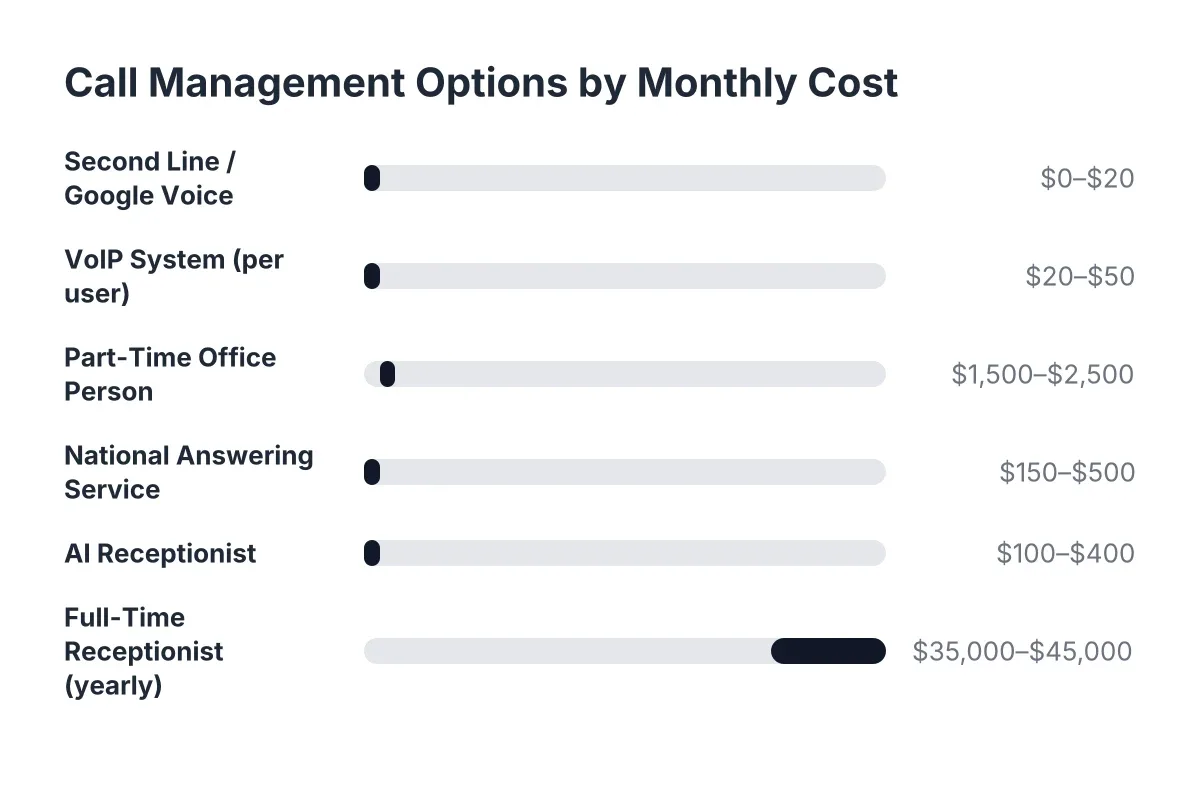
Before choosing anything, know the full menu. Most owners only compare two options, voicemail and hiring, and both are wrong for a shop doing $150K to $600K a year. Here is the complete list, cheapest first, with honest 2026 cost ranges.
1. Voicemail with a better greeting (free)
Rewriting your voicemail to promise a callback time and ask for the job address costs nothing and takes five minutes. It is the floor, not a solution. Most callers with an urgent problem, a leaking water heater or fire ants in the kitchen, hang up and dial the next company. Voicemail captures the patient callers. New customers are rarely patient.
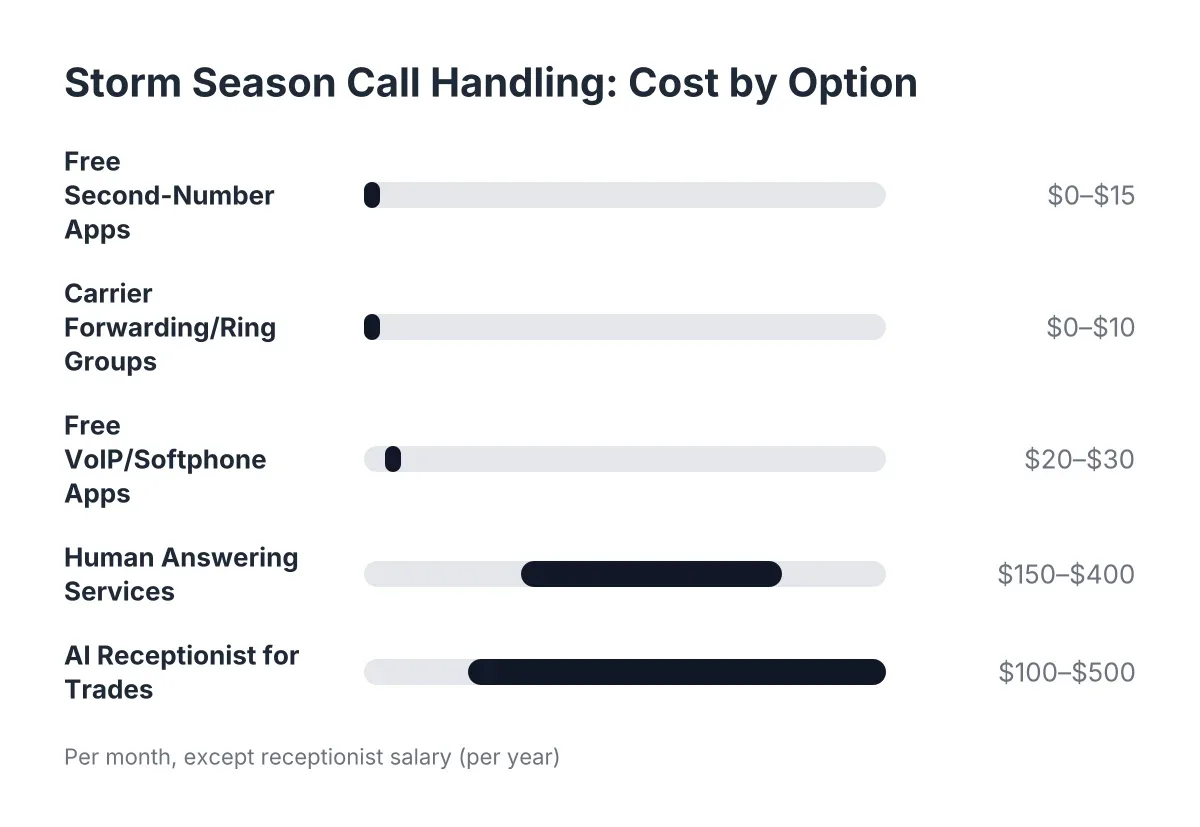
2. Call forwarding and ring groups ($0 to $30 per month)
Forwarding your business line to your cell, or ringing two or three crew phones at once, spreads the load. It works until everyone is on a job at the same time, which in the trades is most of the day. It also means your lead installer answers a sales call while holding a nail gun, which is neither safe nor a great first impression.
3. Text-back auto-replies ($10 to $50 per month)
Missed-call text-back sends an automatic "Sorry we missed you, how can we help?" message. It is cheap and better than silence. However, it pushes the conversation to text, where qualification is slow and older callers often drop off. It also does nothing for the caller who wanted to talk through a remodel scope or describe a pest problem in Spanish.
4. Human answering services ($150 to $400+ per month)
National answering services put a live person on your line. The trade-offs: most bill per minute or per call, so costs climb during your busy season, exactly when you can least predict them. The operator is reading a generic script, usually cannot book anything, and often cannot tell a $200 handyman fix from a $40,000 kitchen remodel. You get a message, not a booked job. And callers can tell they reached a call center in another state, not your shop.
5. AI receptionist with lead qualification and booking ($100 to $400 per month)
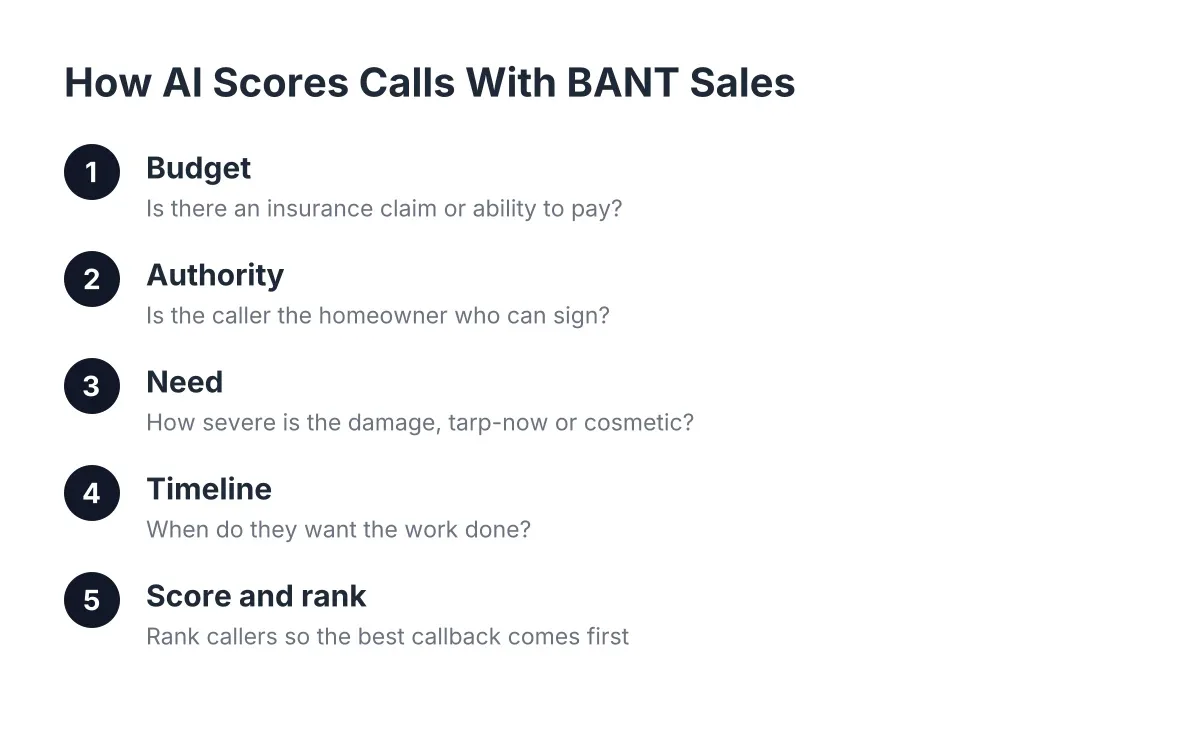
An AI receptionist answers every call 24/7, asks qualifying questions specific to your trade, captures the lead's name, number, address, and job details, and sends a booking link or books the appointment. Good ones also score and summarize each call so you can triage from your truck. This is the category built for shops that need answered calls and booked jobs without adding payroll. More on how to judge these below, because quality varies widely.
6. Part-time or full-time office staff ($1,800 to $4,000+ per month)
A dedicated office person handles calls, invoicing, and scheduling, and adds the human touch on complex jobs. For a shop above roughly $600K to $800K in revenue, this often makes sense. Below that, the math is hard: a full-time hire costs more per month than most shops spend on all their marketing combined, and that person still goes home at 5 PM while 40 percent of your pest or repair calls arrive after hours.
The honest ranking for a one-to-ten-person Central Texas trade shop: start with a better greeting today, skip the per-minute answering services, and compare automated call answering options against a part-time hire based on your call volume and after-hours load. If most of your calls are complex commercial negotiations, a human hire wins. If most are "do you service Pflugerville, what do you charge, when can you come out," automation handles the volume and a human closes the deal.
How Automated Call Answering Turns a Ringing Phone Into a Qualified Lead
Automated call answering turns each inbound call into a captured, qualified lead by answering instantly, asking your qualifying questions, and delivering a booking link or booked appointment. Instead of a voicemail you return at 7 PM, you get a summary with name, address, job type, and urgency within minutes of the call ending.
The mechanics matter, so here is the sequence a well-configured system runs on every call:
- Instant answer, every time. The call picks up on the first or second ring, at 2 PM or 2 AM, in English or Spanish based on the caller.
- Qualification. The AI asks the questions you would ask: What is the problem? What is the address? Is this urgent or can it wait? Have we serviced you before?
- Booking. Qualified callers get a booking link by text, or the appointment gets booked directly, depending on your setup. "Booked" beats "message taken" every time.
- Routing. Urgent calls, a burst pipe or an active roof leak, can live-transfer to your cell if you opt in. Everything else lands as a summary you handle between jobs.
- Sync. Lead details push to your CRM through webhooks or Zapier, HubSpot, Salesforce, or Zoho, so nothing lives only in a text thread.
The qualification step is where the automated call answering lead process earns its keep. A raw phone number is a chore on your callback list. A qualified lead, with address, job scope, and urgency already captured, is close to a sales-qualified lead before you ever dial. You call back knowing whether you are quoting a fence repair in Cedar Park or a full bathroom remodel in Georgetown, and you prioritize accordingly.
For recurring service businesses, this changes seasonal economics. Spring booking season compresses three months of new customer acquisition into six weeks. Every answered call during that window is a potential 40-visit-per-year contract. An AI receptionist does not get overwhelmed at 30 calls a day the way a forwarded cell phone does.
Can Automated Call Answering Really Qualify Leads Like a Person Would?
An AI receptionist can qualify leads reliably for the structured questions that make up most trade calls: service area, job type, timing, budget range, and contact details. It cannot replace you on a nuanced commercial bid negotiation, and a good provider will say so plainly. The goal is capturing and qualifying the lead, not closing complex deals by robot.
Skepticism here is reasonable, and worth addressing head-on. Voice AI from three years ago earned its bad reputation. Current systems built for a specific trade vertical hold natural conversations, handle interruptions, and answer questions like "do you treat for scorpions" or "do you handle bathroom tile" accurately, because they are trained on your actual services rather than a generic script. The practical test: call the number yourself and try to stump it with the weirdest question your customers ask. Any provider confident in their system will invite exactly that.
Two consumer realities shape how to think about this. According to Five9, 75 percent of consumers prefer talking to a real human for customer support. That sounds like an argument against automation until you finish the comparison: the alternative for a solo operator is not a human, it is voicemail. The same Five9 survey found 84 percent of consumers already know companies use AI for customer service. Callers in 2026 are not shocked by an AI receptionist. They are annoyed by silence.
There is also a competitive angle most owners miss. According to the National Federation of Independent Business (NFIB), only 24 percent of small employers currently use AI tools for business activity. In a market where three out of four competitors still send after-hours callers to voicemail, answering every call is a durable advantage, not table stakes.
One more NFIB finding worth knowing if you have a small office team already: 98 percent of small employers using AI reported no change in employee headcount. In practice, owners use these tools to capture the calls nobody was answering, not to cut the person handling invoicing and dispatch. The technology answers the overflow; it does not touch the relationship.
What Automated Call Answering Systems Should Include Before You Sign
A system worth paying for in 2026 includes 24/7 answering, trade-specific lead qualification, appointment booking, bilingual support, urgent-call transfer, and CRM sync. If a provider is missing two or more of these, you are buying a message-taking service with a modern label.
Use this checklist when you compare providers:
- True 24/7 answering. Not extended hours. The after-hours window is where the untapped leads live, especially for pest, plumbing-adjacent repairs, and storm work.
- Qualification built for your trade. The AI should ask about job type, property address, and urgency in your language, not a generic "how may I direct your call."
- Booking, not just messaging. Look for booking link delivery by text or direct calendar booking. A booked appointment converts; a message waits.
- Bilingual by default. In Central Texas, English and Spanish on every call is not a premium add-on. It is the market. If Spanish costs extra or routes to a separate line, walk.
- Live transfer for genuine emergencies. You should control which call types bridge to your cell. A burst pipe transfers; a quote request waits until you are off the roof.
- Call intelligence. Scoring and summaries let you triage ten leads in two minutes from the truck instead of listening to ten recordings.
- CRM and webhook sync. Leads should flow into HubSpot, Salesforce, Zoho, or a Zapier workflow automatically, so your follow-up list builds itself.
- A regular report. A weekly summary, ideally landing Monday morning, showing calls answered, leads captured, and jobs booked, is how you verify ROI instead of guessing.
Ask two pointed questions on the sales call. First, "Can I call the AI right now and test it?" A no is disqualifying. Second, "What happens to a caller the AI cannot help?" The right answer involves capture and escalation, never a dead end.
Does Local Matter When the Receptionist Is Software?
A locally built AI receptionist matters because qualification quality depends on market knowledge: service area boundaries, seasonal call patterns, and what Austin, TX callers actually ask. A national platform tuned for dental offices in Ohio will not know that Leander is in your service area and Waco is not, or that August in Austin means AC-adjacent emergencies and brown lawns.
Local configuration shows up in small, revenue-relevant ways. The AI should recognize your coverage map across Austin, Round Rock, Cedar Park, Georgetown, and Pflugerville, and politely decline jobs outside it before you waste a callback. It should handle the seasonal shift when your lawn care calls swing from "spring cleanup" in March to "is my grass dead or dormant" in the 95-degree stretch of July. Generic platforms make you build all of that yourself; a provider that already works with Central Texas trades has it dialed in from other shops like yours.
This is also where small business call management stops being a phone problem and becomes an operations problem. The calls, the qualification, the booking, and the follow-up list are one system. When they connect, a solo operator runs an office-grade front desk from a truck. When they do not, leads leak at every handoff.
How Long Does Setup Take, and How Much Should You Budget?
Setting up an AI receptionist for a small trade business takes days, not weeks, and typically costs $100 to $400 per month in 2026 with flat pricing rather than per-minute billing. A solo-operator setup is a one- or two-call process: your services, your service area, your qualifying questions, and your calendar or booking link.
Compare that against the alternatives on annual cost. As rough 2026 estimates: voicemail is free and loses the most revenue. A per-minute answering service runs $2,400 to $5,000 a year and hands you unqualified messages. A part-time office hire runs $22,000 or more and covers 25 hours a week of a 168-hour week. An AI receptionist runs $1,200 to $4,800 a year and covers all 168 hours in two languages.
Then weigh cost against a single recurring customer. Suppose a weekly mowing contract in Cedar Park bills $60 per visit, about 38 visits a year. That one saved after-hours call is worth $2,280 in year one, likely more over the relationship. If an automated call answering system captures two contracts a month you would have missed, it pays for itself several times over before you count one-time jobs.
Setup complexity is a fair concern, so know what the process should look like: you forward your existing number, keep it published everywhere it already appears, and route calls to the AI either full-time or only when you do not pick up. No new number, no ripping out your phone, no software your crew has to learn. If a provider's onboarding takes more than a week for a one-to-eight-person shop, that is a red flag, not a norm.
The Bottom Line for Owners Ready to Decide
Every option on the menu beats voicemail, and none of them requires hiring before your revenue supports it. The decision comes down to what your calls look like. If your volume is low and mostly repeat customers, a text-back tool and a tighter greeting may hold you for a season. If new customer calls drive your growth, and for recurring service businesses they always do, you need every first call answered, qualified, and booked.
Judge any provider on three things: answer it yourself and try to stump it, confirm bilingual answering and booking are standard rather than upsells, and demand a weekly report that proves the leads are real. Speed to answer decides who wins the customer. The shop that picks up at 8 PM on a Saturday in Georgetown gets the quarterly pest contract. The shop that lets it ring gets to wonder where spring went.
If you're losing revenue to missed calls, NeverMiss ATX can help.
Prefer to talk it through? Call (512) 980-9267 — a quick call is usually the fastest way to get a straight answer for your situation.