Virtual Receptionist for Home Service Businesses: 8 Reasons Answer Rates Decide Who Wins in Austin, TX
If you run a lawn care, HVAC, or pest control crew in Austin, TX, your answer rate is the number that decides whether your phone makes money or leaks it. A virtual receptionist for home service businesses exists to fix one problem: calls that ring out while you are on a ladder, under a house, or elbow-deep in a condenser. An effective answer rate for home service operations requires the right call-handling system. This article lays out the full comparison, a live hire, a national answering service, a virtual receptionist, and an AI receptionist, priced against the real call volumes and job values Austin trades actually see. No sales call required to do the math.
Here are eight things to weigh before you choose, each one tied back to the metric that matters most: how many calls get answered, and how fast.
1. Your Answer Rate for Home Service: The Cheapest Lever in Your Business
Before comparing providers, understand what you are buying. Most small crews miss the majority of their inbound calls, because everyone who could answer is on a job. Each missed call is usually a neighbor with a real problem who moves to the next listing within minutes.
Speed compounds the problem. According to MIT Sloan School of Management and InsideSales.com, the odds of contacting a lead drop 100-fold, and the odds of qualifying that lead drop 21-fold, when you call back at 30 minutes instead of within 5 minutes. Voicemail is not a callback system; it is a 30-minute-plus delay machine.
For recurring service businesses the math gets heavier. Suppose a typical Pflugerville lawn care crew misses a call worth $200 a month in recurring mowing. That is not a $200 miss; over a three-year customer relationship it is an estimated $7,000 in lifetime value, gone to whoever picked up first.
2. Building Your Answer Rate Through Home Service Reception Solutions
A complete virtual receptionist home service package covers four jobs: answering every call live or near-live, capturing the lead's name, address, and problem, qualifying the caller against your criteria, and booking the appointment or delivering your booking link. Anything less is an expensive voicemail.
In 2026, treat these as the baseline scope, not premium add-ons:
- 24/7 answering, including after-hours and weekends, when pest and HVAC calls spike
- Lead capture with qualification questions you define (service area, job type, urgency)
- Appointment booking or booking link delivery by text
- Bilingual answering in English and Spanish, which matters in Central Texas
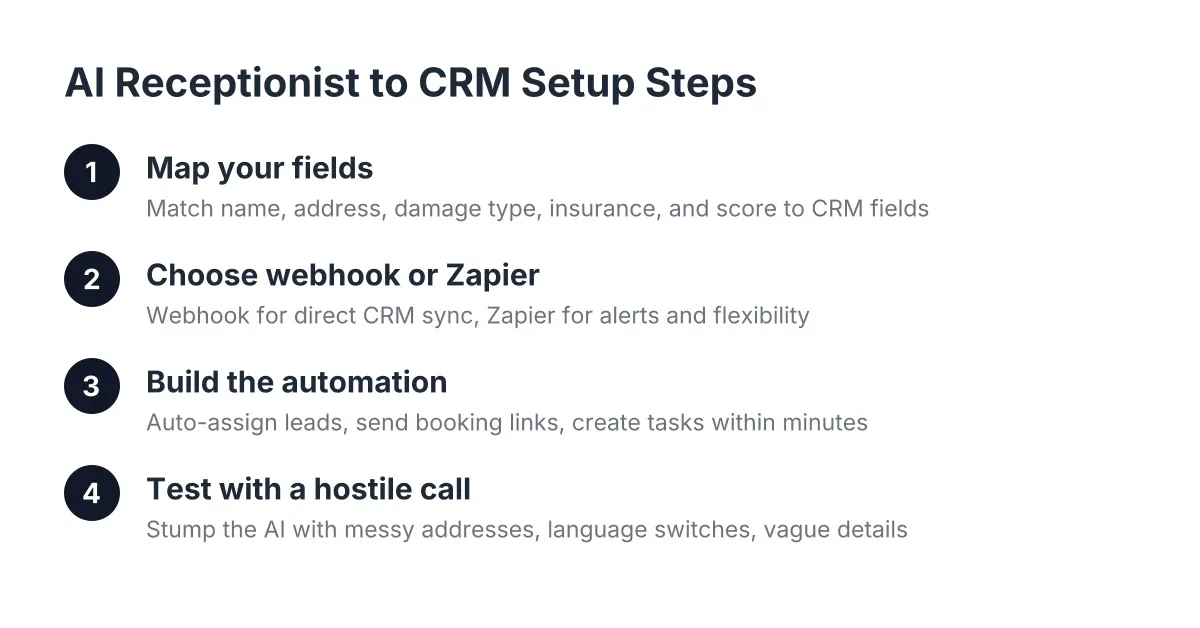
- Call summaries pushed to your phone or CRM (Zapier, HubSpot, Salesforce, Zoho)
- Live transfer for genuine emergencies, so a burst pipe reaches a human on your crew
Watch the extras column. Many virtual receptionist companies charge separately for bilingual answering, after-hours coverage, CRM sync, or appointment booking. Those line items can double the sticker price, so quote the full scope, not the base plan.
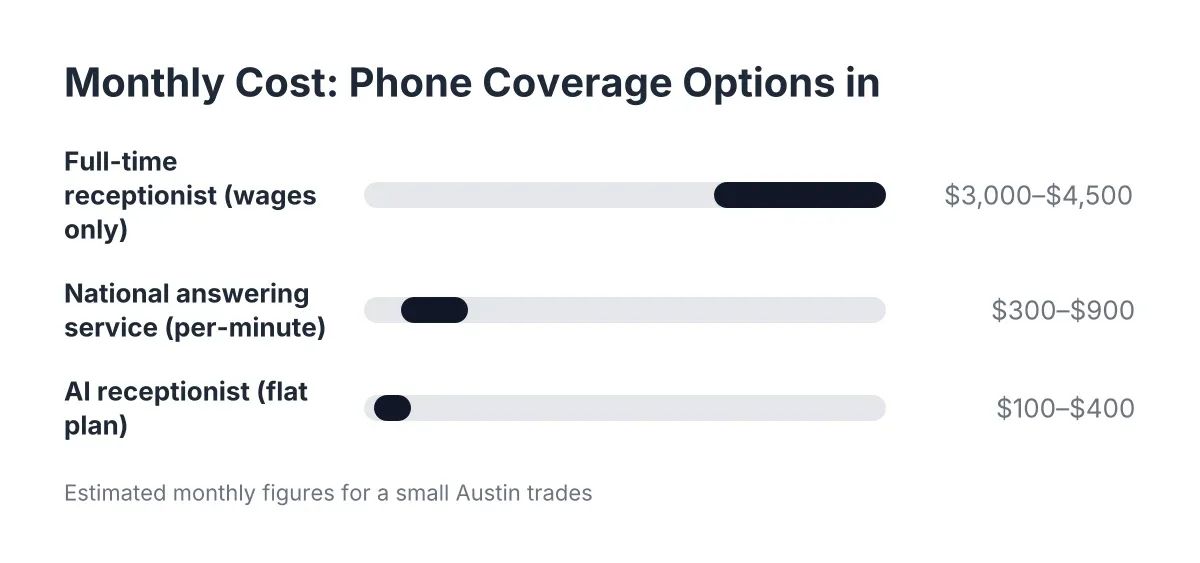
3. How much the four options cost per month in Austin, TX
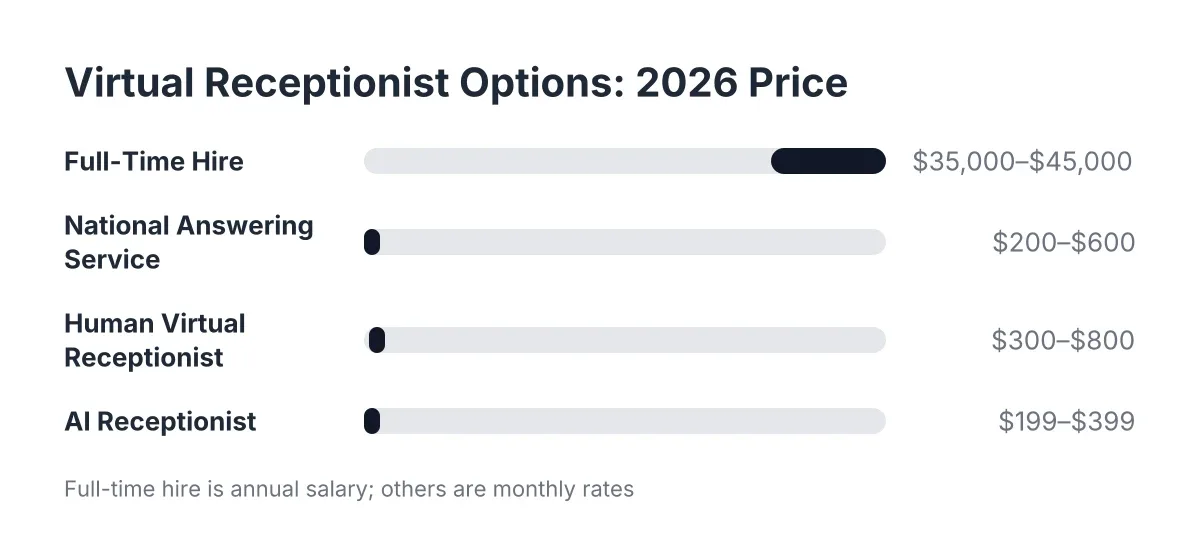
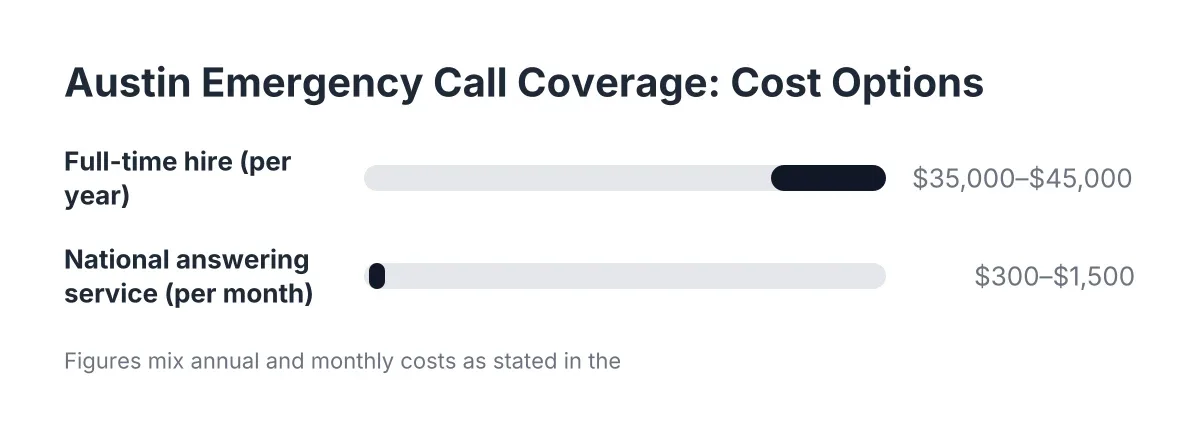
As of 2026, here are realistic estimated ranges for a small Austin trades operation, framed as illustrative figures rather than quotes. A full-time receptionist in the Austin market typically runs an estimated $3,000 to $4,500 per month in wages before taxes, benefits, and the desk they sit at, and they still only cover about 40 hours of a 168-hour week.
National answering services and live virtual receptionist services usually price per minute or per call, commonly an estimated $1 to $2 per minute. For a crew fielding 150 to 300 calls a month during the summer rush, that often lands between $300 and $900 monthly, and overage months during peak season can spike well past that. AI receptionist plans generally run a flat estimated $100 to $400 per month with no per-minute meter, which is why they pencil out for seasonal businesses whose call volume triples in June.
Run your own numbers: multiply your average job value by the calls you miss in a week. For most Central Texas crews, one recovered recurring customer per month pays for any option on this list except the full-time hire.
4. AI receptionist vs live receptionist: judge the output, not the voice
The honest comparison is not "human versus robot." It is answered-and-booked versus missed. A live hire gives you relationship warmth during business hours. An AI receptionist gives you an answer on the first ring at 2 a.m. on a Saturday in August, in English or Spanish, every time.
Skepticism about AI call quality is fair, and the way to resolve it is not a brochure. Call the number yourself and try to stump it. Ask about service areas, throw a Spanish-language question at it, describe a vague symptom like "the AC is making a clicking sound." Five minutes of testing tells you more than any feature list.
Context matters here too. According to Five9, 75% of consumers prefer talking to a real human for customer support, and 84% already know companies use AI for service interactions. The takeaway for trades: callers prefer a human, but they prefer any competent answer over voicemail by a mile. The AI's job is to capture the lead and book the job; your crew still owns the relationship on site.
5. National call centers were not built for Central Texas trades
A national answering service can answer your phone. What it cannot do is know that Cedar Park and Georgetown are in your service area but Waco is not, that chinch bugs hit St. Augustine lawns in July, or that a 95-degree afternoon means your HVAC line is about to light up. Generic scripts read generic to callers, and misrouted or unqualified leads waste your follow-up time.
Local context shows up in qualification. An answering agent in another state logs "AC not working" as a message. A system built around Austin trades asks whether the unit is cooling at all, whether anyone in the home is heat-sensitive, and flags it for live transfer if it is a genuine emergency. That difference decides whether you drive to a tune-up or a replacement job.
Therefore, when you evaluate providers, ask one pointed question: can the service follow qualification logic specific to my trade and my service area, or does every caller get the same national script?
6. Why seasonal overflow breaks per-minute pricing
Recurring and seasonal businesses do not have average months; they have March through June for lawn care, June through September for HVAC, and after-storm surges for everything else. Per-minute billing punishes exactly the months you earn your year.
For example, say a Round Rock HVAC maintenance shop takes 80 calls in February and 320 in July. On a per-minute plan at an estimated $1.50 per minute and four minutes per call, that is roughly $480 in February and $1,920 in July. A flat-rate AI receptionist costs the same both months and never puts a hot-season caller on hold behind another company's overflow queue.
There is a second overflow problem: simultaneous calls. A human receptionist, in-house or virtual, answers one call at a time. During a July heat wave or a spring booking surge, calls two and three hit voicemail. An AI receptionist answers every concurrent call instantly, which is the only way an answer rate holds up at peak.
7. Setup should take days, not a hiring cycle
Owners worry that switching systems means weeks of configuration. The realistic comparison looks like this:
- Full-time hire: weeks of recruiting and interviews, then weeks of training, plus ongoing management. Months before full coverage, and you still have nights, weekends, and sick days uncovered.
- National answering service: typically one to two weeks of script building and onboarding calls, with revisions every time your services or pricing change.
- Live virtual receptionist: similar onboarding, often faster, but scripts still route through an account manager when you want changes.
- AI receptionist: commonly live within a few days. You confirm your services, service area, qualification questions, and booking link, forward your number, and test it by calling in yourself. CRM sync through Zapier, HubSpot, Salesforce, or Zoho is usually a same-day connection.
Keep forwarding control in your hands. You should be able to turn answering on for after-hours only, for overflow only, or for everything, and change that in minutes during peak season.
8. Three questions that separate a fair quote from a padded one
When you get quotes from virtual receptionist companies, you do not need twenty questions. These three expose the real price and the real capability:
- "What is my all-in monthly cost at my July call volume, including bilingual answering, after-hours, and booking?" Force the peak-season number, not the February number.
- "Walk me through exactly what happens when a Spanish-speaking caller reports a pest emergency at 9 p.m." The answer reveals bilingual depth, emergency triage, and whether live transfer exists or is theater.
- "Can I call the service right now and test it before I sign?" Any provider confident in call quality says yes. Treat hesitation as your answer.
A fair quote itemizes everything, caps or flattens peak-season costs, and includes lead capture details in writing. A padded one hides bilingual support, after-hours, and CRM sync in an add-ons page you find after signing.
When a virtual receptionist home service setup is not the right fit
Honesty cuts both ways. If you already employ a full-time receptionist who answers 90-plus percent of calls and handles dispatch, adding a service only makes sense for after-hours and overflow coverage. Multi-location operations with complex dispatch logic, or shops already locked into a large answering service contract, may need enterprise tooling rather than a small-business plan.
Likewise, no answering layer handles the work itself. An AI receptionist captures the lead, books the appointment, and flags the emergency; a licensed tech still has to diagnose the gas smell or the tripping breaker. For anything involving gas, electrical hazards, or structural water damage, the caller needs a qualified pro on site, and your answering setup should make that handoff fast.
One more data point for the fence-sitters: according to the National Federation of Independent Business, only 24% of small employers currently use AI tools, and 98% of those who do report no change in employee headcount. Adopting virtual receptionist services is not about cutting people; it is about answering the calls your people physically cannot reach from a job site.
The bottom line for Austin trades
Every option on this list beats voicemail. A full-time hire buys daytime warmth at the highest cost. A national call center buys coverage without local knowledge. Additionally, a live virtual receptionist splits the difference with per-minute pricing that stings in peak season. An AI receptionist buys 24/7 bilingual answering, lead capture, and booking at a flat rate, with the trade-off that callers who want a long human conversation will notice the difference.
Decide on answer rate. Count your missed calls for one week, multiply by your average job value, and compare that number to each monthly price above. For most Central Texas crews, the comparison ends quickly.
If you want to see how an AI receptionist handles your calls before committing, call one and try to stump it. Ask it the hardest question your customers ask, in English or Spanish, and judge for yourself whether it earns a spot answering your phone.
If you're losing revenue to missed calls, NeverMiss ATX can help.
Prefer to talk it through? Call (512) 980-9267 — a quick call is usually the fastest way to get a straight answer for your situation.